


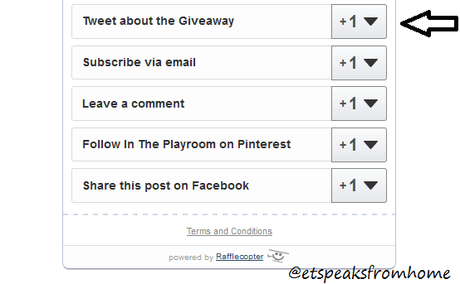
 2. It will open up the entry. Click the button - TWEET.The number next to the TWEET represents how many people have tweeted the following status.
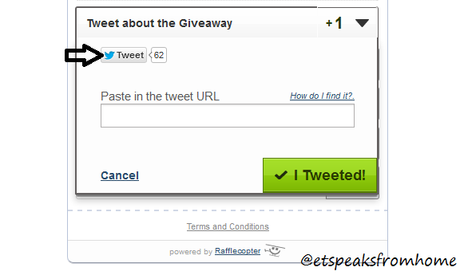 3. Once you click the TWEET button, a pop-up box will show the following:
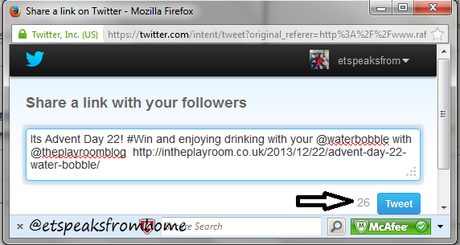 If this is the first time you are using Rafflecopter, please authorise the app on Twitter.4. Click TWEET on the pop-up box. Once done, the pop up box will close itself.5. Next, go to your Twitter homepage/account. Look at your timeline and click EXPAND.
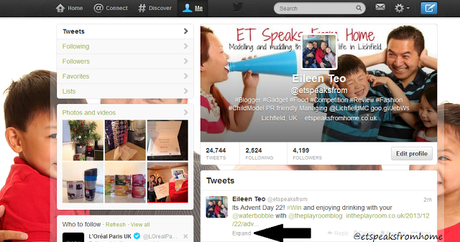 6. Click DETAILS.
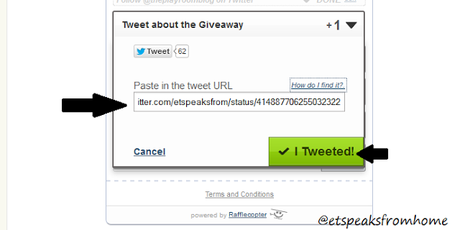
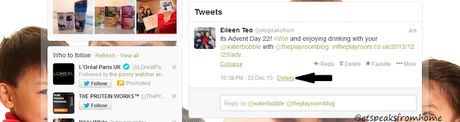 7. It will bring you into another screen. So now you need to copy the URL from your browser and paste it on the competition page.
  8. Then click I TWEETED to register your entry.
 It does look complicated but best to do it right to be in with a chance to win! Since I host quite a lot of competitions, the most wins are from tweet statuses! So there's the incentive to make sure you get it right!







