


Also:Add image hover effect
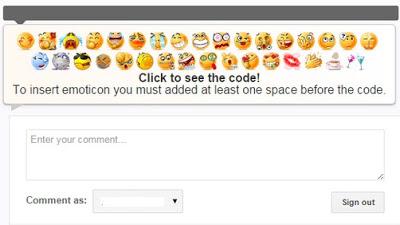
why to add chat emoticons in bloggerThese emoticons become popular in blogging . Every person wants to show feelings and they like to express the feeling by cute smileys and emoticons.bloggers can add these emoticons in their blog just editing some changes in their template.many other blogging platform using emoticons but we can also add these emoticons/smileys in blogger but the method is different. You can use the chat icon while commenting or replying.
Add label with hover effectHow to add smiley emoticons in blogger comments
Login to blogger and go to template.click on Edit template press ctrl+f and search this code.
</head>
above </head> paste the given code.
<script src="https://ajax.googleapis.com/ajax/libs/jquery/1.8.3/jquery.min.js" type="text/javascript">
Again find the code
</body>
paste the given code above </body>
<b:if cond="data:blog.pageType == "item""><style type="text/css">.emoWrap{position:relative;padding:10px;margin-bottom:7px;background:#efefef;background-image:-ms-linear-gradient(right,#fff 0,#fff9f2 100%);background-image:-moz-linear-gradient(right,#fff 0,#fff9f2 100%);background-image:-o-linear-gradient(right,#fff 0,#fff9f2 100%);background-image:-webkit-gradient(linear,right top,left top,color-stop(0,#fff),color-stop(1,#fff9f2));background-image:-webkit-linear-gradient(right,#fff 0,#fff9f2 100%);background-image:linear-gradient(to left,#fff 0,#fff9f2 100%);border:1px solid #ccc;-moz-border-radius:5px;-webkit-border-radius:5px;border-radius:5px;box-shadow:0 4px 6px rgba(0,0,0,0.1),0 1px 1px rgba(0,0,0,0.3);-moz-box-shadow:0 4px 6px rgba(0,0,0,0.1),0 1px 1px rgba(0,0,0,0.3);-webkit-box-shadow:0 4px 6px rgba(0,0,0,0.1),0 1px 1px rgba(0,0,0,0.3);box-shadow:0 2px 6px rgba(0,0,0,0.1),0 1px 1px rgba(0,0,0,0.3);font-weight:normal;color:#333}.emoWrap:after{content:"";position:absolute;bottom:-10px;left:10px;border-top:10px solid #ccc;border-right:20px solid transparent;width:0;height:0;line-height:0}</style><script type="text/javascript">//</script><script src="http://googledrive.com/host/0B-GuAkK2nj5gbVg2dXladnUzbVU" type="text/javascript"></b:if>Save you template.visit your blog and enjoy beautiful emoticons.if you have any question ask me in comment.i would like to hear you.






