Today I am going to share about Thesis like Social Media Subscription Widget For Blogger. This widget is in CSS3. Do check this and see the difference.
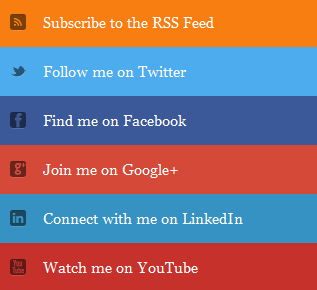
Thesis like Social Media Subscription Widget For Blogger : eAskme
Other people are reading : Best Sites Where You Can Buy and Sell ArticlesHow to Add Social Media Subscription Widget
- Go to Layout
- Click on Add A Gadget
- Click on HTML/JavaScript
- Copy the Following code and Paste inside it.
- <div class="btnt-chronicl-social">
- <ul>
- <li><a class="rss" href="http://feeds.feedburner.com/easkme">Subscribe to the RSS Feed</a></li>
- <li><a class="twitter" href="https://twitter.com/vhowtodo">Follow me on Twitter</a></li>
- <li><a class="facebook" href="https://www.facebook.com/easkme">Find me on Facebook</a></li>
- <li><a class="google" href="https://plus.google.com/+sonamathews/about">Join me on Google+</a></li>
- <li><a class="linkedin" href="http://in.linkedin.com/in/sonamathews">Connect with me on LinkedIn</a></li>
- <li><a class="youtube" href="https://www.youtube.com/channel/UCOcdlixm8qNWjD1-hUPOCGg">Watch me on YouTube</a></li>
- </ul>
- </div>
- <style type='text/css'>
- /*<![CDATA[*/
- .btnt-chronicl-social { width: 320px; margin: -10px; }
- .btnt-chronicl-social ul { margin: 0; padding: 0; }
- .btnt-chronicl-social ul li { list-style:none; padding: 0; text-transform: none; }
- .btnt-chronicl-social ul li a { color: #fff; display:block; }
- .btnt-chronicl-social ul li a:hover { color: #c9c9c9; background-color: #333; }
- .btnt-chronicl-social ul li .rss { background: url("http://i1203.photobucket.com/albums/bb382/chandeep10/social-icons/RSS-1.png") no-repeat scroll 10px center #F87E12; background-size: 20px; padding: 17.5px 45px; }
- .btnt-chronicl-social ul li .twitter { background: url("http://i1203.photobucket.com/albums/bb382/chandeep10/social-icons/Twitter.png") no-repeat scroll 10px center #4CACEE; background-size: 20px; padding: 17.5px 45px;}
- .btnt-chronicl-social ul li .facebook { background: url("http://i1203.photobucket.com/albums/bb382/chandeep10/social-icons/Facebook-1.png") no-repeat scroll 10px center #3B5998; background-size: 20px; padding: 17.5px 45px; }
- .btnt-chronicl-social ul li .google { background: url("http://i1203.photobucket.com/albums/bb382/chandeep10/social-icons/google.png") no-repeat scroll 10px center #D44937; background-size: 20px; padding: 17.5px 45px; }
- .btnt-chronicl-social ul li .linkedin { background: url("http://i1203.photobucket.com/albums/bb382/chandeep10/social-icons/LinkedIn-1.png") no-repeat scroll 10px center #3692C3; background-size: 20px; padding: 17.5px 45px; }
- .btnt-chronicl-social ul li .youtube { background: url("http://i1203.photobucket.com/albums/bb382/chandeep10/social-icons/Youtube-1.png") no-repeat scroll 10px center #C6312B; background-size: 20px; padding: 17.5px 45px; }
- /*]]>*/
- </style>
- Replace highlighted codes with URL`s of your profiles.
- Click on "Save"
So you see this is really easy to Add Thesis like Social Media Subscription Widget For Blogger. If you find this article helpful, do share on twitter and Google Plus.
Don`t forget to like us on facebook and subscribe easkme newsletter to get free updates.