


Now that I have moved to self-hosted, I am having a bucket load of fun trying out a whole bunch of plug-ins and themes.
Here’s a little bit about my experience, probably useful for someone considering a move or has just moved to a self-hosted WordPress blog.
First up themes
I am a wee bit disappointed to find that the whole wonderful world of themes that I thought were out there for me to use when I go self-hosted are not for me after all. A lot of the free available themes were untested in a big blog, and though very pretty were very time-consuming to debug. Even more dangerous, some of them contain malicious code that could bring down the site.
After reading this very eye-opening article post, I decided to really play it safe with themes.
Another word of advice. Stay away from cheaply priced pre-made themes available on sites like Etsy and stuff. Most of these themes are simple customizations of the Genesis framework or similar such themes and aren’t very feature-rich nor are adequately tested. They may work for you if you are a new blogger, but if you have loads of posts already, it’s a massive headache trying to get everything to look the way it should.
In the end, I rather halfheartedly just decided to do a basic switch and moved to the Highwind theme and started customizing it. Surprisingly, what I thought was rather a plain-Jane theme, has come out quite nicely (or so I like to think). It’s amazing what a change of color can do. A little more customization is in the works, but I am holding off the publish until I’m sure I like what I see.
So, that was about the themes. Now on to the plug-ins
This is where things really get exciting. Like themes, plug-ins can also be really buggy, and I really spent a lot of time trying to decide what functionality I wanted to include on the blog.
For commenting: I really like CommentLuv. It’s an awesome plug-in that gives a shout out to whoever is kind enough to comment on your blog, and encourages movement within blogs. I love this one.
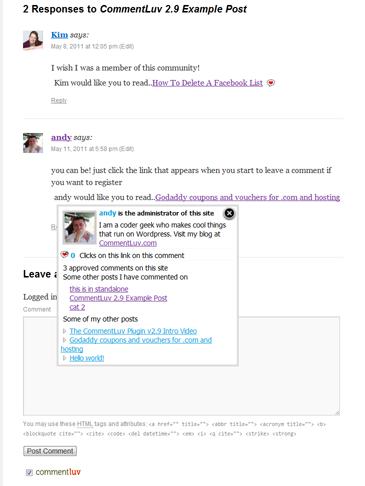
How comments look with CommentLuv enabled
Although I love CommentLuv, I eventually went with Disqus as a 3rd-party commenting system on my blog.
From a user’s perspective, the benefit of Disqus is that you can stay logged in, so you don’t have to login at every blog you comment on. I also love that it enables you to sign in with Twitter or Facebook and doesn’t need a new authentication system. Their Discovery feature (see screen-cap below) both within and outside of the blog also rocks. And me being very superficial, I love the professional look and feel it gives to my blog


What I mean by Disqus’ Discovery System
Also, it’s super easy to migrate comments over from WordPress to Disqus.
One last point on commenting systems: If you are pondering which commenting system to use – IntenseDebate and Disqus are the popular options. Before you decide on either one, read this. I read it before deciding to go with Disqus. Whichever option you choose, it’s good to know the pros and cons upfront.
For intra-blog navigation: By intra-blog navigation, I mean the suggested/related topics that appear at the bottom of each post page at the end of each post like so…

One of the many display options for related topics
You can use either nrelate or LinkWithin to add this feature to your blog. Both plug-ins seem to have very similar functionality. I went with nrelate just because I found it simpler to configure and set up.
I love adding related topics at the end of the blog posts. I think it’s important to be able to direct users to other similar content and get more hits on some of the older blog posts as well.
For pinning blog images: In the past year, I’ve seen a lot of traffic to my blog from images that I have posted and which have been pinned by readers. To make image pinning easier, I used the Pinterest Pin It plug-in.
I modified the plug-in a wee bit so that I don’t have to use the default boring pin-it image it comes with. It’s just amazing how much people use pinterest and just how much visuals matter in a blog (even if it is a book blog). My blogging resolution for next year is to make sure I add interesting visuals in my blog posts, and to be more active on pinterest.
For recipes: This is not a must-have, but it’s something I saw on Janel’s blog, which she recommended I try, and I think it’s a super-cool plug-in if you are into posting a lot of recipes.
I immediately installed EasyRecipe and set it up for one of my older posts, and I am very happy with the look. This plug-in is highly customizable, and I am definitely going to play around with it a lot more. So, don’t be surprised if you suddenly see a rash of recipes published on the blog

Another bonus EasyRecipe offers is the opportunity to get your recipe featured on Fooderific (optional feature). This is not a huge incentive for me as I am only a casual food blogger, but when I went to the Fooderific site, I loved the huge amount of recipes within the database, and the ease of searching for just the recipe you want with the ingredients you have. Truly a great plug-in and feature, and I am so excited to discover this one

So, this is the list of my favorite plug-ins of the top of my head, and which I have implemented on my blog.
I hope this post is useful for beginner bloggers new to the self-hosted world. For other bloggers, I’d love to know which plug-ins you use on your blog? Which were the stars and which were the duds? And why?






