I ahve already shared about : 5 Steps to Build Amazing Email Lists from the Ground Up
Zoho Mail has free and paid versions. It`s free version is also interesting. So today we will discuss about how to setup your domain Email address using ZohoMail.

How to Create Free Business Email with ZohoMail in 5 minutes : eAskme
Other people are reading : 10 Ways To Market Your WebsiteHow to Create Free Business Email with ZohoMail in 5 minutes
First of all you need to sign up for Zohomail. Click here to go to Zohomail link.- Click on SignUp under FREE plan.
- Click on Add domain

- Fill up the sign-up form.
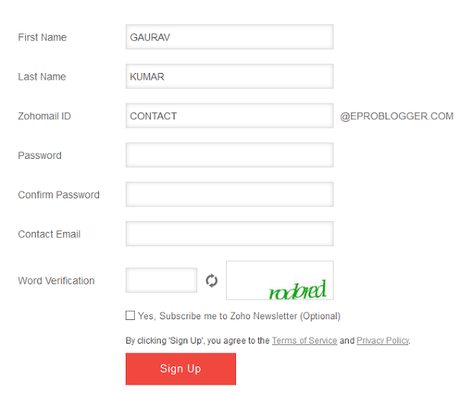
How to Create Free Business Email with ZohoMail in 5 minutes : eAskme
- Confirmation for your sign up for free lite plan.
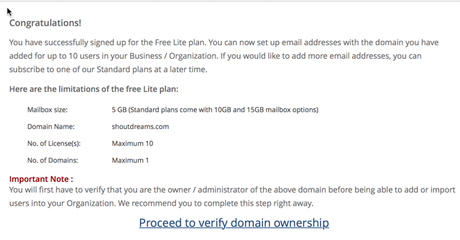
How to Create Free Business Email with ZohoMail in 5 minutes : eAskme
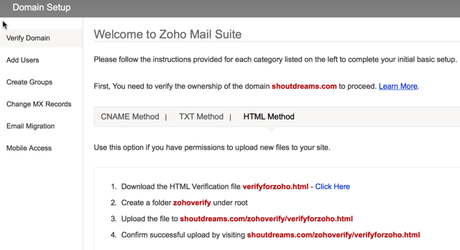
Verifying Domain ownership on ZohoMail:
How to Create Free Business Email with ZohoMail in 5 minutes : eAskme
- Click on “Proceed to verify domain ownership”.
- Verify domain ownership page will open.
- Verify with any of these options “CNAME or TXT or HTML file upload“.
- Now you will get Success message
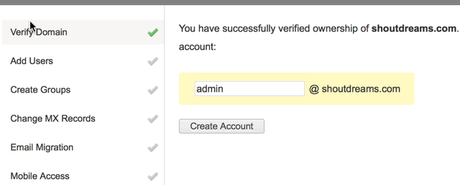
Zoho configured Successfully : eAskme
Update MX record to complete Zoho business Email setup:
Click on Change MX record and you will see what MX record you need to use. If you are on hostgator you can see this: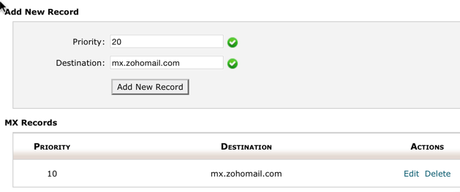
Add MX record on Hostgator : eAskme
- Now go to Zoho domain setup and finish the process.
- Now you be on Zoho cPanel
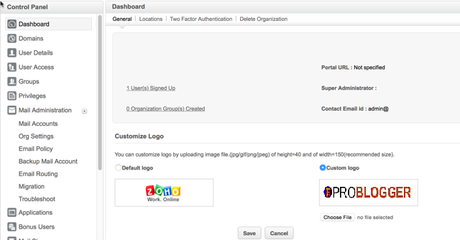
domain email address : eAskme
Zoho also offers mobile apps.
So you should try ZohoMail to Create Free Business Email. If you are using any other service, do let me know via comments. If you like this article, do share it on Facebook, twitter or Google Plus. Don’t forget to like us on Facebook and subscribe eAskme newsletter for free updates..