


Most WordPress sites do not need a job board. A few do, and the ones that do tend to find out the hard way that their options are narrow. You can pay a hosted service and watch the listings load inside an iframe that has nothing to do with your brand. You can install an old plugin that has not seen a Gutenberg update in four years. Or you can build one yourself and maintain it forever. We thought there should be a fourth option, so we built it.
This post introduces WP Career Board Pro, our new job board plugin for WordPress. Instead of listing every feature, we want to walk through the technical choices we made while building it, and explain what those choices mean for you as the person running the site. The short version is that the plugin is built on the stack you already own, stores your data in your own database, and plays well with the other plugins you have running. Here is the longer version.
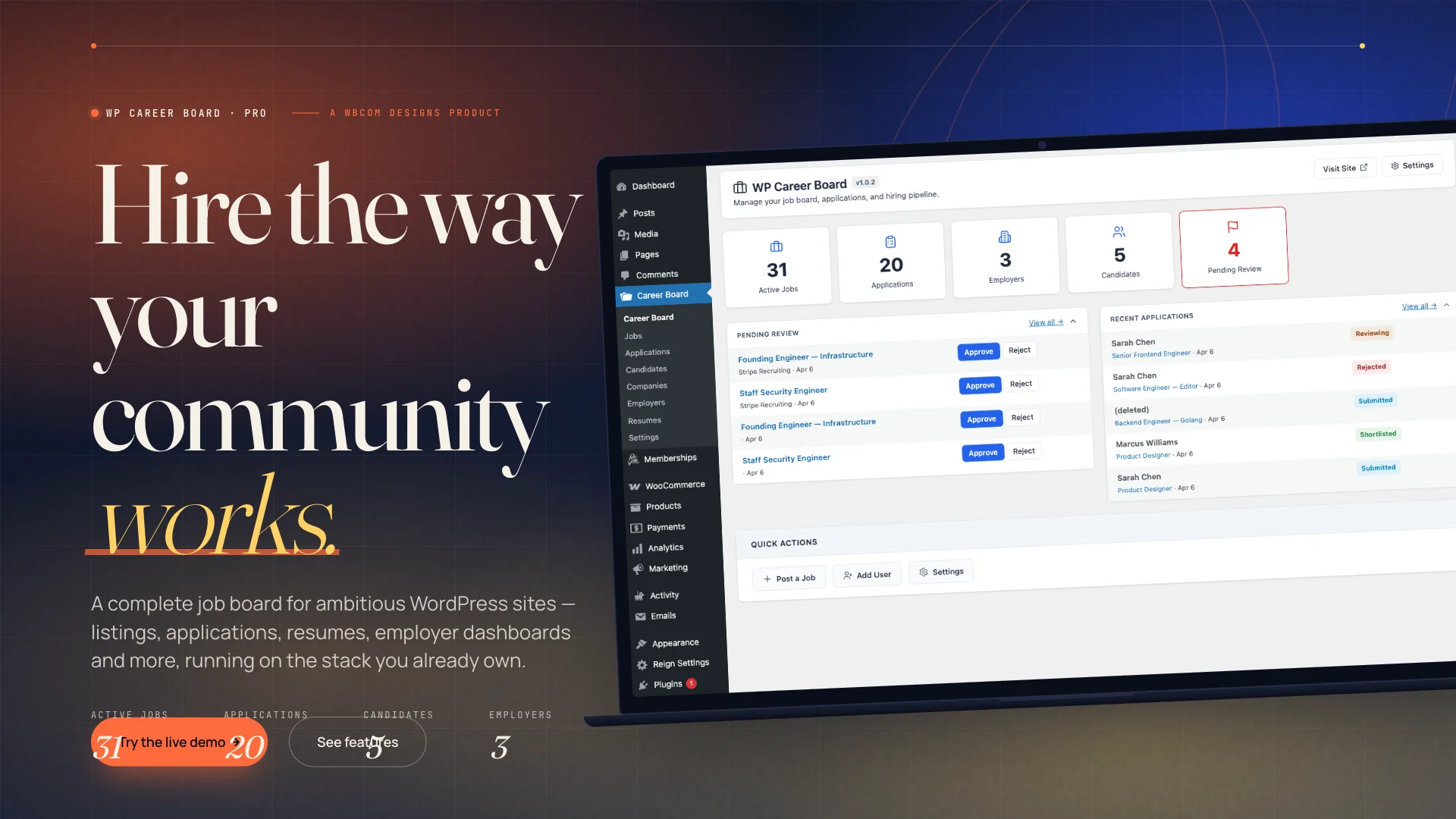 The WP Career Board Pro dashboard, running on a real WordPress install with seeded demo data.
The problem with most ways of adding a job board to WordPress
When a community site, a training platform, or a professional association decides to add jobs, the conversation usually goes one of three ways. Each one has a cost that is not obvious until you are already paying it.
Option one is a hosted SaaS board. It looks great in a demo because someone else’s servers do the work. The iframe embeds cleanly, the emails go out on time, and the uptime is not your problem. Then the bills start. Most of these services charge per seat, per listing, or per application, and they scale with your success rather than your revenue. Your data lives on someone else’s infrastructure. If you ever want to leave, the export is usually a CSV that loses half the context. This is the same pattern we have written about before when explaining why a self-hosted feedback tool beats Canny or UserVoice for WordPress sites.
Option two is an older WordPress plugin. Some of these are fine. A lot of them were written before Gutenberg existed, and it shows. Shortcodes everywhere. No REST API. An admin UI that fights with your theme. Templates that were designed for themes that have been retired for years. The data stays with you, which is good, but the developer experience is painful and the visual experience is worse.
Option three is to build one yourself. This is the most honest path. You own everything, the UX matches your brand, and the code does exactly what you want. You also have to maintain it for as long as you run the site, keep it compatible with every WordPress release, and absorb every support ticket that lands in your inbox. For most teams, this is not a realistic plan.
We wanted a fourth option that took the best parts of each path and dropped the worst. It is not the first time we have gone down that road either. Earlier this year we walked through the same calculus for community forums when we launched Jetonomy, our own WordPress forum plugin, and the logic still holds.
What WP Career Board Pro actually is
WP Career Board Pro is a full job board plugin for WordPress. It ships with jobs, applications, candidates, companies, employer dashboards, resumes, and all the settings screens you would expect. It is the paid companion to the free WP Career Board plugin, so you get a zero-risk starting point and a clear upgrade path when you need more. Every screen is built with native WordPress components, every public template respects the active theme, and every piece of data sits in your own MySQL database.
That sounds like standard plugin marketing until you compare it with how the alternatives work. So let us compare it.
How the three options stack up
Here is a side-by-side look at WP Career Board against hosted SaaS boards and older WordPress plugins. These are the capabilities that actually affect your day-to-day work, your budget, and your long-term flexibility.
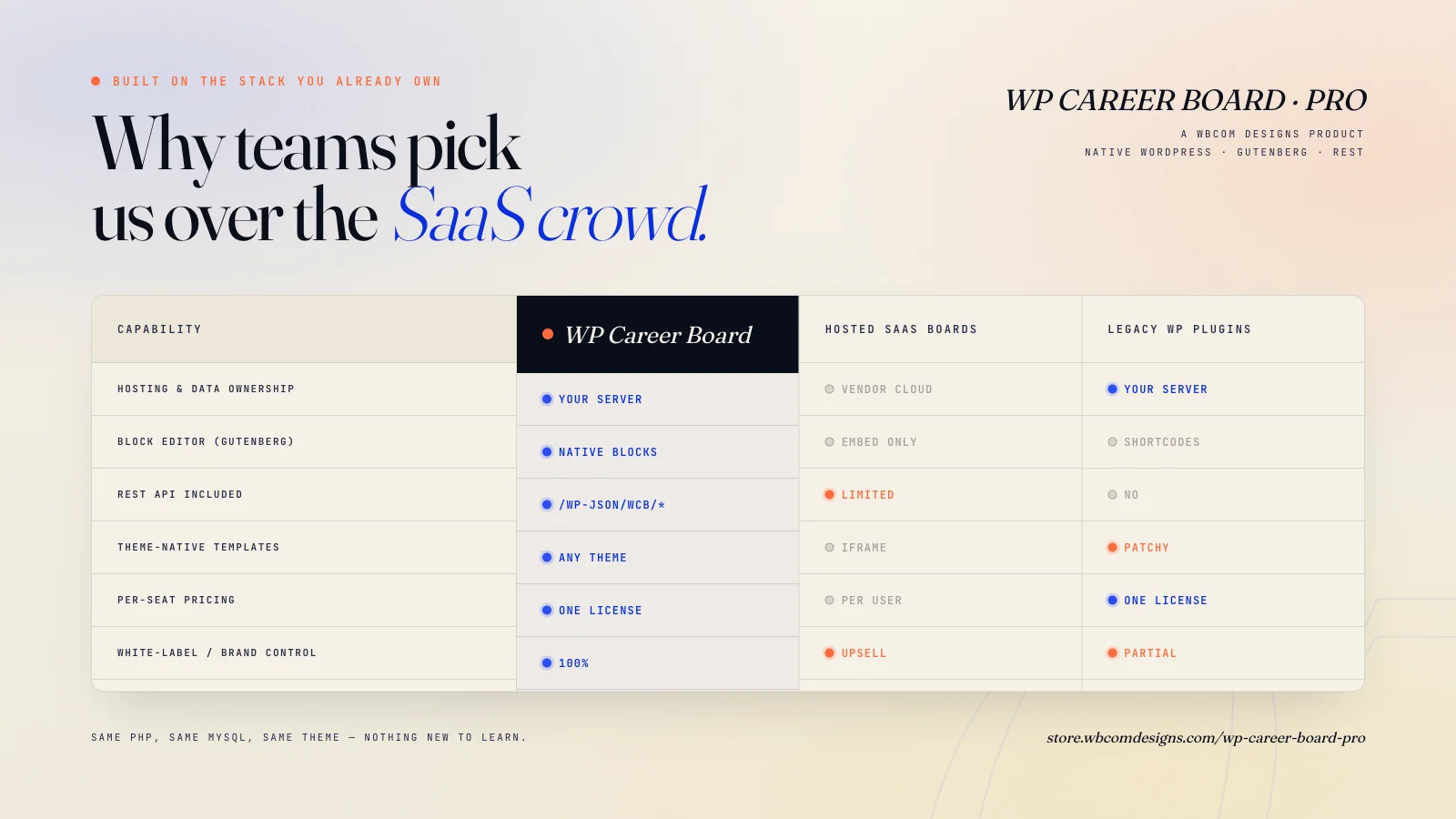 Capability by capability: WP Career Board against hosted SaaS and legacy WordPress plugins.
The interesting parts of that table are not the green checkmarks. They are the rows where the other options leave a gap you did not know you were going to hit. The rest of this post walks through those rows and explains what each one really costs.
The tech choices, and what you get from each one
Six decisions shaped the plugin. Each one sounds like an engineering detail, and each one changes what you can do with the plugin six months from now. We will take them in order.
1. Native WordPress data model → you own your candidates
Jobs, applications, candidates, and resumes are stored as WordPress custom post types and custom tables inside your existing MySQL database. Nothing phones home, nothing routes through an external API, and nothing is stored on an infrastructure you do not control. The benefit is simple. Every candidate profile, every application, and every attached resume belongs to you. You can back them up with the same tools you already use for the rest of your site. You can query them from your own code if you need to. You can comply with a data request without filing a ticket with a third party. If you ever migrate servers, the data moves with you because it is already in your database.
2. Gutenberg blocks → your editors already know how to use it
Every surface a content editor touches is built with the Gutenberg block editor. If someone on your team can publish a blog post on your site, they can add a job listing, build a job board landing page, or configure an employer profile. There is no second admin UI to learn. There is no shortcode soup to memorize. The same alignment controls, color pickers, and template parts that you already use everywhere else also apply here. Onboarding a new team member takes minutes, not an afternoon.
3. REST API included → it plugs into the rest of your stack
WP Career Board Pro exposes its entities through the standard WordPress REST API at /wp-json/wcb/*. That means you can read and write jobs, applications, and candidates from anywhere that speaks HTTP. A few practical examples. You can mirror listings into a mobile app you are building with React Native. You can push new candidates into your CRM from Zapier or Make. You can pull analytics into a Metabase dashboard your team already watches. You can build an internal scoring tool that reads applications, runs them through a language model, and writes tags back to the profile. None of this is a roadmap item. It works the day you install the plugin.
4. One-time license → your bill does not grow with your success
You buy the plugin once for the site and use it as long as you want to. There is no per-seat fee, no per-listing fee, and no percentage of transactions routed back to us. Compare that to hosted job boards that price by active listings, or by seats, or by applications received. Every time your board gets busier, their price goes up, and the tool you bought to help you grow starts quietly charging you for growing. A one-time license puts the cost back on your side of the ledger.
5. Theme-native templates → the job board looks like part of your site
Every public page the plugin renders is a real WordPress template that respects the active theme. Jobs appear inside the same header, footer, and sidebar patterns as the rest of your site. Your custom color scheme applies. Your typography applies. Your block patterns and global styles apply. The result is a job board that feels like a native part of your brand, not a widget that someone dropped into a div on an otherwise unrelated page. If you use Reign, BuddyX, or any other WordPress theme, the plugin inherits its look without a single override.
6. Works with the plugins you already run → no stack conflicts
If you run BuddyPress, LearnDash, or WooCommerce on your site, you are already running a stack. A job board that refuses to cooperate with that stack creates constant friction. WP Career Board Pro was built to slot into the Wbcom ecosystem on day one. Candidate profiles can extend BuddyPress member profiles. Jobs can gate behind a LearnDash course completion. Premium job slots can be sold through WooCommerce with a standard product. None of that requires custom glue code. It is the plugin respecting the environment it was installed into.
A look inside the admin
Technical choices are invisible until you see the product in use. Two screens tell most of the story.
The command center
The main dashboard is the first thing every admin sees. It shows active jobs, pending reviews, new applications, and recent employer activity on one screen, with quick actions to publish a job, add an employer, or jump into settings. The point is that the first thing you see is the thing you need to do next. You do not have to click through three menus to figure out where your attention belongs this morning.
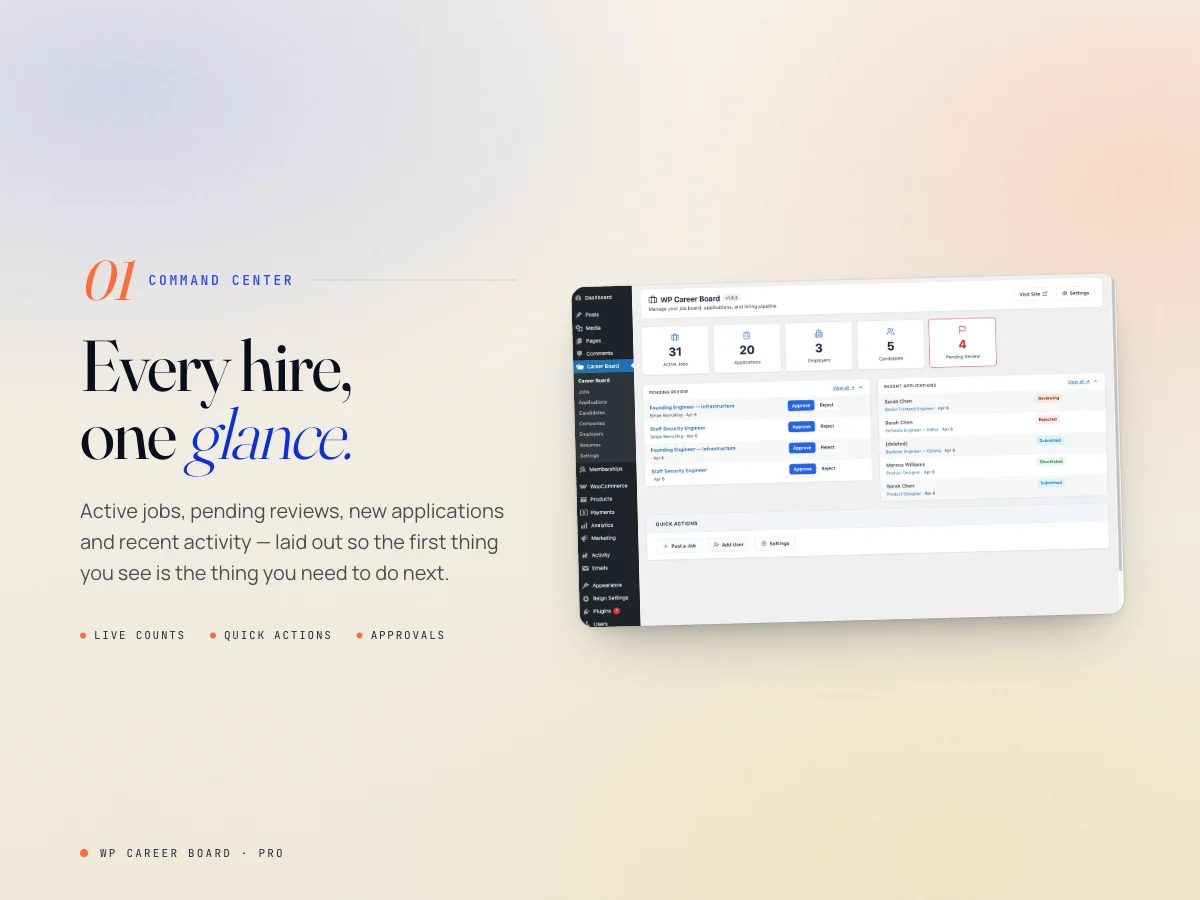 The admin dashboard, with live counts and the quick actions most teams use every day.
The application pipeline
Applications move through four stages: Submitted, Reviewing, Shortlisted, and Hired. The pipeline view lets you move candidates between stages in bulk, tag people, leave private notes, and see every application against every job without leaving WordPress. If you have ever run a small hiring round inside a spreadsheet or a trail of emails, the difference is immediate. One place, one timeline, one source of truth.
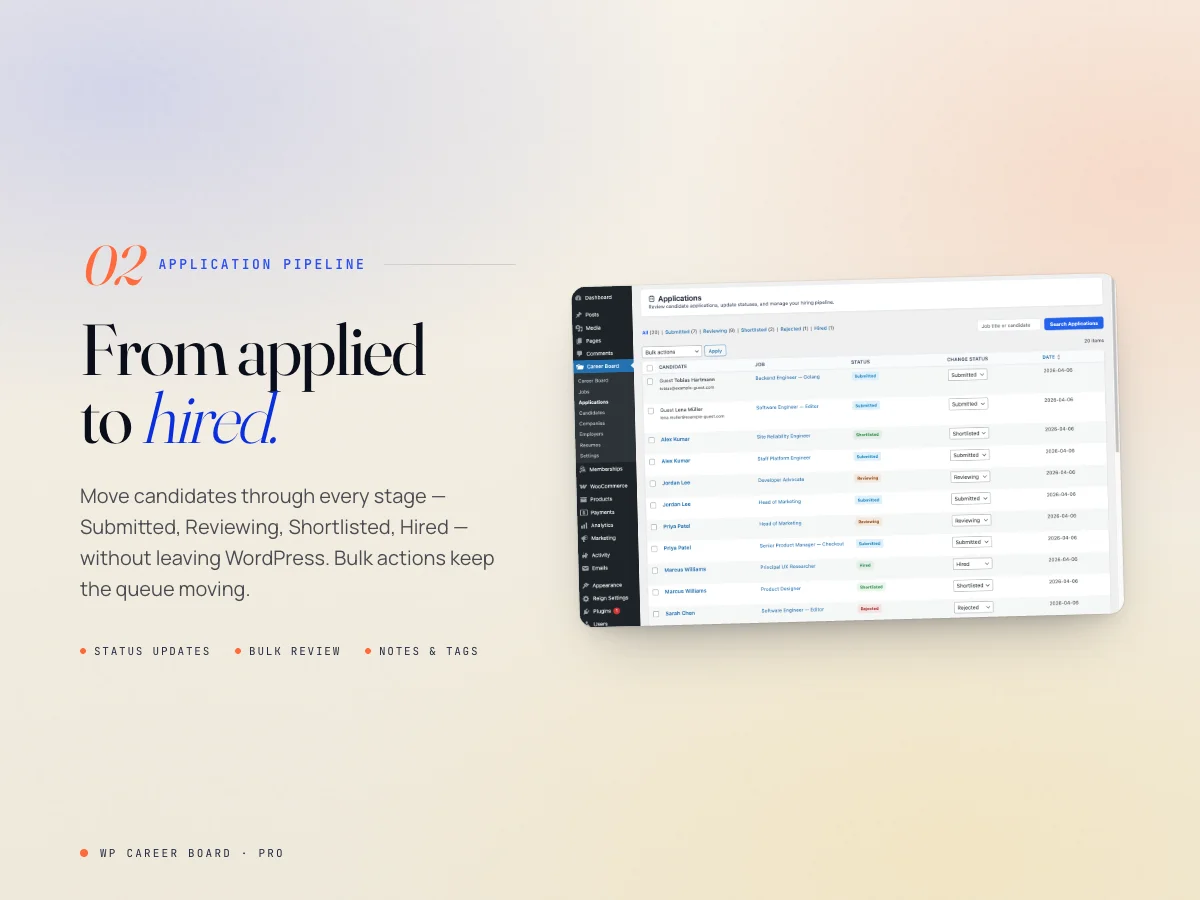 The application pipeline. Move candidates through stages in bulk, tag and annotate them, and keep the whole history in one place.
The stack under the hood
Here is what the plugin is actually built on. There are no surprises on this list, and that is the point.
- Language: PHP 8.1 and up, with strict types and modern syntax
- Platform: WordPress 6.x and later
- Editor: Native Gutenberg blocks, no page builder dependencies
- API: Standard WordPress REST API under
/wp-json/wcb/* - Database: Your existing MySQL, with custom tables for the hot paths
- Testing: PHPUnit, PHPStan, and WPCS in CI for every release
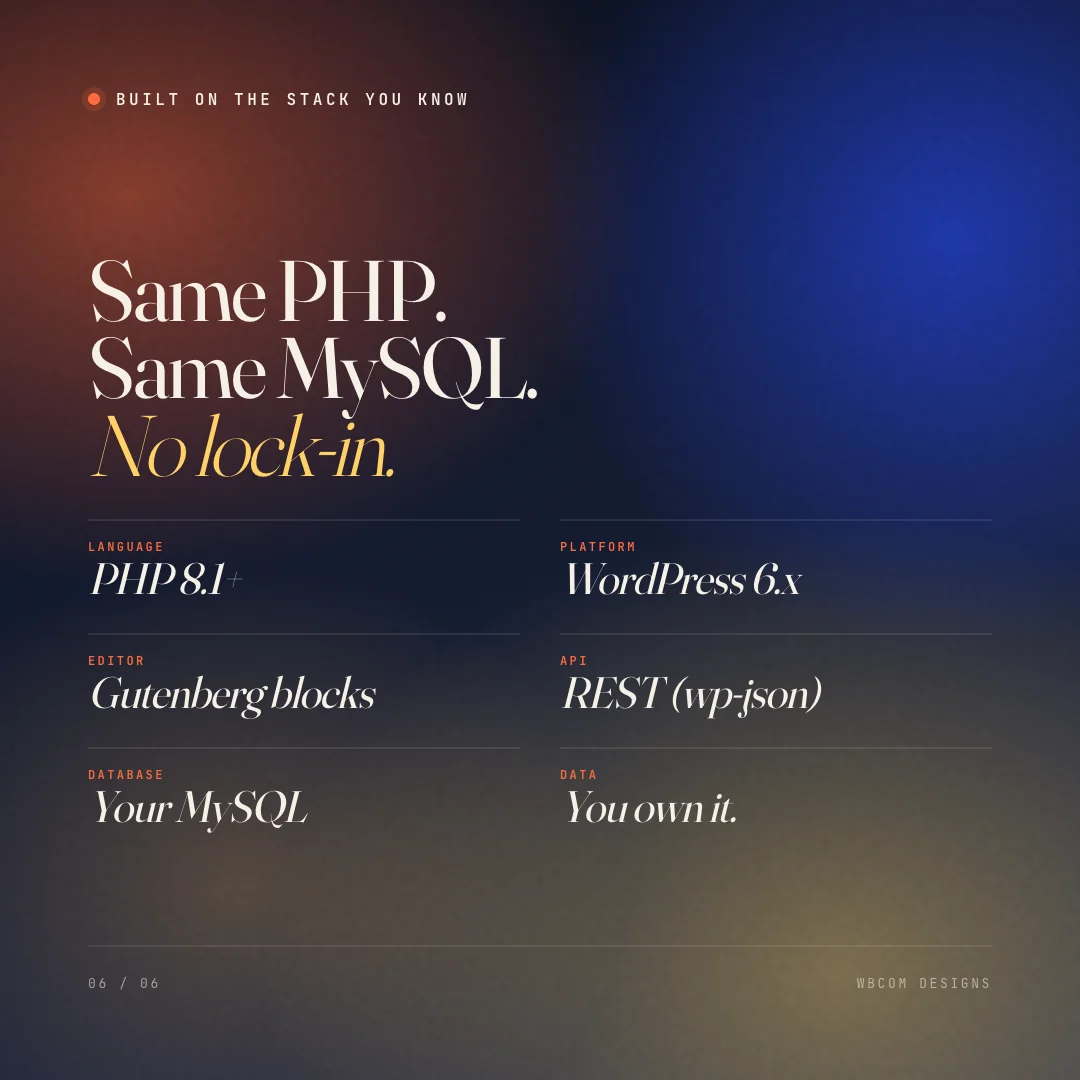 Same PHP. Same MySQL. No lock-in.
If your team already runs a WordPress site, every item on that list is technology you already have and already know how to operate. Deploying the plugin does not introduce a new runtime, a new database, a new authentication layer, or a new SaaS dependency. Your existing backups cover it. Your existing monitoring covers it. Your existing hosting plan covers it. The total cost of ownership is the license fee plus zero extra infrastructure.
Who this plugin is for
WP Career Board Pro makes the most sense for a few specific kinds of sites. If you run one of these, the plugin will feel like it was written for you, because it was.
- Community sites built on BuddyPress or BuddyBoss. Your members already have profiles. Let them apply to jobs with the same identity. The same logic applies when you add a business directory to your community site.
- Professional associations and alumni networks. A member-only job board is one of the clearest benefits you can offer, and it should live on your own site.
- Training platforms running LearnDash, LifterLMS, or Tutor LMS. Graduates want jobs. Gate premium listings behind course completion.
- Niche industry boards. If you serve a specific vertical, you probably know your audience better than any general-purpose SaaS board will.
- Agencies building hiring portals for clients. A one-time license is the cleanest way to hand off a functioning job board without tying your client to a monthly fee.
If you are a hiring team of five that just needs to post a single job on your marketing site, a hosted board is probably fine for you. The plugin is for everyone else.
Try it, or just buy it
There are two ways to get started, and you do not have to pick one before you see the other.
Try the live demo first. We run a public sandbox with seeded demo data, so you can click around the dashboard, the pipeline, the front-end job listings, and the candidate experience without installing anything. It is the same code that ships in the plugin, running on a real WordPress install. No signup, no trial clock, no credit card.
Or jump straight to the product page. If you already know you want a WordPress-native job board and you are comparing options on features and price, the product page has the full capability list, the license tiers, and a changelog.
View WP Career Board Pro Try the live demoHow we built it, and why the engineering choices hold up
The list of technologies above is only interesting if the code behind it is written well. A few notes on how the plugin is actually built, because those details are the difference between a plugin that ages gracefully and one that becomes a maintenance headache twelve months after launch.
Strict types, real testing, and a CI pipeline that runs on every push
Every PHP file in WP Career Board Pro is written for PHP 8.1 and uses strict typing where it matters. We run PHPUnit for unit and integration tests against WordPress 6.7, 6.8, and the latest point release.
PHPStan at level 5 runs in CI and blocks merges if the type surface regresses. WordPress Coding Standards checks run on every pull request. None of that is glamorous, and none of it is visible to you when you install the plugin. All of it is the reason the next WordPress release will not break your job board.
Custom tables where the hot paths live
Jobs, companies, and candidates are stored as WordPress custom post types, which gives you the standard query API for free. Applications and resume metadata live in custom tables instead, because that is where the high-volume reads and writes happen.
On a busy board, an applications table with proper indexes will keep the pipeline view fast even after thousands of submissions. Using custom tables for that layer was an engineering decision that traded a little portability for a lot of performance. The data is still exportable through the REST API at any time.
A settings UI that respects the WordPress admin
Every settings screen uses native WordPress admin components. No bundled React admin that fights with the rest of the dashboard. No custom style framework that ages out of sync with core. When core ships a new Settings API block, we get it for free on the next release. When you customize the WP admin with your own branding plugin, our screens pick up the overrides without a second thought.
Questions we expect to get
Before you reach out with any of these, here are the honest answers. We would rather tell you now than have you find out after a purchase.
Can I migrate away from it later?
Yes, and the path is short. All of your jobs, companies, and candidates live in your own WordPress database as standard custom post types. You can export them through the REST API, through WP-CLI, or by running a SQL query against your own database.
The applications table uses documented columns that are easy to read. We do not encrypt your data, we do not obscure it behind a proprietary format, and we do not phone home to check a license server. If you want to leave, you can leave.
We price for renewal, not for ransom.
What happens if I do not renew the license?
The plugin keeps working. You just stop getting updates and support from us. Your job board continues to run, your data continues to belong to you, and nothing gets disabled as a pressure tactic. We price for renewal, not for ransom.
Does it work with my existing theme?
If your theme follows the WordPress template hierarchy, yes. We have tested against Reign, BuddyX, BuddyX Pro, Astra, Kadence, and the default twenty-something themes.
If you run a block theme, the plugin’s templates respect your global styles out of the box. If you are on a classic theme, they inherit your header, footer, and sidebar patterns. If anything looks off, the templates are overrideable in your child theme like any well-behaved WordPress plugin.
What about email notifications and spam?
Notifications ride on standard WordPress mail hooks, so they work with any mail plugin you already have set up. WP Mail SMTP, Post SMTP, Mailgun, SendGrid, Amazon SES, all fine. For spam on the public application form, we ship with native honeypot protection and optional Google reCAPTCHA or Cloudflare Turnstile integration. Most hobby-scale boards will not need anything more than the honeypot. Busy boards can layer on the captcha at any time.
Is there a free version I can try before I buy?
Yes. WP Career Board is available on the WordPress.org plugin directory and gives you the core job board experience for free. WP Career Board Pro adds the premium features we walked through in this post: the application pipeline, the candidate directory, the employer dashboard enhancements, premium listings, email automation, and everything else on the product page. The free version is not a crippled demo. It is a genuinely useful product, and you can upgrade when the day comes that you need the extra power.
What is coming next
The launch release is not the end of the roadmap. A few things we are working on for the next few updates, in rough order.
- Structured job schema for better Google Jobs indexing out of the box
- First-class Zapier and Make integrations on top of the existing REST API
- Additional payment gateways for premium job slot purchases through WooCommerce
- AI-assisted job description drafting for employers, with your own API key so the data stays on your terms
- More block patterns for common job board landing page layouts
None of these are promises with dates attached. They are the direction, not the schedule. If any of them is especially important to you, the fastest way to move it up the list is to tell us which one and why.
Final thought
The best argument for a native WordPress job board is not a list of features. It is the absence of friction. Nothing new to learn, nothing new to host, nothing new to back up, and nothing new to pay for every month. Your candidates end up in your database. Your editors use the tools they already know. Your API answers the calls you already know how to make. Your theme renders the pages the way you already want them rendered.
If that sounds like the kind of plugin you want on your site, we built it for you. Take the demo for a spin, look through the product page, and tell us what you think.





