


Navigating the digital landscape can be a rollercoaster, especially when your crucial PDF files fall victim to corruption. Fear not, as Wondershare Repairit emerges as a savior, presenting a straightforward and efficient remedy for swiftly repairing damaged PDFs.
Are you curious about how to effortlessly revive your essential files through PDF repair? Join us as we explore the process of using Wondershare Repairit, a beacon of simplicity and effectiveness in today’s fast-paced digital environment. This step-by-step guide is accessible even for those with minimal technical expertise, offering a solution to the frustration of encountering corrupted or damaged PDF files. Whether your PDFs have suffered accidental deletion, software issues, or other unforeseen circumstances, Repairit’s user-friendly interface and robust functionality provide a seamless path to recovery.
So, let’s begin to learn the complete details regarding this PDF repair process!

Ways to Overcome Complex PDF Repair Scenarios
Navigating complex PDF repair scenarios can be daunting, but fear not—there are practical ways to overcome these challenges efficiently.
- Identify Root Cause:
Adopting a systematic approach is critical when faced with intricate issues like extensive file corruption or unexpected errors. Initially, you must identify the basic and root cause of the problem. Understanding whether the corruption stems from accidental deletions, software glitches, or external factors.
- Specialized Tools:
Once you pinpoint the issue, consider leveraging specialized tools like Wondershare Repairit. This user-friendly software is designed to simplify the repair process, even for those with limited technical expertise. In cases of severe corruption, consider breaking down the repair process into smaller steps. Extracting information from a partially damaged file might be more achievable, allowing you to salvage essential content. Also, obtain a backup copy of the original PDF, which can be a reliable fallback.
- Consult Professionals/Colleagues
Collaboration can also be beneficial. Seek assistance from forums, online communities, or colleagues who may have encountered similar challenges. Their insights and experiences can provide valuable perspectives, potentially leading to innovative solutions. Combining these practical approaches allows you to navigate complex PDF repair scenarios effectively, restoring your documents and alleviating the frustration often associated with intricate file issues.
What is Wondershare Repairit?
Wondershare Repairit stands as your reliable ally when it comes to addressing issues in your PDF files. These files can sometimes run into trouble due to unexpected computer shutdowns or other glitches, rendering them unreadable or riddled with errors. Enter Repairit – the problem-solving wizard. This software goes beyond just scanning your troubled PDF. It identifies glitches in the document structure, recovers lost data, and resolves pesky problems with fonts and images. Consider it your document mechanic, tirelessly working to transform a troublesome PDF into a smooth, readable masterpiece.
Key Features
- Repairit seamlessly recovers data across various platforms, ensuring a user-friendly experience for online and PC users.
- This tool retrieves corrupted videos, photos, and files, demonstrating exceptional prowess in comprehensive data recovery.
- Streamlining the recovery process, Repairit allows users to effortlessly import, repair, preview, and export files, enhancing overall efficiency and user-friendliness.
- Utilizing advanced AI technology, Repairit delivers precise and effective PDF repair solutions, addressing issues across different file formats with unparalleled accuracy.
Tired of grappling with PDF file troubles or facing unexpected JPEG repair online challenges? Give Wondershare Repairit a try for a quick and effective solution to your document and multimedia recovery needs.
Steps for PDF repair using Wondershare Repairit
Revitalize your PDF files effortlessly with Wondershare Repairit. This powerful tool simplifies the PDF repair process, ensuring a seamless experience for users of all technical levels. You can bid farewell to corrupted or damaged PDFs in just a few easy steps. Let’s explore the straightforward and effective process of PDF repair using Wondershare Repairit.
Step 1: Open the Repairit PDF repair tool and go to the “More Types Repair” section. Choose “File Repair” and easily upload multiple PDFs using the “Add” button to manage several files simultaneously.
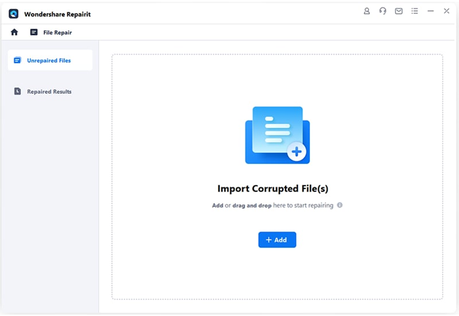
Step 2: Begin the repair process by selecting the “Repair” option after adding the files. If needed, you can pause the repair at any stage.
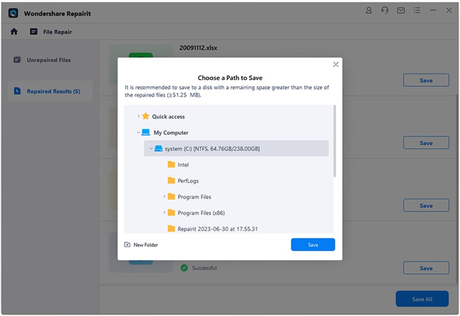
Step 3: Once the repair is finished, retrieve your repaired PDF by clicking “OK.” Confirm the successful repair, and save the file in your desired location by choosing “Save.”
How Do You Ensure Data Integrity During The PDF Repair Process?
Safeguarding the integrity of your data is a top priority during the PDF repair process. Wondershare Repairit offers a reliable solution, accompanied by essential practices to ensure the accuracy and reliability of your documents. To ensure data integrity during the PDF repair process:
- Create Backups:
Before initiating the repair, create backups of your original PDF files. This precautionary step serves as a safety net, preserving your data in case of unexpected issues.
- Follow Software Steps:
Carefully adhere to the steps outlined by Wondershare Repairit. Avoid abrupt interruptions during the repair process to prevent potential data corruption. Let the software systematically identify and address issues.
- Exercise Patience:
Patience is crucial during the repair. Allow Repairit the time it needs to methodically identify and mend problems without compromising the integrity of your content. Rushing the process may lead to undesired outcomes.
- Verify Repaired Files:
After the repair process is complete, take the time to verify the integrity of the repaired files. Open them and ensure the content, formatting, and embedded elements are accurately restored.
- Keep System Updated:
Maintain your computer system and the Repairit software up-to-date. Regular updates often include enhancements and bug fixes, reducing the likelihood of encountering issues that could compromise data integrity during the PDF repair process.
Closing Words
Navigating the complex world of digital document recovery demands a reliable tool and Wondershare Repairit steps forward as a steadfast companion for PDF file restoration. Beyond its user-friendly interface, Repairit places a premium on data integrity, ensuring the accuracy and reliability of your essential documents. As a trustworthy solution, it simplifies the repair process and instills confidence in users, offering a secure pathway to recover PDF files seamlessly. Whether faced with unexpected glitches or proactively addressing file issues, Wondershare Repairit is a dependable partner in digital document restoration.
Wondershare Repairit Free Download:
Click below to download Wondershare Repairit.






