


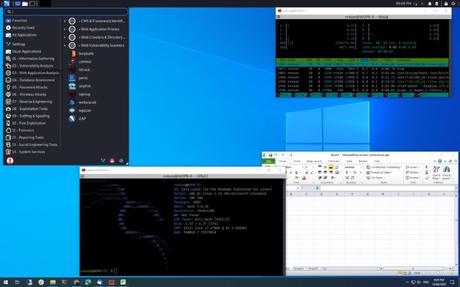
Last month, when Kali Linux 2020.3 was released, it came with a lot of cool features, including a new package tool, Win-KeX (Windows plus Kali Desktop eXperience).
To further extend its support, Kali Linux now has ad the second iteration of Win-KeX. Win-KeX version 2.0 is loaded with tons of new enhancements such as shared clipboard, sound, and multi-session support.
Win-KeX v2.0: What's new?
For those who don't know, Win-KeX is a graphical desktop environment for Kali Linux running on the Windows Subsystem for Linux 2 (WSL 2). It aims to provide a graphical interface and improve the Kali Linux experience on WSL 2.
With this in mind, the new version 2.0 of Win-KeX added support for concurrent sessions. This means that you can now run Win-KeX GUI sessions as unprivileged user, root user, and Seamless session mode.
Unlike Windows mode which runs a Kali Linux desktop session in a separate window, Win-KeX in Seamless mode is a new edition where the Kali Linux panel launches at the top of the Windows desktop screen. Applications that start through the panel share the desktop with Microsoft Windows applications.
Whichever session you want KeX to run, you can also launch it from anywhere, meaning you don't need to switch to a particular directory first. In addition, v2.0 also added audio support, which you can enable using --sound or -s command line parameter when starting Win-KeX.
However, it's also worth mentioning that launching Win-KeX in Seamless mode or with sound support requires access through Windows Defender Firewall. Therefore, when you are prompted for authorization, you must first check "Public networks".
Another cool feature that the Win-KeX version has enabled is clipboard sharing. You can now easily cut and paste content between Kali Linux running in WSL 2 and Windows applications.
Finally, if you want to run Win-KeX version 2.0, you need to be running Windows 10 version 2004 or higher, which supports WSL 2. However, Microsoft recently backported WSL2 support for older Windows 10 1903 and 1909. So you can also run Kali Linux using Win-KeX in Windows 10 pre-2020 version.
For more information on installing and using Win-KeX, read the official documentation here.
Win-KeX version 2.0 message released for Kali Linux running in WSL 2 appeared first on Fossbytes.






