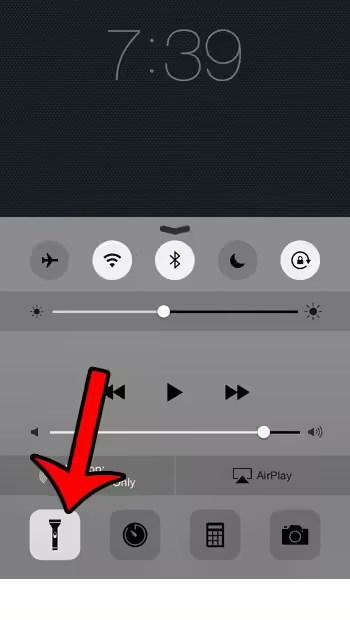
There are certain features on your iPhone that are useful when you can access them as quickly as possible.
For example, being able to launch the Camera app in just a second or two can make a difference in whether you get a good image.
Another useful feature where you can turn it on quickly is the flashlight.
Our iPhone SE flashlight guide can provide specific instructions if you have this iPhone model.
You may be used to using the flashlight from the Control Center, but you may have thought that it can only be used when the phone is unlocked.
Fortunately, this is not the case, and you can set up your iPhone so that you can turn on the flashlight without unlocking the device.
The same flashlight light can also be turned on as a flashing light when you receive an alert. Read about how to turn on your iPhone's LED flash if you want to use it.
How to turn on the flashlight on the lock screen on iPhone
The steps in this article were written using an iPhone 6 Plus running iOS 8.4. The same steps will work for other iPhone models running iOS versions above 7.0.
Once you've followed the steps below to enable Control Center on your lock screen, you can access other options as well. First, you can control whether your device is locked in portrait orientation.
Step 1: Open the settings menu.
Step 2: Select Control Center.
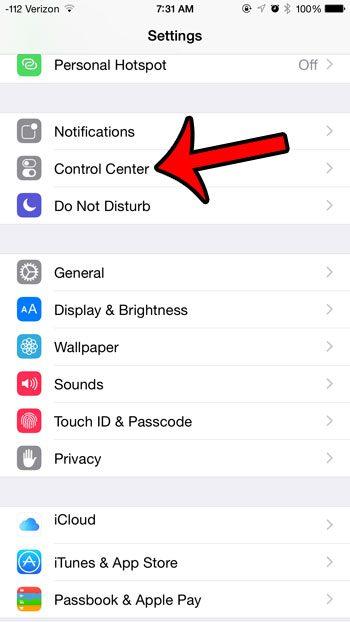
Step 3: Tap the button to the right of Lock Screen Access to turn it on. You'll know it's enabled when a green shadow appears around the button. For example, in the image below, the Control Center is enabled on the lock screen.

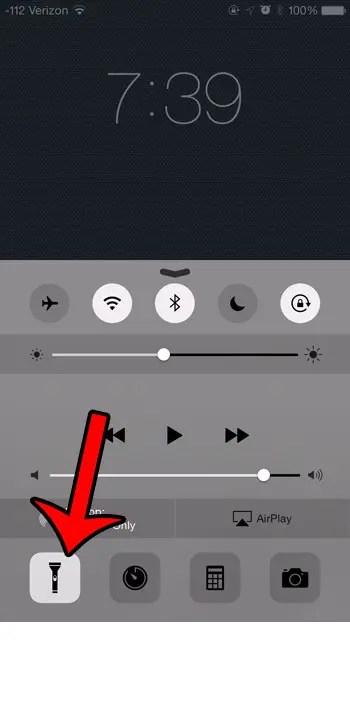
Once you've enabled this option, simply swipe up from the bottom of the screen on the lock screen to open the Control Center. You can then take advantage of the various options available in this menu.
Have you tried taking pictures in a quiet environment only to hear the sound of the flash? This guide will show you how to reduce camera noise to make your shots more discrete.
You may also like
Руководства
#flashlight #iPhone #lock #screen