Did you just forget your iPhone password? Did your Face ID suddenly fail to work? Did your iPhone get disabled due to several failed attempts to unlock the screen? Is your Touch ID not working properly?
Is your iPhone screen unresponsive or broken? If the answer to all or some of the questions is 'Yes', you needn't panic! TunesKit iPhone Unlocker is there to pull you out of all sorts of troubles related to your iPhone lock screen.
We understand how frustrating it can be when you fail to remember your iPhone password. There are several users for whom this is nothing but the dead end as all their vital messages, personal data, and important photos are blocked. There is no other unlock key apart from the passcode.

Keep reading to know about the features and uses of the TunesKit iPhone Unlocker and how user-friendly it is. Check out more on this effective tool.
Important Features of TunesKit iPhone Unlocker
Before we move into the details of the features of iPhone Unlocker tool, here is a quick glance at the same.
- Unlocks iPhone password from different scenarios.
- iPhone gets locked or disabled.
- You forget your iPhone passcode.
- iPhone gets disabled due to multiple wrong attempts.
- Broken iPhone screen.
- Second-hand iPhone.
- Unresponsive iPhone screen.
- When your FaceID is not recognized.
- The passcode is set by someone else intentionally.
- Touch ID is not working.
Removes all sorts of lock screens on iOS devices like.
- 4 digit or 6-digit passcode.
- Custom alphanumeric passcode.
- Custom numeric code.
- Face ID
- Touch ID.
- Compatible with all iOS versions and devices.
- Factory reset iPhone without iTunes or passcode.
- Unlock any type of screen lock with maximum success rate.
- User-friendly design makes unlicking easy.
- Supports free lifetime software update.
Circumstances when your iPhone can get locked
Once you get to know the situations when your iPhone might get unlocked, you'll know when to seek the help of tools like iPhone Unlocker.
Breaking your iPhone screen is no less than a misfortune. A phone with a broken screen is unusable as it is impossible to feed in the . But in case of emergency reasons, you might find it important to retrieve data from your phone.
How would you do that when your iPhone screen is broken? Well, this is a situation when TunesKit iPhone Unlocker can help you retrieve information.
Another worst circumstance when it is tough to unlock your iPhone is when you manage to lock yourself out of the phone. As soon as you do this, your phones become unusable and there's no other way to directly unlock your phone.
This is when you'll have to try out several ways of using your iPhone unlocker to unlock your phone. Besides using this tool from TunesKit, you should also try setting a password that is easy to remember.
Almost every iPhone user has had a moment when their iPhone screen failed to respond properly. This is yet another irritating issue that arises out of nowhere. The only method you can adapt is to choose an unlock procedure that can make life easier. There can be several reasons that crop up and resolving the issue is the foremost thing you can do.
Being an iPhone user, you must have come across a time when you forgot your screen password or when you fed in a wrong passcode. This is one of the easiest ways of getting your phone bricked. Due to the high security feature of the iPhone, it gets difficult for the user to enter the phone.
There are numerous ways of pulling out your iPhone from the poor state. You can use the TunesKit iPhone unlocker during such a situation.
TunesKit iPhone Unlocker - Best iPhone Unlocker
No matter what circumstance you go through with your iPhone, TunesKit iPhone Unlocker is possibly the best tool for unlocking your iPhone device.
It has been designed in order to make removing screen locks easier than ever before. With the help of this tool, you'll just need a single click to bypass a 4-6-digit passcode, Touch ID, Face ID, etc. For more details, check out the video.
Thanks to this useful tool that you can also factory reset your iPhone that's running on iOS 15 without iTunes or a passport. There are numerous introductory discounts that can help you stay within your budget. You may think of it as a type of insurance for being able to unlock the iPhone during an emergency.
Let's take a quick look at the steps that you should take in order to unlock your iPhone with TunesKit iPhone Unlocker.
Firstly, you will require a lightning cable to link the device to the PC. The next step would be to launch the TunesKit iPhone Unlocker software and let it automatically detect the phone.
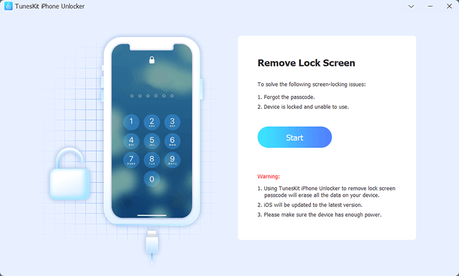
You require following a guide and placing your iPhone into DFU mode . In case you are not able to do that, you should put the iPhone into recovery mode to move further.

The next step is to click on the 'download' tab and the app will install the firmware package for you. However, before you do this, you should check the details of the device which should match with your device. In any case of discrepancy, rectify it manually.

TunesKit iPhone Unlocker will begin the process of unlocking the iPhone as soon as the firmware package has been downloaded. You should note that the current data will be deleted and if you want to retain the data, you have to back up all data before unlocking.

Therefore, if you're an iPhone user who is eager to know how to remove lock screens from your iPhone, you should download the TunesKit iPhone Unlocker to reap the above-listed benefits.