


If you are a Mac user, you will likely love the sleek desktop experience and how easy it is to use and understand. However, finding an antivirus platform to protect your Mac can be a challenge since so many options are only compatible with Windows.
The good news is that Mac owners are offered numerous antivirus solutions - all they need to know is where to look. That is why we have compiled this list of the best free antivirus platforms for Mac in 2020 so that you can keep your operating system safe from now on.
further reading
Malwarebytes Free
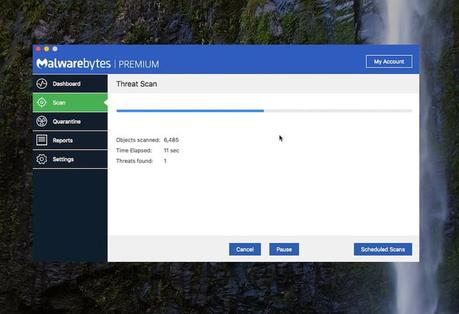
Windows users have long chosen the free Malwarebytes version as a backup for constantly active malware software. The Mac version was launched as an adware removal tool. However, as of today, it's also a full-fledged tool for protecting your computer from other forms of malware. Plus, it's just as effective on macOS as it is on Windows. This is supported by the team's ongoing investigation into current threats. In fact, the company identified the first Mac malware threat in 2017!
Using the app couldn't be easier. Just choose scan and the software quickly warns you of a malware infection - often when other software is missing something. However, like the Windows iteration of the free version, this solution isn't always available, so it's better for in-depth scans and for getting rid of particularly harmful threats like the fake Adobe Zii malware.
There are planning and proactive blocks, but these features expire after two weeks in the free version. You'll need the premium version for Live Protection, which starts at $ 30 for a year on a single Mac.
Avast security

Avast Security for Mac is one of the most popular security suites available, and it's easy to see why. It's effective and free for non-commercial use, and it has on-demand tools for quickly running malware scans on the entire system. It also searches certain email threads, attachments, and various web activity. It even offers drag-and-drop scanning for individual files and phishing protection, as well as the ability to scan external drives and attached volumes.
The app's user interface is straightforward and self-explanatory. On the left is a navigation area made up of five main buttons and a real-time graph that summarizes shield activity and allows you to quickly review your Mac's overall stats.
If privacy is particularly important, consider recent reports that Avast collects and sells internet browsing data from customers. And while Avast admits this, the company also claims it doesn't collect names, email addresses, or contact details. Users have the option to deactivate the sharing of their data.
Sophos Home Free
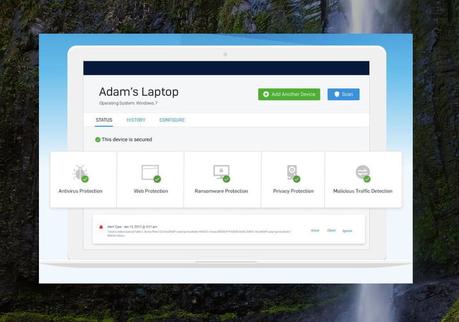
Hanging somewhere between necessity and excess, Sophos has all of the basic utilities you'd expect from high quality antivirus software and more. It offers on-demand, scheduled and custom scans for specific files, folders and drives, as well as additional tools for erasing and quarantining software that Sophos sees as a potential threat.
The software includes real-time protection features that quarantine unknown files with suspicious behavior. Although the app scans slower than most, it is quite light. It does not intrusively perform important background tasks without straining or exhausting your system's resources.
Despite its robust functions, Sophos manages to combine all of these functions in one compact interface. Starting a full system scan can be done right from the main menu, and you can quickly configure exceptions to easily navigable menus. The malware definitions are also constantly updated to ensure that the app is never without the latest knowledge of potential threats. It's one of the most practical antivirus apps out there, and as such, it's among the best.
The free version includes ransomware monitoring, webcam protection, and live support options. However, all of these options expire after 30 days. You need the premium version for $ 45 per year to get these features.
Bitdefender virus scanner
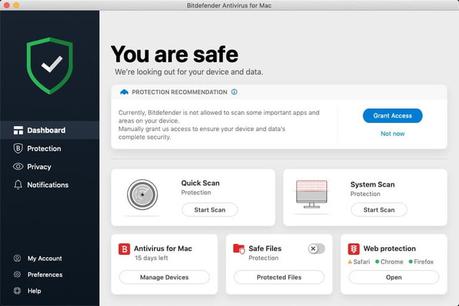
Bitdefender virus scanner is based on the company's award-winning anti-virus engine and offers a variety of scanning options that allow users to quickly perform comprehensive scans of the entire system or specific destinations. When granted, it even offers an option to scan critical locations - such as B. startup agents and the entire system library - so users can bypass lengthy scans if they are pressed for time.
This antivirus client is automatically updated with Bitdefender's hourly malware definitions before scanning, while also providing a quick way to blacklist specific locations from system scans. Attempts are made to disinfect suspicious files and place them in quarantine. While this feature isn't unique to this software, it can also quickly scan for malware in various archives and file types (PDF, PKG, ZIP, RAR, etc.).
On the home screen, in addition to an update button and a, users can select four different scanning options view
quarantine Button. It's all very easy to understand and use.
Avira free antivirus software
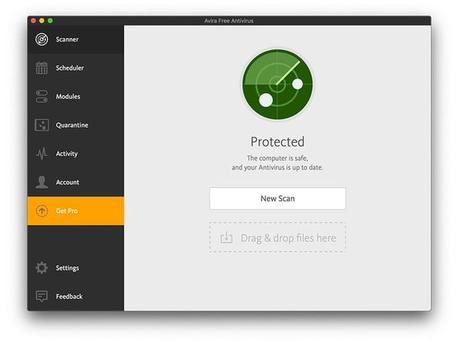
Avira strikes a good balance between ease of use and quick access to advanced utilities, making basic system scans just as easy to perform as scheduled and file-specific scans. The software includes standard spyware and adware protection, as well as the ability to intercept malicious websites and block tracking. If an infected file or folder is found, the problem can be fixed or deleted. It can also check USB devices for possible hazards.
Avira's fully functional user interface uses a navigation bar on the left-hand side to, among other things, display the system status, schedule tasks and view the history of the quarantine in the past. Virus definitions are also updated in a timely manner, regardless of how long the initial updates may take. It's resource-intensive, but powerful enough to look for automation, scan history, and other advanced features.
In contrast to most of the software programs in our summary, Avira is associated with a moderately long installation and update process, which is associated with the heavy use of system resources by the software. It's certainly not a deal breaker given the nonexistent price tag and thorough anti-virus engine, but it's an unfortunate downside.
Bonus option for extra protection: Antivirus Zap

If you don't mind spending a few dollars on affordable software, Antivirus Zap is a worthwhile download too. This Mac security app offers a quick scan that scans likely spots for viruses, as well as a full scan that takes longer and scans your entire system. Zap also offers a custom scan that can be used to check specific folders or locations if you have strong reason to believe something is infected.
However, in the additional options, Antivirus Zap comes in very handy. It provides a browser restore option that will automatically remove your extensions, cookies, and caches. This essentially cleans up your browser to fix problems and make it work faster. It can also scan Windows Boot Camp partitions, external networks, and other systems that you may be using on your Mac - and that you therefore want to protect. Plus, the user interface is particularly simple and easy to understand, even if you don't have a lot of experience.
Editor's recommendations







