📌 What Is Subscribe & Save?
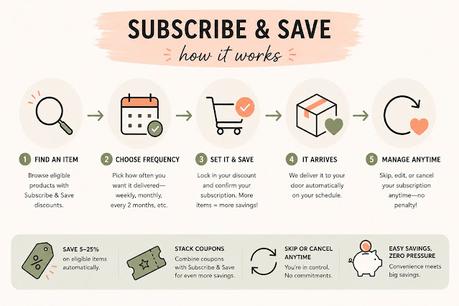
Subscribe & Save lets you schedule automatic deliveries on select products you use regularly, like snacks, coffee, toiletries, cleaning supplies, pet food, and more.
The best part? You’ll usually save an extra 5% to 25% off just for subscribing!
A lot of items also have clickable coupons you can stack on top of the Subscribe & Save discount for even bigger savings.
And yes… you can absolutely use the discount for a one-time order and cancel later if you don’t want repeat deliveries. Just make sure your first order ships before canceling.
📌 How To Use Subscribe & Save
When viewing a qualifying item on Amazon, you’ll usually see two purchase options:
✔ One-time purchase
✔ Subscribe & Save
To get the extra discount:
Select the Subscribe & Save option
Choose how often you want deliveries (monthly, every 2 months, etc.)
Click Set Up Now or Subscribe Now
Complete checkout like normal
That’s it! Amazon will automatically send the item based on the schedule you selected.
You can:
• Skip deliveries
• Change delivery dates
• Cancel anytime
Super easy!
📌 How The Discounts Work
Most Subscribe & Save items start with a discount of around 5% to 10% off.
But if you have 5 or more Subscribe & Save items delivering in the same month, Amazon usually unlocks even bigger discounts, often 15% to 25% off on eligible items.
The more qualifying subscriptions you have, the more you can save.
💡 Pro Tip: Many deal shoppers add low-cost Subscribe & Save items each month just to help unlock the higher discount tier.
📌 How To Tell What Discount You’re Getting
On the product page, the Subscribe & Save percentage shows directly under the price.
If you see multiple percentages, the highlighted one is usually the discount you’ll receive for that item.
Always check for:
✔ Subscribe & Save discount
✔ Extra clickable coupons
✔ Lightning deals or sale prices
These can often stack together for HUGE savings.
📌 How To Cancel A Subscription
Don’t want repeat deliveries? No problem!
After your first order ships:
Log in to your account
Go to Your Account
Click Subscribe & Save
Select the item you want to cancel
Click Cancel Subscription
Confirm cancellation
You can also skip upcoming deliveries instead of canceling completely.
📌 Is There A Penalty For Canceling?
Nope! There’s no penalty at all.
You can cancel, skip, or change your subscriptions anytime. Just wait until after your first order ships so your discount still applies.
Easy savings without being locked into anything. 🙌
Check out all the Subscribe & Save deals!
If you love these deals, you’ll love my storefront:
Walmart deals: Walmart.com storefront (ad)
US Deals: Amazon.com storefront (ad)
Canadian Deals: Amazon.ca storefront (ad)
If you love freebies, join our Facebook group!
Frugal Freebies - Grab All the Freebies