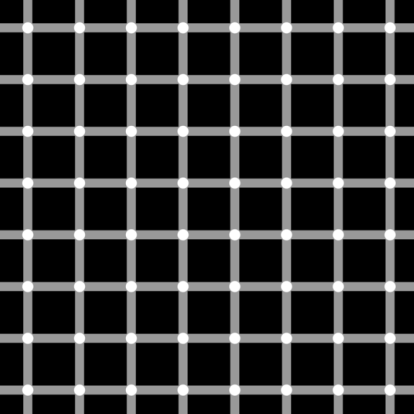
 A
classic example of ‘optical illusion’ courtesy www.livescience.com – the black dots seem
to appear and vanish at the intersections of the gray horizontal and vertical
lines. Called the scintillating grid, this illusion was first discovered by E.
Lingelbach in 1994 and is a modification of the so-called Hermann grid illusion.
Searching
about Optical illusions, this post in Daily Mail attracted me most. The pictures more confusing than #TheDress!
These two images are the SAME (but appear as light pink or purple when placed
in front of different backgrounds). It is the new set of pictures doing the
rounds on Twitter that are boggling the mind. They are two identical images
featuring painted fingernails held up to a mouth, but they appear in completely
different colours - one is pink and the other is maroon.
A
classic example of ‘optical illusion’ courtesy www.livescience.com – the black dots seem
to appear and vanish at the intersections of the gray horizontal and vertical
lines. Called the scintillating grid, this illusion was first discovered by E.
Lingelbach in 1994 and is a modification of the so-called Hermann grid illusion.
Searching
about Optical illusions, this post in Daily Mail attracted me most. The pictures more confusing than #TheDress!
These two images are the SAME (but appear as light pink or purple when placed
in front of different backgrounds). It is the new set of pictures doing the
rounds on Twitter that are boggling the mind. They are two identical images
featuring painted fingernails held up to a mouth, but they appear in completely
different colours - one is pink and the other is maroon.
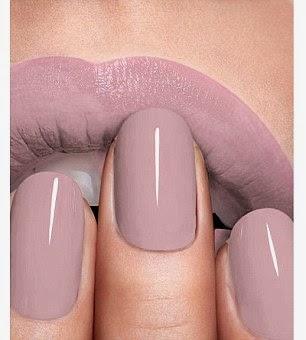
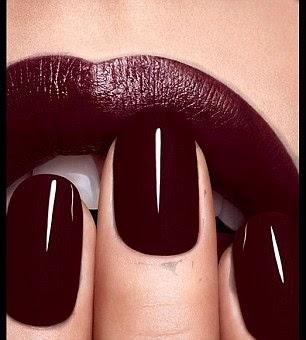
These images are identical, but they appear very different because of the background they have been placed on in Photoshop. The 1stpicture was placed on a white background, the 2ndpicture was placed on a black background. That is the only difference between the photos: one has been put in front of a black background (the maroon picture), while the other (the pink picture) has been placed in front of a white background. In the original picture, the lips and nails are pixellated, with some of the small squares appearing as a shade of purple, while others look pink. These pixels mean that the image is semi-see through, so it can adapt to different colours when they appear behind it in Photoshop. Which is why you see a pink pair of lips and fingernails on a white background on Twitter, but when you click on the image to reveal a second picture against a back background it looks maroon.
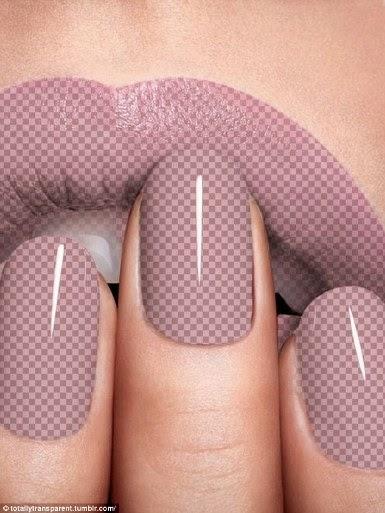 MailOnline's
graphics whizz Leo Delauncey explained the science behind the photos... The
colour of the nails and lips in the original pre-photoshopped image was a
darker shade of pink. There are two main tools in photoshop that make this
possible. Firstly the ‘colour selection’ tool was used to select a specific
tone within the pink of the nails and lips. The midtone makes it possible to select the
main color but leave the shadows under the lips and the highlights on the
nails.Then the ‘mask’ tool was applied to the selected area. The mask tool
allows you to change the opacity of the selected area. By filling the area
black you can make the image within the selected area disappear. By filling the
area white you can preserve the opacity of the image. By filling the area grey
you can essentially dilute the image, much the same way you would dilute paint
with water - where paler gray would equal less water and more opacity, darker
grey would mean more water and more transparency.
Once the mask has
been applied you have an image that is partially transparent, and the colour
affected by the background behind. It’s the same as having some clear coloured
acetate or tissue paper. If you hold the pink tissue paper to a white light the
tissue paper remains pink. If you hold it up to a blue light it becomes purple.
The illusion comes
just a month after the internet went into meltdown over a blue and black dress
that almost 50 per cent of people saw as white and gold.
With regards – S.
Sampathkumar
MailOnline's
graphics whizz Leo Delauncey explained the science behind the photos... The
colour of the nails and lips in the original pre-photoshopped image was a
darker shade of pink. There are two main tools in photoshop that make this
possible. Firstly the ‘colour selection’ tool was used to select a specific
tone within the pink of the nails and lips. The midtone makes it possible to select the
main color but leave the shadows under the lips and the highlights on the
nails.Then the ‘mask’ tool was applied to the selected area. The mask tool
allows you to change the opacity of the selected area. By filling the area
black you can make the image within the selected area disappear. By filling the
area white you can preserve the opacity of the image. By filling the area grey
you can essentially dilute the image, much the same way you would dilute paint
with water - where paler gray would equal less water and more opacity, darker
grey would mean more water and more transparency.
Once the mask has
been applied you have an image that is partially transparent, and the colour
affected by the background behind. It’s the same as having some clear coloured
acetate or tissue paper. If you hold the pink tissue paper to a white light the
tissue paper remains pink. If you hold it up to a blue light it becomes purple.
The illusion comes
just a month after the internet went into meltdown over a blue and black dress
that almost 50 per cent of people saw as white and gold.
With regards – S.
Sampathkumar
20th Mar 2015.