


Since Xiaomi unveiled MIUI 12 to the world in May, it is constantly releasing MIUI 12 updates for supported devices.
At the same time, however, the MIUI development team also released beta updates to MIUI 12 and experimented with new features. Few days ago it released a new version of MIUI Gallery app (v2.2.16.17) with several new features. The new version of the app was part of a recent beta of MIUI 12 China.
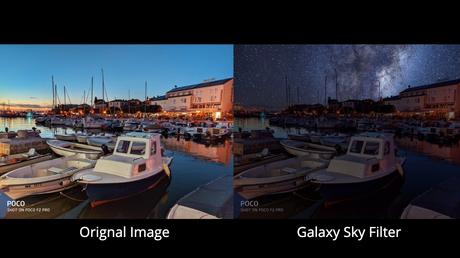
Among the many changes to the Gallery app are the new Sky AI Replacement Filters whose amazing efficiency will leave you at a loss for words.
Xiaomi brought the Gallery app's sky filters with MIUI 11. For those who don't know, the feature flawlessly adds color tones and cloud patterns to the sky element of the picture. With a new update, Xiaomi has further improved the implementation and added new filters.
A brand new set of "Night" and "Dynamic" filters has been added to the new version of the MIUI 12 Gallery app. Here's a look at the AI Sky Replacement feature.
How to get MIUI 12 Gallery app AI sky replacement feature?
Fortunately, you can immediately get the new MIUI 12 beta feature on your current Xiaomi device, even if you are using MIUI 11.
- Download and install the MIUI Gallery app v2.2.16.17 or higher from APKMirror
- Then open the app and select an image with the sky inside
- Tap the Edit tile at the bottom → Filter tile → Sky filer
- Experiment with the newly added AI Sky replacement filters
The MIUI 12 development team continues to experiment with things. For example, a MIUI 12 beta version code suggested that Xiaomi test iOS 14's "Back tap" feature for Xiaomi devices.
Keep following Fossbytes to hear the latest news on Xiaomi and MIUI 12.






