


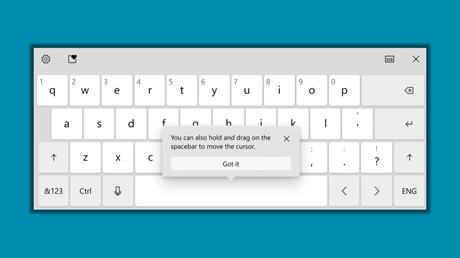
With Windows 10 20206 Preview build ad Microsoft made significant improvements to the virtual keyboard on Windows 10 last week for Dev Channel.
While the visual changes come in the form of new key animations and sounds, searches for emojis and labels in the Settings menu entries, Redmond has done some work to improve the usability of the virtual keyboard.
Insiders can now press and hold the space bar on the virtual keyboard to move the cursor anywhere when editing text. This is a handy feature for tablets because it allows you to quickly get to the point where changes are needed. Otherwise, typing in the right spot on the first attempt is a bit tricky.
As a reminder, a similar functionality exists on the iPad and the Apple iPhone; it was introduced in the iOS 12 update. After holding down the space bar, you can move your finger left, right, up or down, which lets you jump between lines.
However, it remains to be seen what differences Microsoft has made in its implementation of the feature.
The "hold space to move cursor" feature is available for limited Dev Channel users. Microsoft will deploy it to all Dev Channel users after identifying issues affecting performance and reliability, the company said.
Windows 10 virtual keyboard improvements and new features are always welcome, as we see more hybrid PCs with an optional touchscreen. Microsoft Surface branded tablets would also benefit from all of the new keyboard features.






