


Starting an eCommerce business can be challenging without the right tools and knowledge, especially if you're a beginner.
From brainstorming what to sell to researching the right platform, integrating with a payment gateway, and designing your store, how to start an online store isn't easy.
You must prepare, think it through, and research extensively to find trending products with high demand and good profit margins to make profits.
With retail eCommerce sales estimated to reach 5.7 trillion dollars in 2022 globally, there has never been a better time to start an online store.
This article will teach you step-by-step processes for creating an online store.
Whether it's an online beauty store, thrift store, or shoe store without inventory management, fashion, or cosmetics, this article covers all the steps you need to launch an eCommerce store.
Here are some of the lessons:
- How to find products to sell
- Discovering your target audience.
- Picking the right store platform
- Design
- Choosing a suitable payment gateway for your audience.
- How to launch your store for viral sales.
- And using paid and free channels to promote your product.
What Do You Want to Sell?
The first step in starting an online ecommerce business is to get clear on what you intend to sell.
You don't just start a business without knowing your offer.
Sure, as you build and grow in the industry, your product will evolve from the initial launch, but having a clear view of your lunch product will help you save time and start with clarity.
You don't want to waste time and resources promoting products people are not buying, so you must do product research and validation before anything.
There are many ways to do that; I prefer keyword research.
Keyword research gives you access to marketing data, deep insight into what people are searching for, how often they search, market value, search intent, and many more valuable insights.
You don't need an expensive keyword tool for this task. Semrush free plan is sufficient to dig deep into your keyword research processes.
Check out the in-depth Semrush keyword tool review to learn how to use it.
Rank Tracker is another keyword tool you can use for this task; though its free plan is too basic, it is better than many free keyword tools. Here I review Rank Tracker if you want to learn how it works and what features are in the free plan.
If you're not a fan of keyword research, here is another way to discover products people already buy in the market.
Go to marketplaces like Amazon, Aliexpress, and Walmart, and look at their best-selling categories, giving you an idea of trending products.
Don't limit your search to a marketplace; compare two or three to have a solid view of products people buy and their high demand.
For example, I searched for kid toys in Walmart and sorted the results by the bestseller; here are the results.
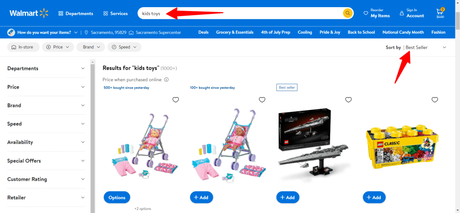

You can dig deeper into this information to get more valuable data. Walmart shows you how many items were sold in the past few days. And how many customers had a particular product on their carts?
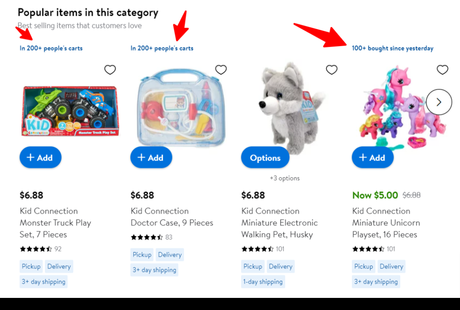
This information could be useful for learning about products you should consider selling in your store.
Who Are Your Target Audience
Selling online requires a lot of research and information, part of which is knowing your ideal audience.
You must identify your target audience to provide the best website and user experience and increase conversion and sales. This is a critical aspect of starting an online store.
Depending on the products you intend to sell, you should look at your target audience from this perspective:
Ask yourself how this product aligns with your target audience's interests.
What problem is the product going to solve? In what geographical location does my audience reside? Are the products gender-specific or suitable to both, and what currency is most convenient for my audience to make payment?
You must answer these questions to be clear on creating website design and content for your blog. The more information you learn about your customers, the better you can serve them.
Knowing your ideal audience becomes easier if you complete the first step above. When you've identified products, you can use that information to discover your target audience.
For example, if you're from South America and love barbecue, your ideal audience might be Brazilian and Argentina. These countries are known for their love for barbecue meat.
You can start an online barbecue delivery store targeting this audience. Here is a comprehensive post about identifying your target audience.
Choose Your Store Platform
Now that you've identified products to sell and know your target audience, it's time to pick which eCommerce platform fits you.
Honestly, there are no right or wrong answers; it depends on available budgets, platform features, technical knowledge, business requirements, etc.
Also, you must consider possible feature needs in case you need to scale your business.
Some platforms are best suited for beginners, some are good for small to medium-sized ecommerce stores, and some can accommodate all, including enterprise-level businesses.
However, there are two options to choose from:
- Self-hosted store builder.
- Hosted store builder.
You can use a self-hosted platform like Woocommerce or a hosted store builder like Shopify, Squarespace, Weebly, etc. Both approaches have pros and cons; as I said, it depends on several factors.
Here is the thing, if you choose a self-hosted eCommerce software like Woocommerce, you will need to purchase hosting and register a domain name yourself.
And build the store to your satisfaction, and get access to features that allow absolute control over your store design and functions.
Self-hosted platforms allow more flexibility and control; it gives you endless possibilities to reimagine your store's functions. You have more control over site functions like SEO, performance, design, platform code access, third-party service integration, etc.
A hosted platform also gives you control over these things, but most functions are built-in to the software, which can limit customization possibilities and access control.
One significant feature of a hosted platform is hosting.
A hosted platform has hosting features installed; you don't need to purchase hosting for your store. The platform takes care of that.
Though this might be an advantage in certain scenarios, it could also be a disadvantage in some situations.
For example, if the hosted platform has an under-optimized hosting server, poor downtime, low speed and bad performance, you can do nothing to improve your site speed and performance.
Your store's performance is at the platform's mercy, begging for improvements.
In a nutshell, your store is fast and provides optimal performance as the hosted platform hosting infrastructure.
But with a self-hosted platform, you determine where your store is hosted, the features and functions, and to a large degree, you can improve site speed, SEO, and performance.
And if your web host is not providing the level of service or support your business requires, you can move to another web hosting company without losing your store data or content.
So, it is not a straightforward answer to which option is the right between a self-hosted and hosted eCommerce platform.
To help narrow the option, Woocommerce is the best hosted eCommerce platform if that is what you pick. You need hosting and a domain name to get started with Woocomerce.
You should try Cloudways to host your eCommerce store.
Cloudways offer unparalleled cloud hosting infrastructures and features to help you start and grow online. Plus, it offers a 3-day free trial to test its features and free 1-year access to Astra Pro premium.
And since Woocommerce is built on the WordPress open-source platform, you have equal access to the thousands of plugins to extend your store's function and features further.
For hosted platforms, there are several options.
Shopify is the most popular.
The platform has hundreds of themes to customize your store design and look. Built-in Shopify SEO store features, speed optimization apps, several payment gateways, POS (Point-of-sale), Shopify payment, thousands of apps, etc.
Check the Shopify review for more information on how the platform works.
Create Your Store Front
The steps in creating your storefront also depend on the platform, hosted or self-hosted.
Hosted platforms like Shopify, Wix, BigCommerce, and Weebly don't require installing any additional software to build your store. The store builder software is auto-installed upon creating your account.
After completing the signup process, you're logged into your admin backend, where you can install features like themes, and apps, upload products and customize the storefront.
However, if you purchase hosting, you must install the software via the control panel or your web host's custom dashboard.
Since this article isn't about a particular eCommerce platform, it's difficult to illustrate how to create an online store for all known eCommerce builders.
But, for demonstration and that most hosted store builders follow the same process let's watch this Shopify video on designing your online store.
To use Woocommerce, you must install WordPress and the Woocommerce plugin. The process is straightforward if you're a WordPress user.
Next, choose your store theme, install plugins, upload product catalogues, set up payment options, shipping, tax, etc.
Woocommerce and Shopify allow merchants to securely process payment from their store with credit cards, mobile wallets, bank transfers, POS, offline payments, etc., using several providers, including Stripe, PayPal, Square, Amazon, Google Pay, etc.
These platforms also provide store management features like inventory, sales orders, analytics, order fulfilment, tracking, etc.
There are a few things to remember before creating your store:
Upload Your Products
Uploading products should go together with your store design because part of the design process will need to consider product placements and image size.
Your website design isn't complete without products to sell.
If you don't have products, marketplaces like Aliexperess import one-click products into your store via third-party app developers. Check your store builder for similar apps or functions.
Shopify's merchants can use apps like Dsers Aliexpress drop-shipping to source products and import them into their stores for dropshipping.
Woocommerce allows you to upload different product types.
It can be physical, variable, digital, or products on external websites and grouped products. You can sell all products or goods types with Woocommerce and Shopify, provided it does not violate existing law.
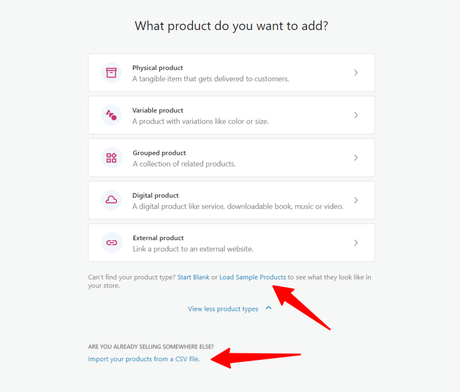
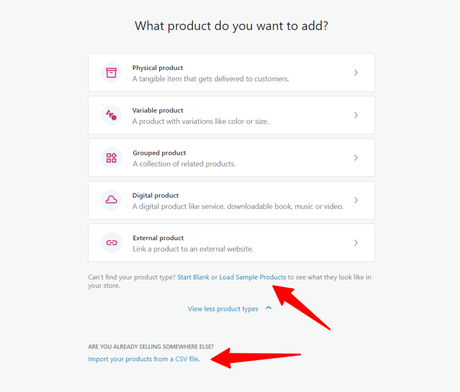
If you're migrating from another store builder and have your product catalogue downloaded, import your products from a CSV file feature to automatically upload products to your store.
Or you can load the sample product to see how your store design looks with demo products.
Before publishing, here are a few checklists you should fix:
These processes can vary across store builders, but they should be similar and easy to follow. Perhaps, most eCommerce store builders have guides walking you through each step the first time you log in.
Another thing to note is that if you're shipping your own products, you need to keep details of store inventory.
Inventory management is a common feature offered by many eCommerce platforms, eliminating the need for you to track store products, orders, and supply requirements manually.
But if you're dropshipping or selling print-on-demand products, this is not an issue to bother you.
Connect a Payment Gateway
To kick-start your sales, it is crucial to establish a payment system on your website that enables customers to place and pay for their orders seamlessly.
Many eCommerce platforms have their native payment system, which usually attracts no or minimal transaction fees. But for many, this payment system is usually limited to certain countries.
The Shopify Payment option is exclusively accessible in a few chosen countries, such as the United States, Canada, Australia, the United Kingdom, Japan, Hong Kong SAR, Singapore, and several European Union nations.
Woocommerce Payments are also available to only a few countries, the US, UK, Singapore, Hong Kong, and countries in the European Union.
Suppose the native payment system is not supported in the locations where you sell. In that case, you must establish alternative payment gateways that accept credit cards, bank transfers, mobile wallets, QR codes, cash, point of sale, and more.
The good news is that most eCommerce platform providers allow access to hundreds of payment gateways providing these services.
From 2Checkout to PayPal, Amazon Pay, Google Pay, Stripe, and hundreds of other payment gateway providers, you can sell globally from your store and in local currencies.
If you use other payment gateways, check out the associated platform and service providers' transactional fees. This fee can range from 0.15% to 5%, depending on the platform and plan subscription.
For example, Shopify has a 5% transaction fee for its Starter plan, but the percentage goes down in the higher plan. If you're on Shopify Advanced, the transaction fee is 0.5%.
Consider these factors when choosing payment gateways, add the cost to your product price, and other external factors that might determine product prices.
Additionally, you must add security layers like CVV or ZIP Code verifications and customize how your store purchase transactions statement appears on customer bank details.
Create Essential Pages
How to start an online store won't be complete without creating some important store pages. For a start, you need an About us page, contact page, store policy page, and FAQ page.
These pages can help shoppers understand your website better, navigate essential pages, learn about you and your business, and make it easy to contact in case of inquiry.
You don't need to get all your store pages ready before launch, but you should these pages:
Launch Your Store
So far, we've built your store and added a payment system. We are ready to tell the world about our new adventure; it's time to launch.
Launching your store is just the beginning; several tasks ahead to get customers to your store and consistently make sales.
Here are some of the things you can do to bring people to your store:
- Advertise on social media. You can run paid ads or collaborate with other marketers.
- If you have an email list, send them an announcement newsletter.
- Run PPC advertising using Google, Bing, or Facebook.
- Publish blog posts promoting specific products and share the content with your followers.
- Use Pinterest and Reddit.
- And lots more.
Conclusions
The internet has made it possible to sell and buy anything online today.
You can buy goods in your local currency from the comfort of your home and get them delivered to your doorstep within a few days or even hours, depending on location and product type.
How to start an online store is easy if you follow the steps described in this post. Though this post is not focused, the steps required to create an online shop are the same in most store builders.






