


Printing to PDF in MacOS is as simple and straightforward as it gets. You don't need to find, download, and install software like Adobe Acrobat or Reader, as access to printing and converting your Mac files to PDF is all done with built-in features that come standard on any Mac. With this easy how-to guide, you'll be printing files to PDF on your Mac in no time at all.
Printing files to PDF on your computer has a number of really useful benefits too. You're able to save a few trees, ensure cross-compatibility with any platform including Windows and Linux, and share documents at the snap of a finger when printing to PDF in MacOS.
For other PDF-specific content, click over to our rundowns of how to edit a PDF file, how to convert a PDF to a Word file, and how to convert a PDF file to a JPG.
Step 1: Open the File menu
Note: Almost every Mac application can save a document as a PDF, but to make it easy, we're going to show you how to print a document to PDF in Numbers.
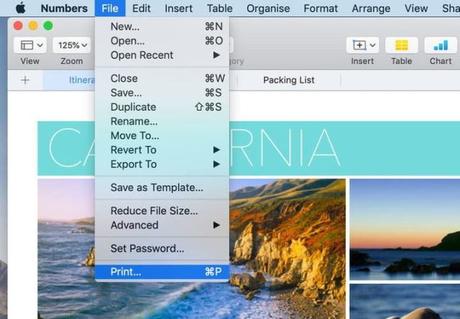
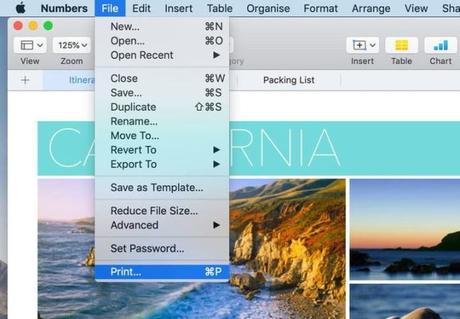
First, open the document you wish to print to PDF in any Mac application. Once your document is open and you're ready to save it as a PDF, open the File menu at the top of the page and click Print.
Step 2: Choose the output file type
Next, a print options dialog box will open. If you look to the bottom left, you will find the dropdown menu. By opening the dropdown, you will be able to select several options, including emailing your PDF. Be aware that some applications, such as Numbers, may not have this dropdown. If you are working with one of those applications, click print and select the new dialog box's output or delivery method.


Step 3: Save as PDF
For our purposes, we want to choose Save as PDF. A new dialog box will open where you can name your file, select the appropriate destination, and click Save. The conversion process will complete in a few moments, depending on your document's size, as indicated by the progress bar.


Congratulations, your PDF file is complete. It is a quick and easy process. PDFs are a great format for sharing documents as they are universally readable across a variety of platforms. Now that you know how easy it is to create a PDF on your Mac, you can start sharing your documents quickly and easily.






