In earlier versions of iOS, the default web browser on your iPhone was supposed to be the Safari browser. Luckily, in iOS 14, you can use something else by default, like Google Chrome.
While the default Safari browser on the iPhone is a very good browser, fast, and easy to integrate with many of your apps, you might just want to use something else.
Several third-party browsers are available for iPhone in the App Store, including popular options like Firefox and Chrome.
Our guide below will show you how to use Google Chrome as your default web browser so that the links you open on your device use Chrome and not Safari.
How to Make Google Chrome the iPhone's Default Web Browser
- Open settings.
- Select Chrome.
- Select the default browser application.
- Tap Chrome.
Our guide continues below with more information and images for these steps.
If you want to make Google Chrome the default browser on your laptop or desktop, you can also check out our guide on setting Chrome as the default browser for Windows 7.
How to Set iPhone's Default Web Browser to Google Chrome
The steps in this article were performed on an iPhone 11 running iOS 14.3.
This guide assumes that you are already installed the Google Chrome web browser on your iPhone and that you have updated to iOS 14. This will not work if you are using iOS 13 or earlier.
Step 1: Open the Settings app.
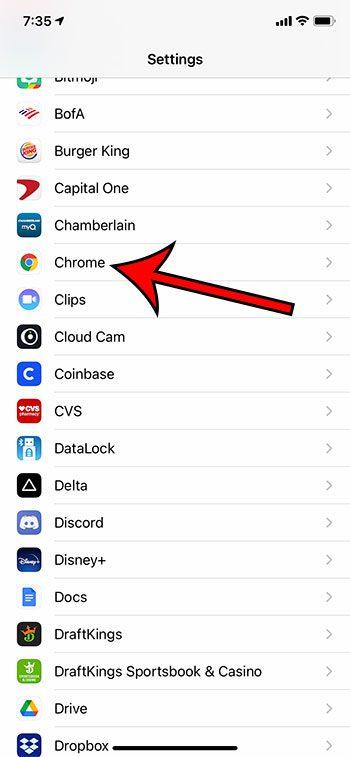
Step 2: Scroll down and select the Chrome option.
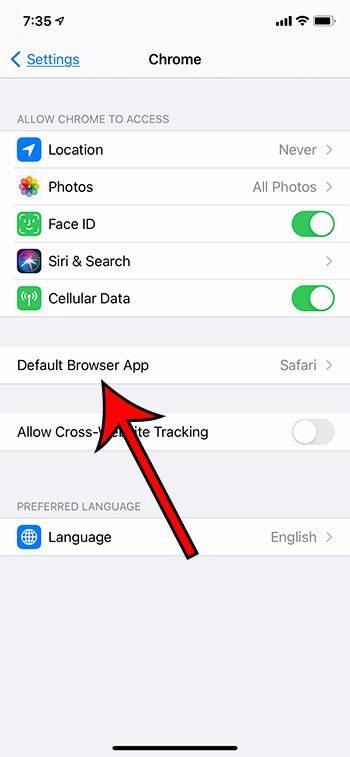
Step 3: Click the "Default Browser Application" button.
Step 4: Tap the Chrome option to make it the default iPhone browser.
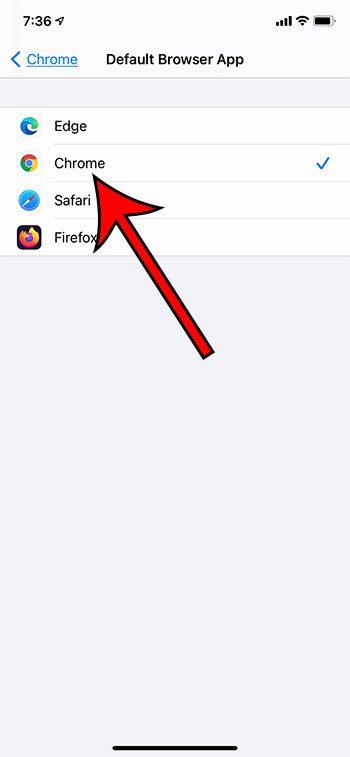
Note that you will also see other installed browsers as options if you prefer to use one of them.
Some of the status icons that appear at the top of the iPhone screen can be confusing. Our article on how to get rid of the moon on my iPhone can tell you more about one of these icons.
You can change the iPhone's default web browser at any time. This option is also available if you open the menu for other third-party browsers as well.
see also
You may also like
Руководства
#Chrome #default #browser #iPhone