


This page includes affiliate links where TROYPOINT may receive a commission at no extra cost to you. Many times, you will receive a discount due to the special arrangements made for our visitors. I will never promote something that I personally don’t use or recommend. Purchasing through my links directly supports TROYPOINT which keeps the content and tools coming. Thank you!
This article provides a step-by-step guide that will show you how to install the Peacock TV App on Firestick/Fire TV, Android, Roku, and iOS devices.
Peacock TV is a streaming service that hosts NBC’s original programming as well as movies and sports specials.

As of this writing, Peacock TV is currently compatible with the following streaming devices:
- Firestick/Fire TV
- Roku
- iPhone/iPad
- Android devices
- Apple TV
- Chromecast
- Xbox One
- LG Smart TVs
- Vizio Smartcast
- Xfinity Flex 4k
With a standard plan, you are able to stream this service on 3 devices simultaneously.
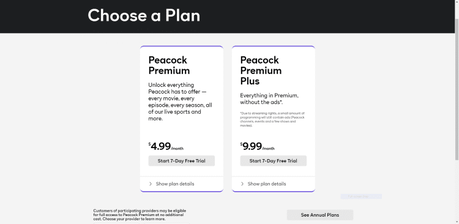
Peacock TV currently offers 3 different plans: Free, Peacock Premium, and Peacock Premium Plus.
As seen in the image below, Peacock Premium costs $4.99/month and Peacock Premium Plus costs $9.99/month. There is also a 7-Day Free Trial available for these plans.
For more information on plan details, pricing, and more, I suggest viewing the official Peacock website.

For these reasons and more, we have included Peacock TV within our list of Best Firestick Apps.
For those unfamiliar with Live TV services or IPTV, these streaming services offer live TV channels at a set time delivered over the internet.
To stream Live TV, you need a high-speed and stable internet connection, streaming devices such as smart TV or Amazon Firestick, and a subscription to a streaming service.
Viewers can watch the latest news, sports, sitcoms, and other entertainment channels on an affordable subscription-based service without the hassle of cable.
You can also install a digital antenna should your live TV provider offer no over-the-air TV networks such as CBS, FOX, NBC, ABC, and PBS.
For more information on Live TV (IPTV), best streaming services, devices, and more, I highly recommend viewing our IPTV Guide below.
TROYPOINT IPTV Guide
We have also included Peacock TV as one of our Best Streaming Apps.
Below you will find both a video and screenshot guide to install the Peacock TV App on your streaming device.
The video tutorial is recommended as it provides important details that the screenshot guide does not cover.
Peacock TV App Video Tutorial

 Register for IPVanish VPN with Best Discount
 Free TROYPOINT App with Rapid App Installer
 Install Downloader on Android Boxes, Phones, & Tablets







