


If you’re an iPhone user and want to try out something really interesting and unique than you are at the right place! Not many of us know that in iOS 10 there is a way to enable the secret emoticon keyboard in your iPhone, iPad or iPod . You can easily unlock it and get access to your favorite emoticons.
Emoticons have a slight advantage over emoji as they are made or regular characters, they can show up on any computer hence will look same to anyone on any device.
How to enable the secret emoticon keyboard in your iPhone
Apple has hidden an entire keyboard of Emoticons and unhiding is just a tap away.
Open the Settings app > Tap General
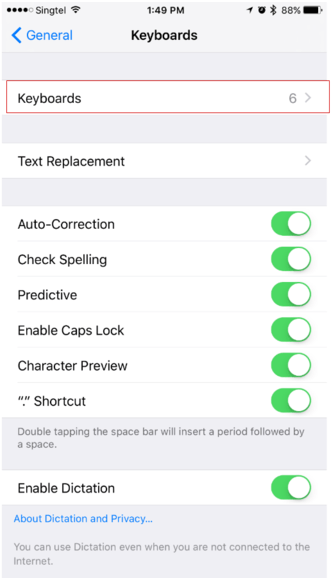
Scroll down and tap Keyboard

Now select Add New Keyboard

From the list of languages, choose Japanese and

then select Kana
That’s all you need to do to enable the secret emoticon keyboard in your iPhone. You can now switch from Apple’s standard keyboard to this emoji keyboard by tapping on the “globe icon” in your existing keyboard app. You now will notice a ” ^_^” icon at the bottom left, once you select that, it will bring the other emoticons for you to select from.
Remember to hit the “Globe” button switch back to English or whatever keyboard you may want to switch back on, once you’re done sending the emoji to your friends.
In the upcoming release of iOS 10.2, Apple is planning to add more than 70 new emoji to your favorite devices. The new set of emoji may include face palm, shrug, selfie, lying face, clown, dancing man and a lot more. Alternatively iMessage now also support stickers however, emoji has its own charm, isn’t it.
Source: Cultofmac
Also Read :
- Must have iMessage apps
- Best iPhone 7 and iPhone 7 Plus Cases
- Best Rugged iPhone 7 Cases
- Best Keyboard case for iPad Pro 9.7
- How to add & remove widgets in iOS 10







