If you have been forced to stay home more often due to the coronavirus pandemic, you may need some basic tools on your personal or work computer, such as Microsoft Office 365. And if you don’t want to spend your cash, there are some ways to get Office 365 and its applications totally free.
Microsoft’s subscription service productivity software package, which includes Word, Excel, PowerPoint, Outlook, Microsoft Teams, OneDrive, and SharePoint, typically costs $150 for a one-time installation or $70 to $100 each year to access through devices and family members.
Microsoft may change its Office 365 subscription price soon. The company is expected to announce a consumer version of Microsoft 365, its Office 365 package, Windows 10 Enterprise and Enterprise Mobility, and Security, later in March, as a replacement for Office 365, according to ZDNet.
But there are changes to come: In March, Microsoft announced that Office 365 will be called Microsoft 365, a new service that adds more features to office software. Microsoft 365 will be available starting April 21 at $7 a month for an individual plan and $10 for a family plan of up to six people.
In the meantime, here are the versions of Office 365 and its apps that you can find online for free right now.
For students and teachers
If you’re a student, teacher, or faculty member with an email address for your school, you likely have access to Office 365 for free through Microsoft, including Word, Excel, PowerPoint, OneNote, Microsoft Teams, and additional tools for the classroom.
All you have to do is enter your school email address on this page on the Microsoft website: Get started with Office 365 for free. In many cases, you will be granted instant access thanks to an automated verification process. If you attend an institution that needs to be verified, it can take up to a month to confirm your eligibility.
Recent graduates who want to stick with Office 365 can also get Office 365 Personal for $12 for 12 months if they have a valid email address.
For everyone else
Anyone can receive a free one-month trial of Office 365. However, it does require that you enter a credit card, and if you don’t cancel before the end of the month, you’ll be charged $100 for a one-year subscription to Office 365 Home.
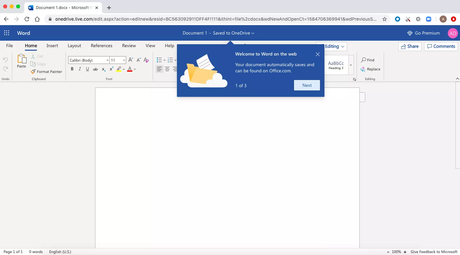
The good news is that if you don’t need the full suite of Office 365 tools, you can access several of its online applications for free, including Word, Excel, PowerPoint, OneDrive, Outlook, Calendar, and Skype. Here we tell you how to get them:
- Go to Office.com.
- Sign in to your Microsoft account (or create one for free). If you already have a Windows, Skype, or Xbox login, you have an active
- Microsoft account.
- Choose the app you want to use and save your work in the cloud with OneDrive.
What is behind the free version?
You’re probably wondering the following: If I can get all those apps for free, why pay for Office 365 in the first place? The reason is that the functionality of these applications is limited. That is, they only run through your Web browser and you cannot use them if you are not online. There are also fewer features than the full versions of Office 365.
However, there are still a number of benefits, including the ability to share links to your work and collaborate in real-time, similar to G Suite tools. If you are looking for basic versions of each of these applications, the free version should work well for you.