


Your Photos Live on Rented Land
Instagram’s algorithm now shows your posts to roughly 9% of your followers. The other 91% never see what you upload. Your content, your audience, their rules.
But here is the thing most people miss: Instagram is not magic. It is a photo upload form, a feed, a like button, a follow system, comments, DMs, stories, and a search page. Every one of those features can run on WordPress — on a server you own, with an audience you control, and zero algorithm between your content and the people who want to see it. On your own platform, every follower sees every post. That is 100% reach, every time.
This guide walks you through building a fully self-hosted Instagram alternative using WordPress and WPMediaVerse — the media platform plugin we built at Wbcom Designs specifically for this use case. Uploads, explore feed, reactions, follows, DMs, stories, albums, AI moderation — all of it, on your domain.
Want to see it running before you read another word? Launch a free sandbox and click around for yourself.
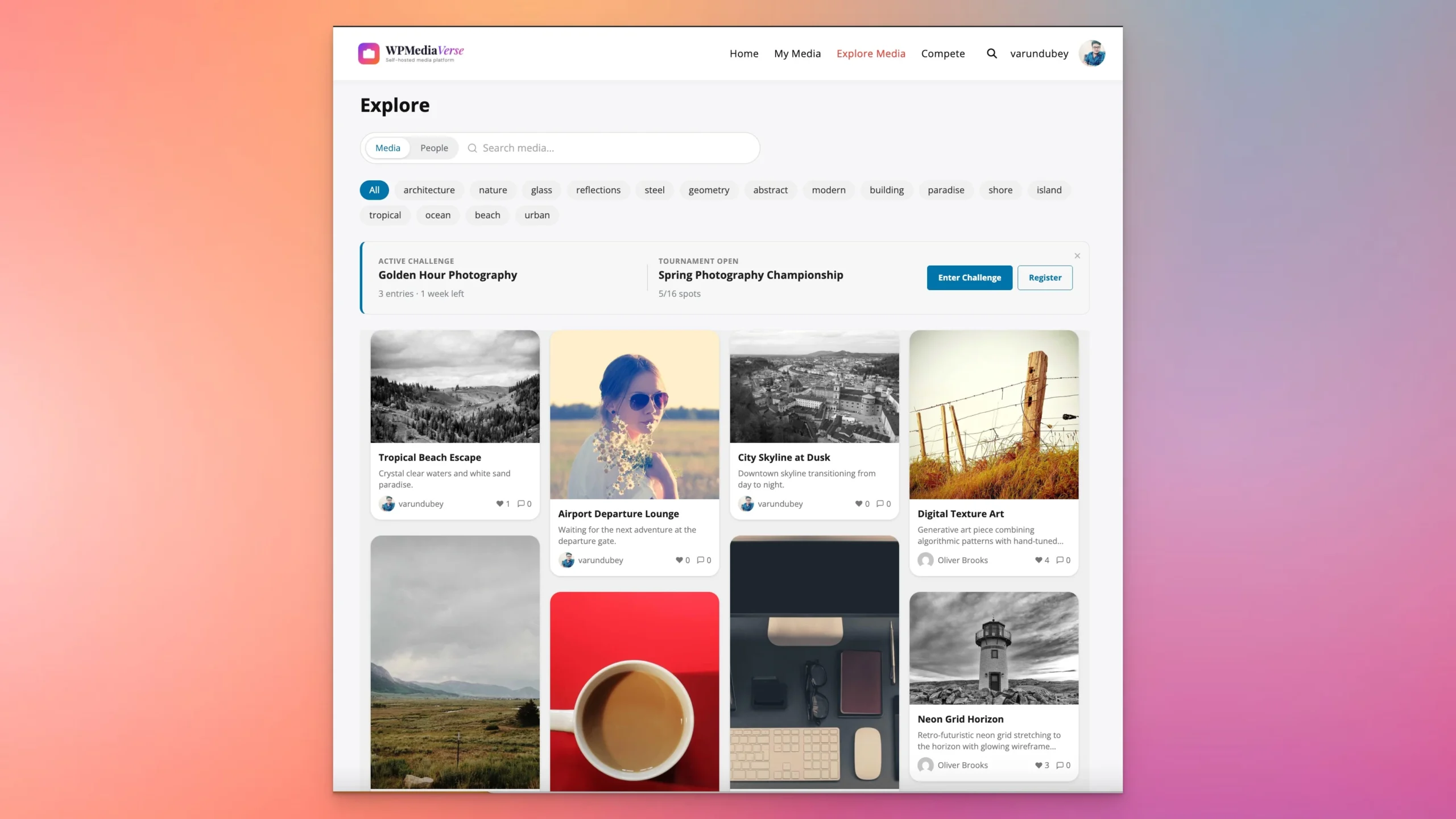 WPMediaVerse’s Explore feed — the self-hosted alternative to Instagram’s discovery page
What Instagram Actually Is: A Feature Map
Strip away the branding and Instagram is 13 discrete features stitched together. Not one of them is proprietary or unreplicable. The table below maps each Instagram feature to what it actually is under the hood and what handles it on your WordPress site.
Photo/Video Upload File upload with processing WPMediaVerse drag-and-drop with EXIF stripping and AI scan
Feed Algorithmic content stream Explore feed — chronological + tag-filtered, no algorithm
Likes/Reactions Single heart button 6 emoji reactions: like, love, haha, wow, sad, angry
Comments Flat comment list Threaded comments with @mentions
Follow Subscription system Follow system with notifications
DMs Messaging inbox Messaging engine with conversations (Pro: voice messages)
Stories Ephemeral 24h content Stories with auto-cleanup
Explore/Search Discovery + search page Explore page with tag filtering + search, Media/People tabs
Profiles User page with grid Profile with grid, followers, bio, Follow/Message buttons
Albums/Highlights Grouped media Albums + smart collections with auto-curation rules
Reels Short-form video Video uploads (Pro: HLS streaming, chapters, auto-captions)
Privacy Settings Public or private account 6 privacy levels per individual upload
Content Moderation Black-box AI review OpenAI Vision AI (free) + Google/AWS options (Pro)
That is 13 features. WPMediaVerse covers all 13 — some of them with more depth than Instagram itself (6 reaction types vs one heart, 6 privacy levels vs a binary switch, threaded comments vs flat). The difference is that you own the server, the data, and the rules.
Why Build Your Own: 9 Practical Reasons
1. You own your content. Instagram’s Terms of Service grant them a “non-exclusive, royalty-free, transferable, sub-licensable, worldwide license” to your photos. On your WordPress site, your content stays yours — full copyright, no license granted to anyone.
2. No algorithm suppression. When you post on your platform, every follower sees it. There is no engagement score deciding who gets to view your work. 100% reach, every post.
3. No ads between your content. Your members browse your media without sponsored posts, suggested reels, or shopping interruptions breaking the experience.
4. SEO value. Every media page on your site is an indexable URL. Your photos and videos can rank in Google Image Search and regular search results. Instagram gives you zero SEO value — nothing on Instagram ranks outside of Instagram.
5. Monetization freedom. Sell prints, memberships, storage upgrades, or stock licenses. No platform takes a cut. No “creator fund” with opaque payout rules.
6. Granular privacy. Instagram gives you two choices: public account or private account. WPMediaVerse gives you 6 privacy levels per individual upload — public, members-only, friends, group, private, or custom access lists.
7. GDPR-compliant data export. Your database, your server. Export any user’s data anytime without submitting a request form and waiting weeks.
8. Custom branding. Your domain, your logo, your colors, your layout. No Instagram chrome. Your community looks like your community.
9. AI moderation on your terms. You choose the moderation rules, the sensitivity thresholds, and the monthly budget. No opaque content review board making decisions you cannot appeal.
Who This Is For
- Photography communities — camera clubs, photo walks, genre-specific groups
- Creative portfolios — photographers, illustrators, designers showcasing work
- Client portals — deliver photos to clients with privacy controls and download options
- Educational platforms — art schools, photography courses, visual learning
- Niche interest communities — birdwatching, car enthusiasts, cosplay, architecture
- Internal teams — marketing asset libraries, brand photo banks, event documentation
The Tech Stack
You do not need a custom-coded application, a DevOps team, or a six-figure budget. The entire stack runs on standard WordPress hosting.
CMS WordPress Free
Media platform WPMediaVerse Free
Pro features WPMediaVerse Pro $69/yr
Theme BuddyX Pro or Reign $69/yr
Social layer BuddyPress (optional) Free
Hosting Any WordPress host $5-30/mo
Total Year 1 $138-498/yr
How this compares: Instagram is free but you own nothing — not your audience, not your content distribution, not your monetization. Pixelfed is a solid open-source project and genuinely free, but it runs on its own stack (Laravel/PHP), has no WordPress integration, no AI moderation, and no built-in monetization tools. WPMediaVerse gives you the self-hosted ownership of Pixelfed with the ecosystem advantages of WordPress — themes, plugins, Gutenberg blocks, WooCommerce, and a REST API with 114 endpoints.
Step-by-Step Setup
Step 1: Install WordPress and Your Theme
If you already have a WordPress site, skip ahead. For a new install, any managed WordPress host (Cloudways, SiteGround, Starter, Flavor Cloud) will have a one-click installer.
For the theme, you want something built for community and media-heavy sites. Two options from our team that work particularly well with WPMediaVerse:
- Reign Theme — full-featured community theme with multiple layout options
- BuddyX Pro — lighter, faster, modern design with social features built in
Both themes handle media grids, user profiles, and responsive layouts out of the box. Either one pairs well with WPMediaVerse.
Step 2: Install WPMediaVerse
Download the free version from store.wbcomdesigns.com/wpmediaverse or search “WPMediaVerse” in the WordPress.org plugin directory. Upload, activate, done.
On activation, WPMediaVerse auto-creates three pages: Explore Media, My Media, and Upload Media. These pages come pre-configured with the right shortcodes and blocks. A setup wizard walks you through initial configuration — file types, upload limits, and privacy defaults. The whole process takes under five minutes.
Step 3: Configure Upload Settings
Navigate to WPMediaVerse > Settings > Uploads. Here you control what your members can upload and how files are processed.
Allowed file types: Enable or disable specific formats — JPEG, PNG, WebP, GIF, MP4, MP3, and more. Keep it tight to what your community actually needs.
Max upload size: Set per-file limits. For photography communities, 20-50MB covers even high-resolution RAW conversions. For casual sharing, 5-10MB keeps storage manageable.
EXIF stripping: Enabled by default. This removes camera metadata including GPS coordinates from uploaded photos — important for member privacy. Photographers who want to preserve EXIF data can toggle this off in their profile settings.
Duplicate detection: WPMediaVerse hashes every uploaded file. If someone tries to upload the same image twice, they get a notice instead of a duplicate entry. This keeps your media library clean without manual policing.
Step 4: Set Up the Explore Feed
The Explore feed works immediately after activation. No configuration required for the basics — it pulls all public media into a filterable, searchable grid.
What your members see: a masonry grid with tag filters across the top, Media and People tabs for switching between content discovery and user discovery, and a search bar. Click any tag and the grid filters instantly with no page reload. Infinite scroll loads more content as members browse.
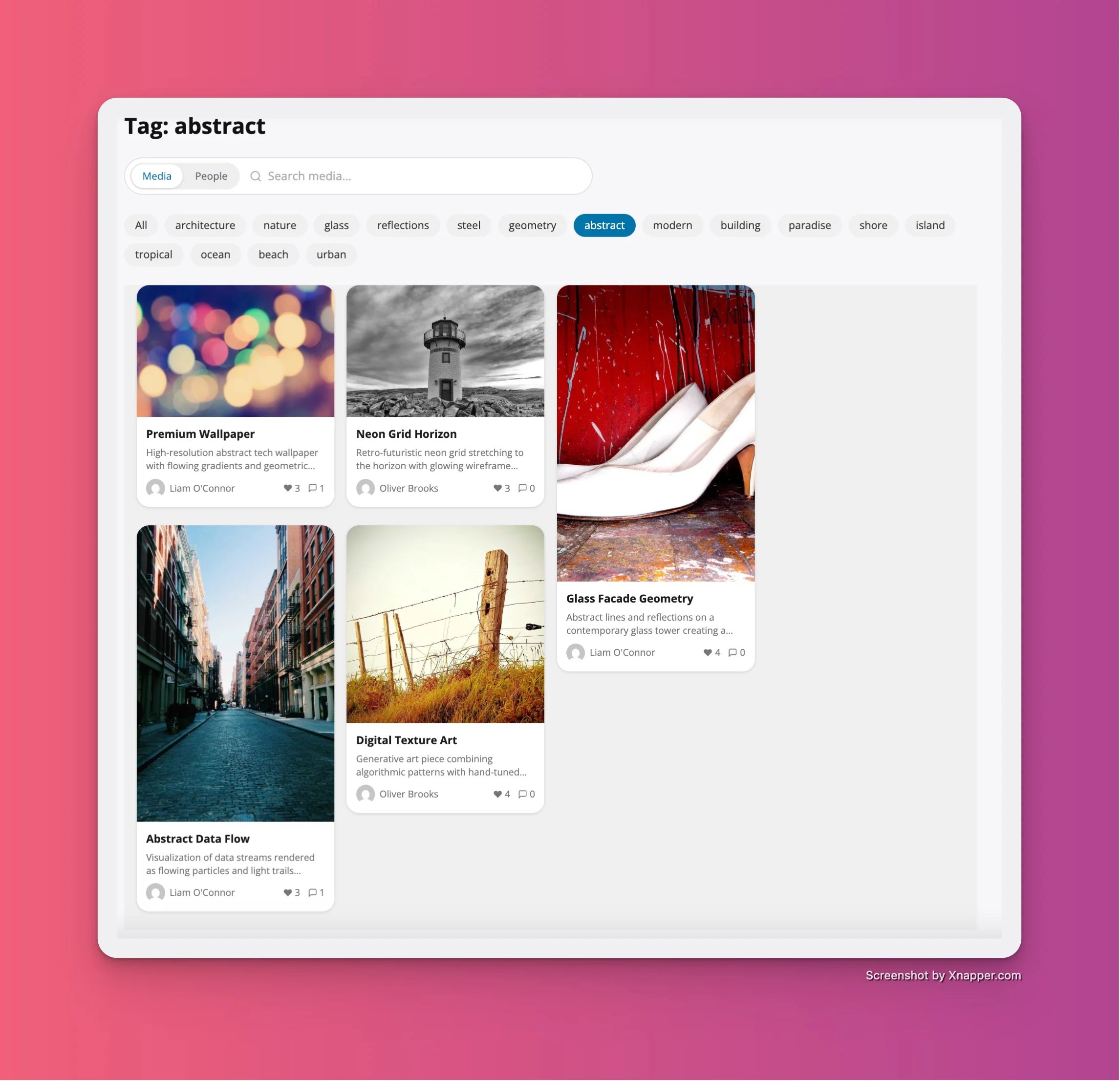 Click any tag and the explore grid filters instantly — no page reload
For customization, you can pin specific tags to the filter bar, set a default sort order (newest, most reactions, most viewed), and choose between grid densities.
Step 5: Configure Privacy Levels
This is where your platform pulls ahead of Instagram. Instead of a single public/private toggle on the entire account, WPMediaVerse lets members set privacy per individual upload. Six levels:
- Public — visible to everyone, including logged-out visitors. Use case: portfolio pieces, community showcases.
- Members — visible only to registered, logged-in users. Use case: community-only content that stays behind registration.
- Friends — visible only to people the uploader has friended (requires BuddyPress). Use case: personal photos shared with a close circle.
- Group — visible only to members of a specific BuddyPress group. Use case: team projects, class assignments, event-specific albums.
- Private — visible only to the uploader. Use case: personal backup, work-in-progress, drafts before publishing.
- Custom — visible to a hand-picked list of users. Use case: client delivery, selective sharing, review access.
As the site admin, you set the default privacy level for new uploads. Members can override it per upload. This flexibility is one of the biggest advantages over any centralized platform.
Step 6: Enable AI Moderation
WPMediaVerse includes OpenAI Vision-based content moderation at no additional cost beyond your OpenAI API usage. Every uploaded image gets scanned asynchronously via Action Scheduler — uploads are not slowed down.
To set it up: go to WPMediaVerse > Settings > AI Moderation, enter your OpenAI API key, and configure three thresholds:
- Auto-approve: confidence score below your threshold means the image passes automatically
- Flag for review: borderline content gets queued for a human moderator
- Auto-reject: content above your rejection threshold is blocked immediately
Set a monthly budget limit to cap your OpenAI spending. Once the budget is hit, uploads continue but skip AI scanning — they go to manual review instead. Pro users can also connect Google Cloud Vision or AWS Rekognition as alternative or supplementary backends.
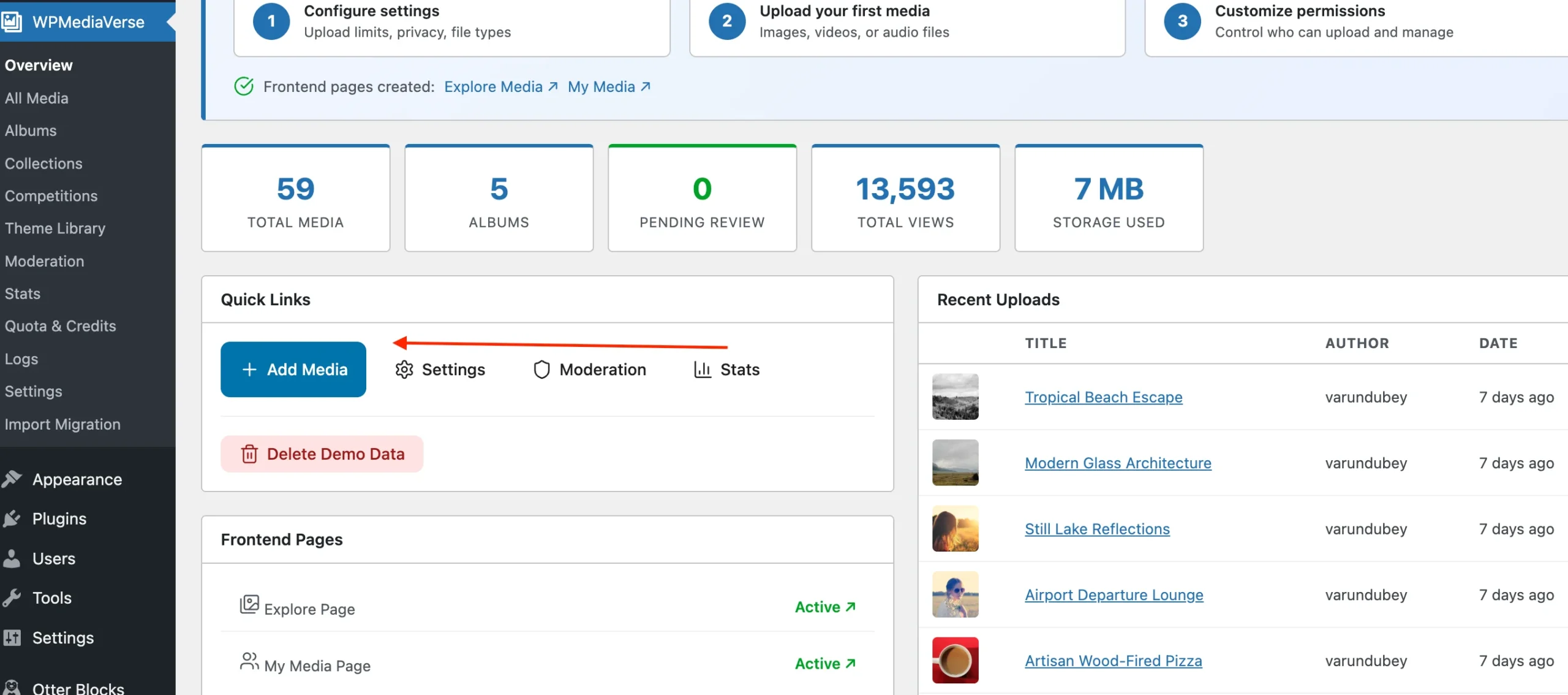 Admin dashboard — media stats, AI moderation status, and recent uploads at a glance
Step 7: Create Albums and Upload Content
Before you invite members, seed your platform with content. Upload 10-20 photos across 2-3 albums to give new visitors something to browse. Empty platforms do not inspire sign-ups.
The upload modal supports drag-and-drop for single photos, galleries (multiple photos in one post), albums, videos, and audio. Each upload gets a title, description, tags, and privacy setting. Tags are critical — they drive the Explore feed’s filtering system.
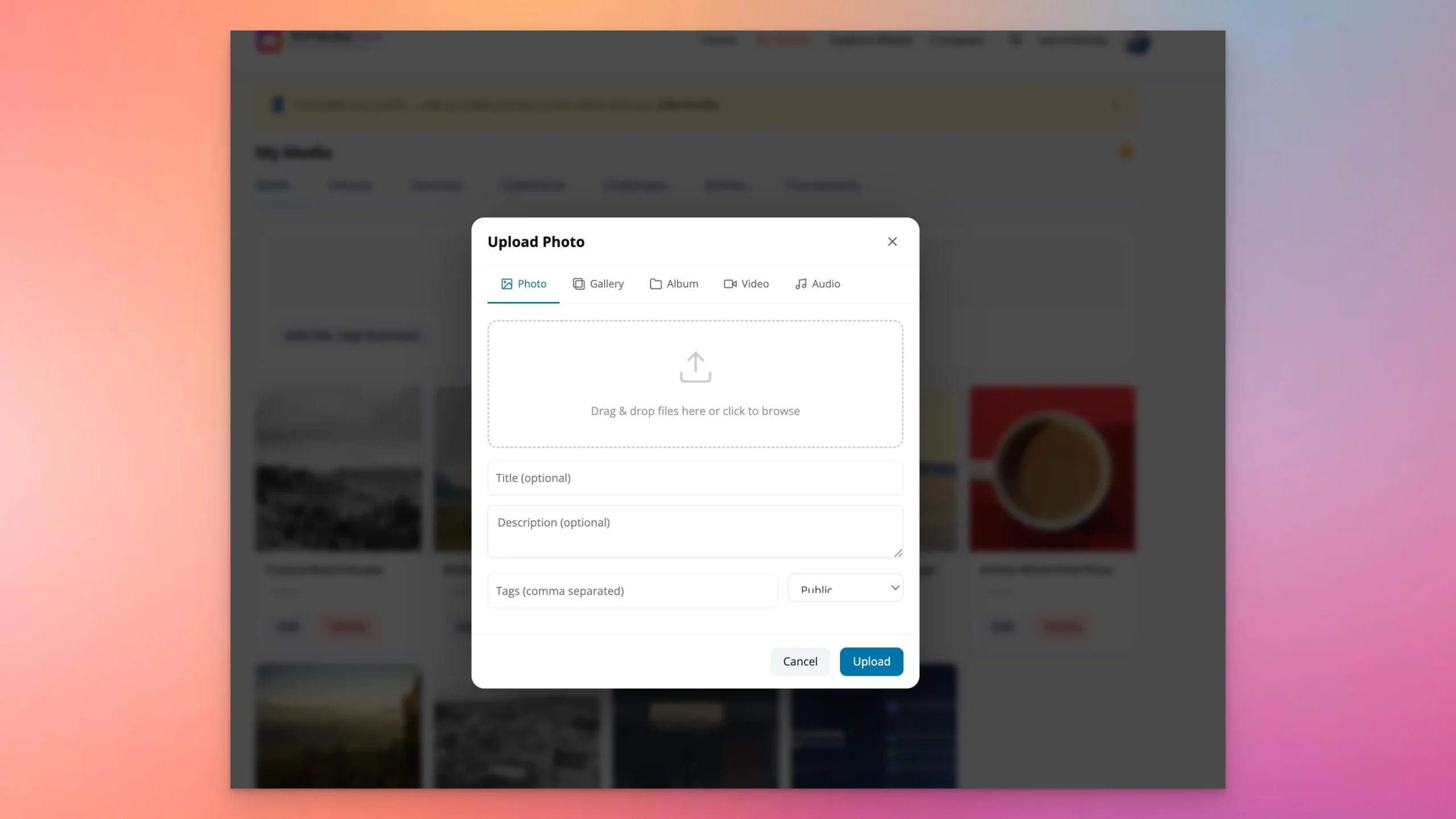 Upload modal — drag-and-drop with title, description, tags, and privacy settings
Create albums with descriptive names, set cover images, and organize content thematically. Albums can be nested inside collections for deeper organization.
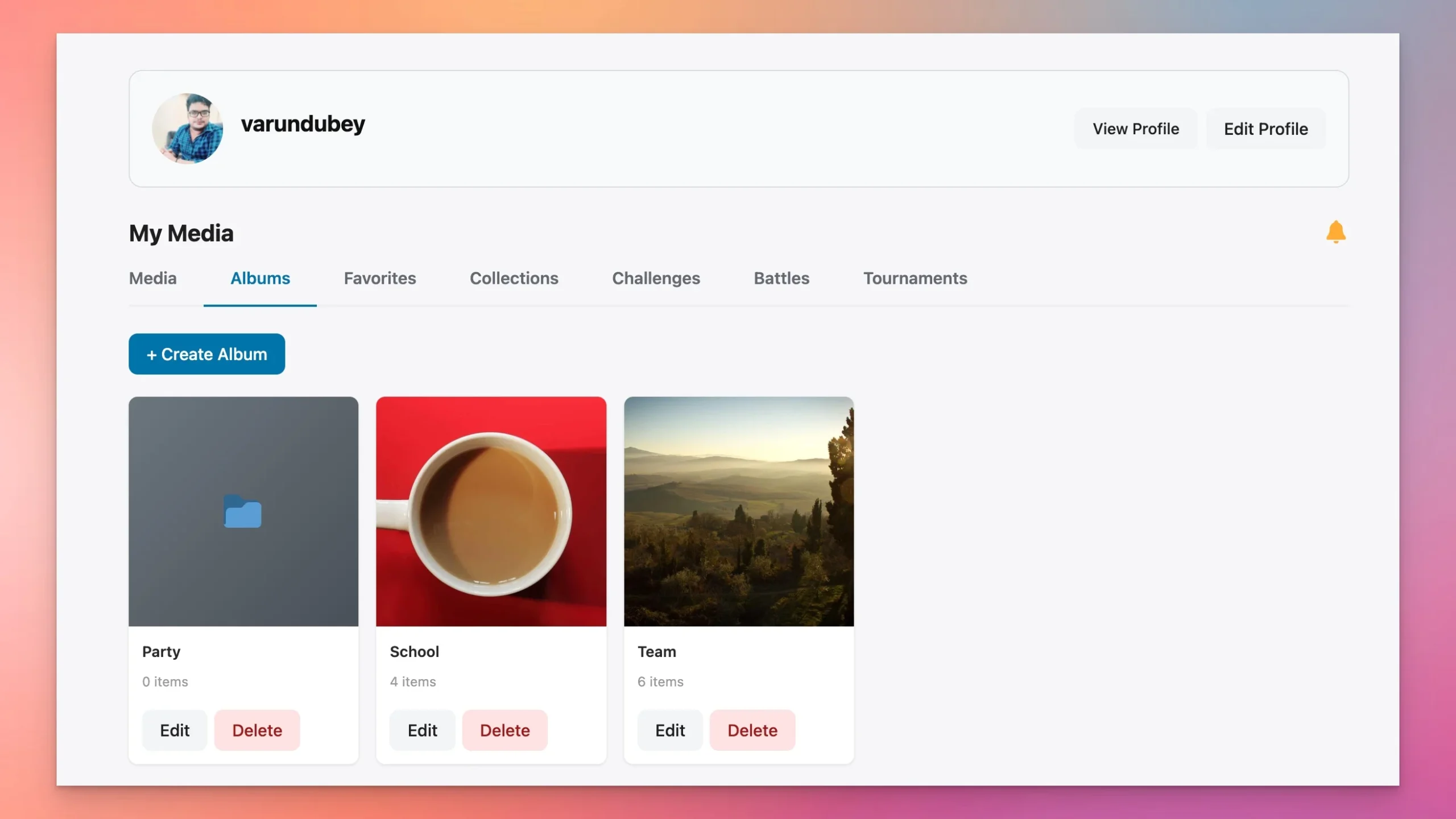 Albums with cover images, privacy settings, and media counts
Step 8: Invite Members
Enable WordPress registration (Settings > General > Anyone can register) and set the default role. Every new member automatically gets a profile page with a media grid, follower count, bio section, and Follow/Message buttons.
Members can upload, follow other users, react to content, comment, create albums, and browse the Explore feed from day one. No additional configuration required per user.
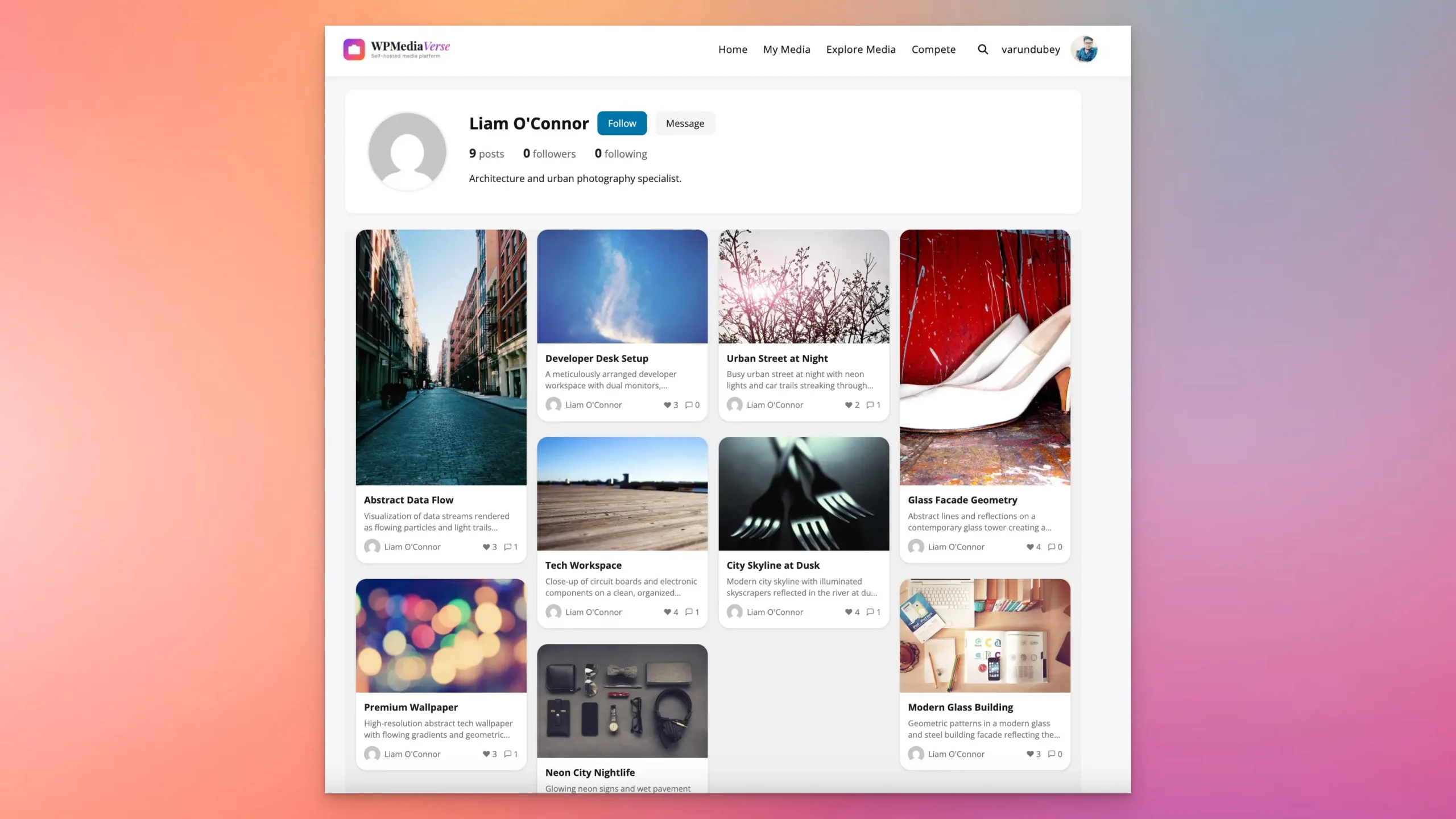 Every member gets an Instagram-style profile — media grid, followers, bio, Follow and Message
The Instagram Features You Get
Explore Feed
The Explore feed is the heart of the platform. It aggregates all public media into a single, browsable page with multiple discovery paths: tag-based filtering (click a tag, the grid updates instantly), a search bar for keywords, and Media/People tabs to switch between content and user discovery.
The feed uses a masonry grid layout that adapts to different image aspect ratios — no awkward cropping. Infinite scroll loads more content as members browse down. Unlike Instagram’s algorithmic feed, everything here is chronological by default. New content appears at the top. Members see everything, not a curated subset.
Reactions and Comments
Instagram gives you one reaction: a heart. WPMediaVerse gives members six: like, love, haha, wow, sad, and angry. Reaction counts are visible on each media item, giving uploaders richer feedback than a simple like count.
Comments are threaded, not flat. Members can reply to specific comments, creating actual conversations instead of a jumbled list. @mentions notify the tagged user. As a site admin, you can moderate comments from the dashboard or delegate moderation to trusted members.
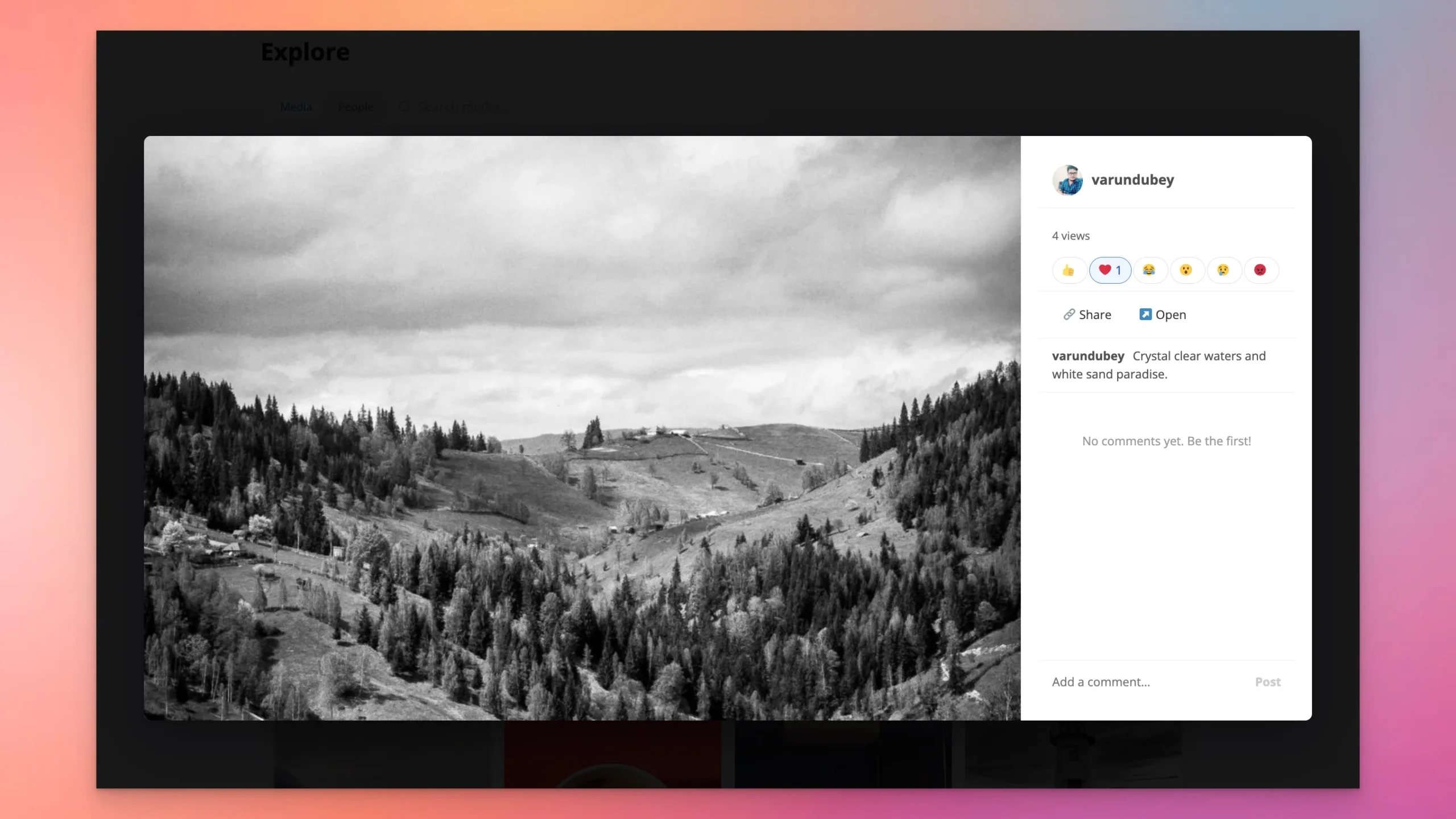 Six emoji reactions, threaded comments, view count, and sharing — richer than Instagram’s single heart
Follow System
Members can follow anyone on the platform. Follower and following counts show on profiles. When someone you follow uploads new content, you get a notification. The follow graph is stored in WPMediaVerse’s own database tables — 21 custom tables with the mvs_ prefix, designed for fast lookups even at scale.
Direct Messaging
The messaging system supports full conversations, not single-message threads. Members can share media directly in DMs, making it easy to discuss specific photos or videos in private. Pro users get voice message support — record and send audio clips within the conversation. All messages stay on your server.
Albums and Collections
Albums are straightforward: create one, add media, set a cover image, assign privacy. But the real power is in Smart Collections. These are rule-based groups that auto-curate content. Set rules like “all photos tagged ‘landscape’ uploaded this month” or “videos longer than 30 seconds from group members” and the collection updates itself. Instagram has nothing equivalent.
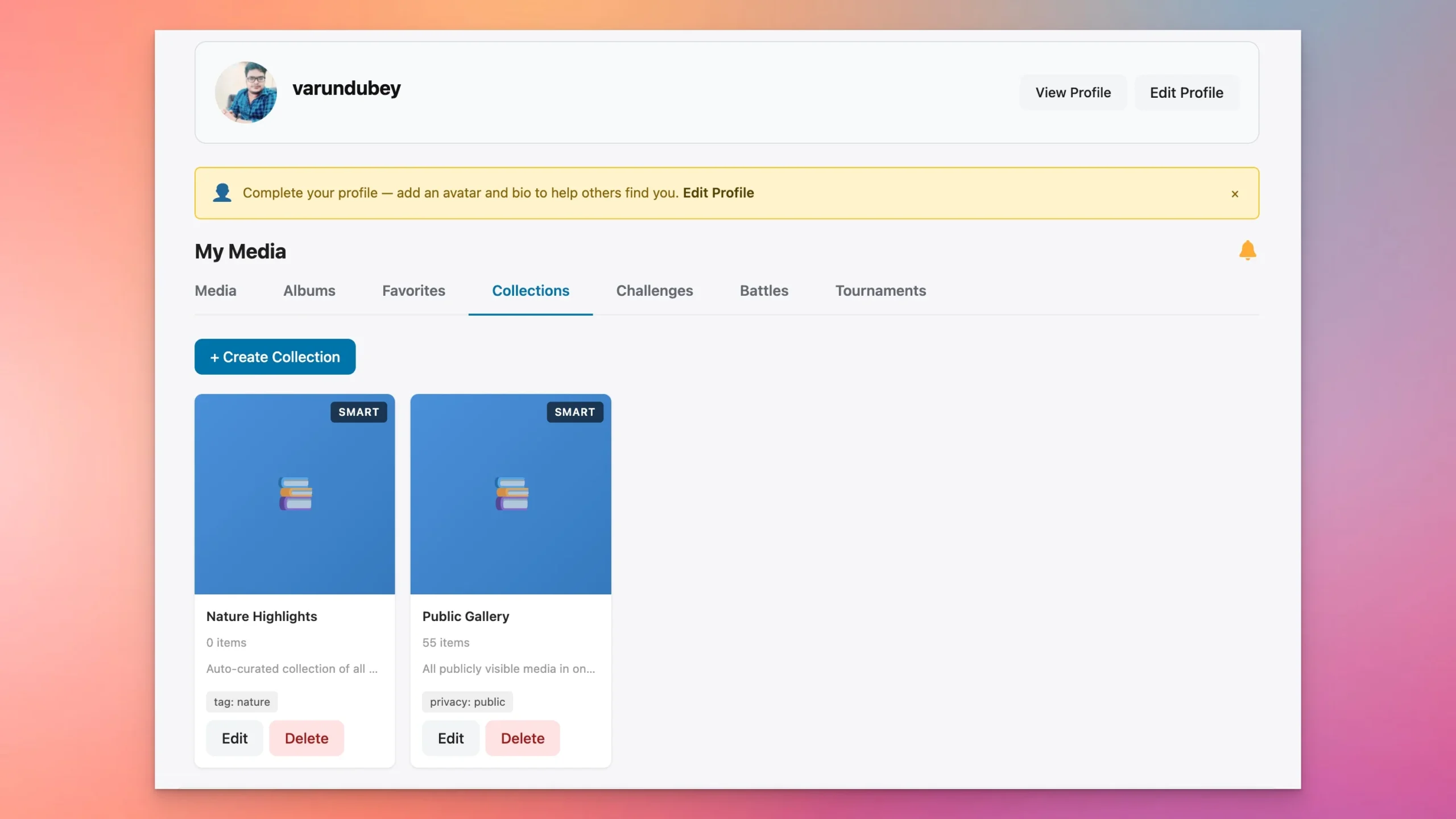 Smart Collections — auto-curate media by rules. Instagram has nothing like this.
Photo Battles and Challenges (Pro)
This is where your platform can do something Instagram literally cannot. Photo Battles let two members go head-to-head: both submit a photo to a theme, the community votes, a winner is declared. Challenges are broader — set a theme (“Golden Hour Photography,” “Street Portraits”), a deadline, and let the community submit entries. Tournament brackets take it further with multi-round elimination competitions.
These features drive engagement in a way that passive scrolling never will. Members come back to vote, to check standings, to submit entries before deadlines. It turns a gallery into a community.
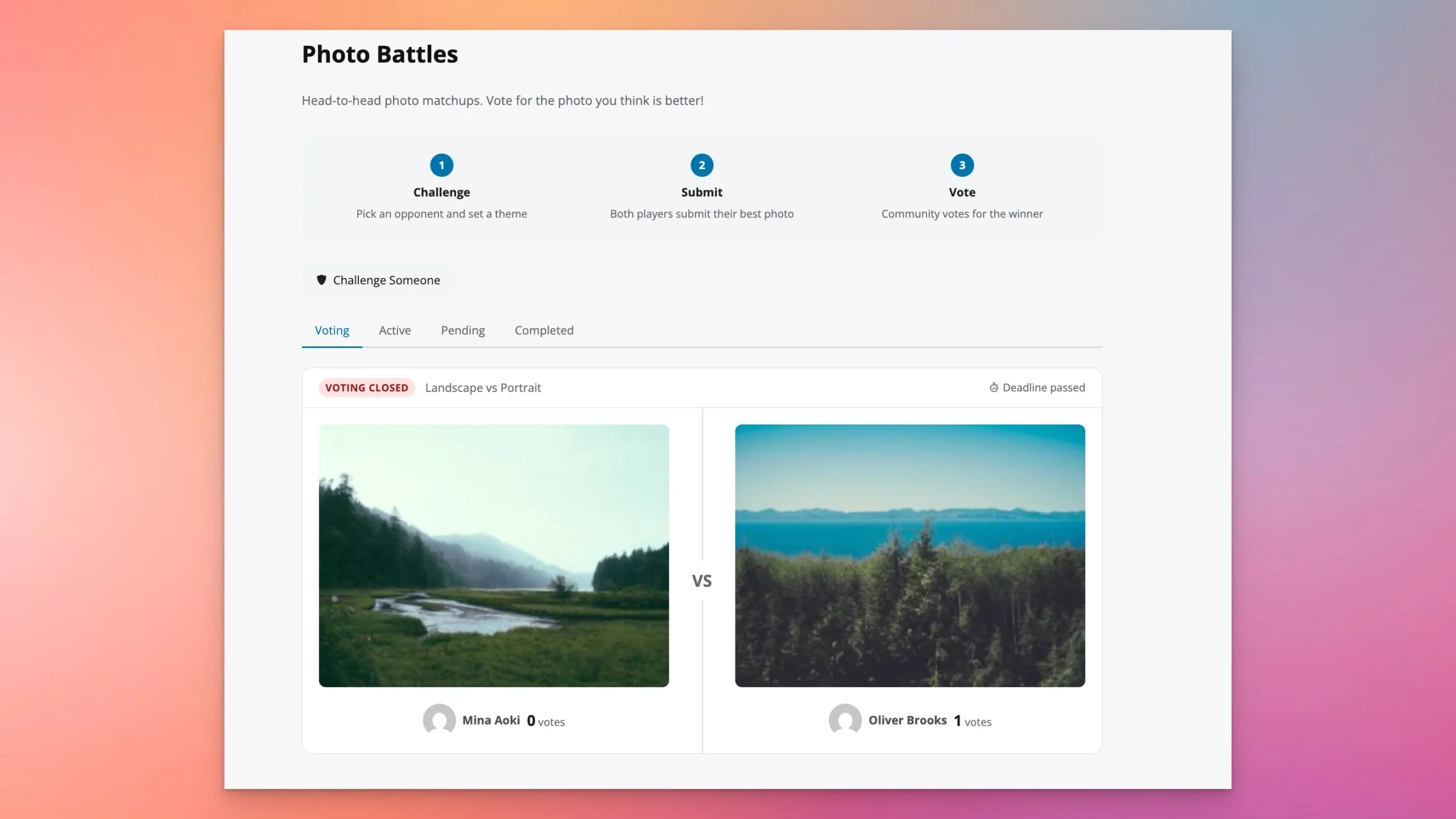 Photo Battles — challenge someone, both submit, the community votes
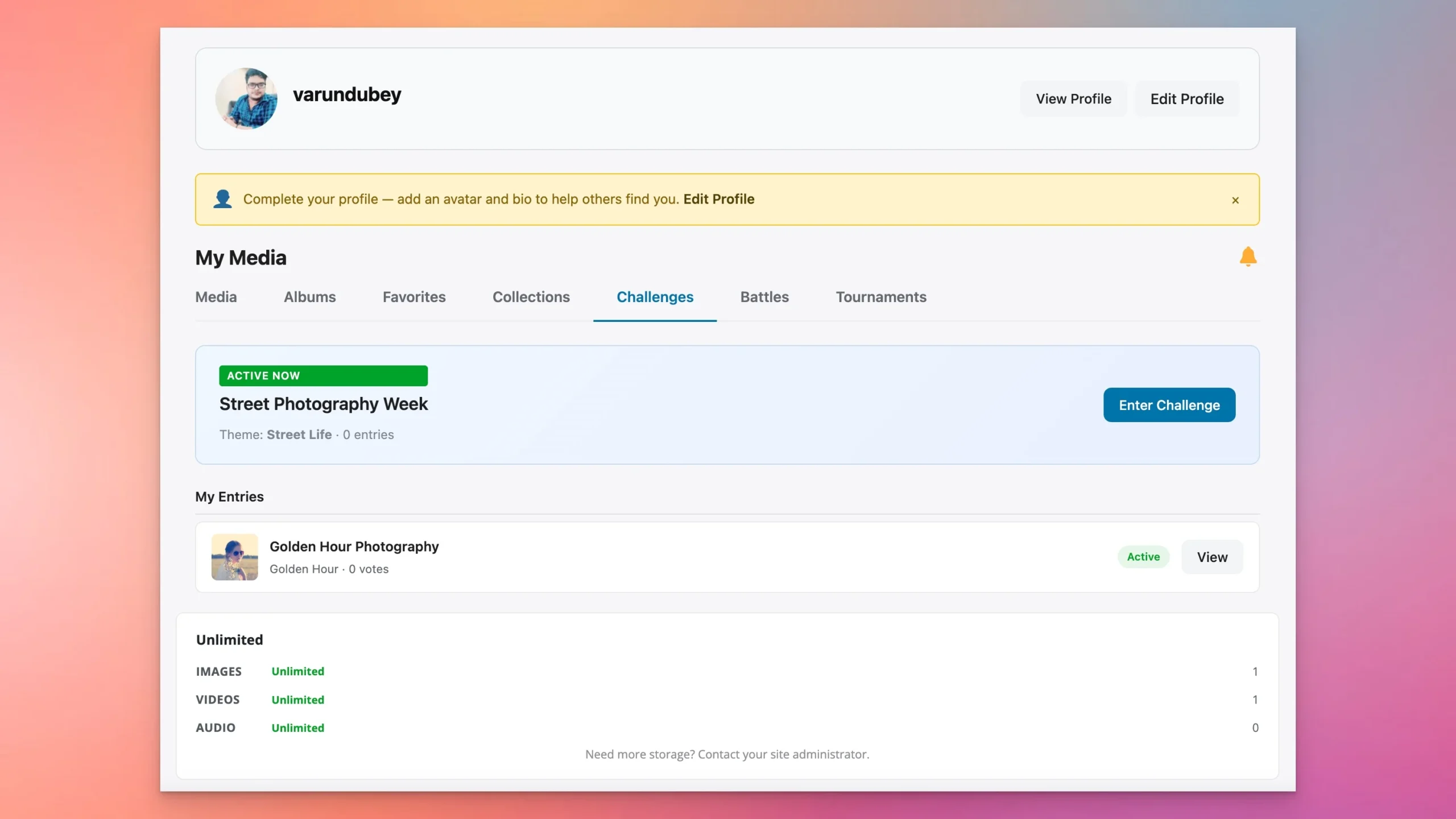 Themed challenges with deadlines — “Golden Hour Photography” with community entries
What You Get That Instagram Does Not
Point-by-point, feature for feature — here is where a self-hosted WordPress platform with WPMediaVerse exceeds what Instagram offers.
Privacy per photo Public or private account 6 levels per individual upload
AI moderation Instagram decides the rules You set rules, thresholds, and budget
Watermarking None Automatic for non-owners (Pro)
Signed URLs None Time-limited links that expire
REST API Limited, restricted access 114 endpoints for building mobile apps
SEO Zero — nothing ranks outside Instagram Every media page is indexable by Google
Data export Submit a request and wait Your database — export anytime
Layout options One fixed grid 5 modes: Instagram, Pinterest, Flickr, Dribbble, Grid (Pro)
Photo competitions None Battles, tournaments, themed challenges (Pro)
Revenue Instagram takes a cut You keep 100%
Gutenberg blocks None 12 blocks for embedding media anywhere on your site
Custom database Theirs — you have no access 21 dedicated tables, optimized for speed at scale
The 114 REST API endpoints deserve a special mention. If you ever want to build a native mobile app for your platform, the API is already there — 19 REST controllers covering media, users, reactions, comments, follows, albums, collections, messaging, and more. Instagram’s API is deliberately restrictive. Yours is wide open.
Monetization: 6 Revenue Models
Building the platform is step one. Making it sustainable is step two. Here are six monetization models that work with WPMediaVerse, and you can combine any of them.
1. Free tier + Pro membership. Let everyone sign up and browse for free. Charge a monthly fee for uploads, higher storage, or access to exclusive albums. WPMediaVerse Pro integrates with MemberPress, Paid Memberships Pro, and WooCommerce for membership gating.
2. Storage quotas. Give every free member 500MB. Sell additional storage in tiers — 5GB for $5/mo, 50GB for $15/mo. Per-user storage quota tracking is built into WPMediaVerse Pro with adapters for MemberPress, PMPro, and WooCommerce Subscriptions.
3. Print sales. Connect WooCommerce and let members sell prints of their photos directly from media pages. You take a commission, they handle the creative work.
4. Stock licensing with lock overlay. Members upload high-resolution photos with a lock overlay for non-purchasers. Buyers pay to unlock the full-resolution, unwatermarked file. Think of it as your own micro stock photo marketplace.
5. Course and tutorial sales. Photography courses, editing tutorials, preset packs. Use WPMediaVerse for the visual portfolio and WooCommerce or LearnDash for course delivery.
6. Sponsored challenges. Once your community has traction, brands will pay to sponsor themed photo challenges. “Best Shot with [Camera Brand]” — the brand pays, your community engages, everyone wins.
Instagram vs Pixelfed vs WPMediaVerse
If you are researching self-hosted alternatives, you have probably encountered Pixelfed. It is a genuinely good open-source project that deserves respect. Here is how the three options compare for someone building a media community.
Self-hosted No Yes Yes
WordPress integration No No Native
AI moderation Proprietary No OpenAI Vision (free) + Google/AWS (Pro)
Monetization tools Limited, platform takes a cut None built-in 6 models via WooCommerce/MemberPress
Photo competitions No No Battles, tournaments, challenges (Pro)
Gutenberg blocks N/A N/A 12 blocks
REST API endpoints Restricted ActivityPub/Mastodon API 114 endpoints
Federation (ActivityPub) No Yes No (WordPress-focused)
Existing ecosystem Instagram only Standalone Full WordPress plugin ecosystem
Pixelfed wins on federation — if connecting to the Fediverse matters to you, it is the clear choice. WPMediaVerse wins on WordPress integration, monetization, AI moderation, and engagement features like photo competitions. Different tools for different goals.
Cost Breakdown
Minimal WordPress + WPMediaVerse Free + BuddyX Pro + basic hosting $138/yr
Full WordPress + WPMediaVerse Pro + Reign Theme + quality hosting + OpenAI API $498/yr
Even at the full tier, you are paying less than $42/month for a platform you completely own. No per-user fees, no revenue sharing, no algorithmic toll booth.
Frequently Asked Questions
Can I really build something like Instagram on WordPress?
Yes. WPMediaVerse provides 114 REST API routes, 21 custom database tables, and 34 registered services handling everything from media processing to AI moderation. It is not a toy gallery plugin — it is a full media platform built on WordPress infrastructure. The feature set covers uploads, feeds, reactions, follows, DMs, stories, albums, search, profiles, and content moderation.
How many photos can WPMediaVerse handle?
WPMediaVerse uses 21 dedicated database tables with the mvs_ prefix, separate from the WordPress posts table. This architecture has been tested with over 100,000 media items. Performance depends on your hosting, but because media metadata lives in purpose-built tables (not wp_postmeta), queries stay fast even at scale.
Do I need BuddyPress?
No. WPMediaVerse works standalone without BuddyPress. You get uploads, the explore feed, reactions, comments, follows, albums, collections, search, profiles, and AI moderation without any additional plugins. BuddyPress adds friends, groups, activity streams, and group-level privacy — useful for community sites, but not required.
Can members upload from their phones?
Yes. The upload interface is fully responsive. Members can drag-and-drop or tap to select photos and videos from their phone’s camera roll, add titles, descriptions, tags, and privacy settings, and publish — all from a mobile browser. No native app is needed, though the 114 REST API endpoints make building one straightforward if you want to.
How does AI moderation work?
When a member uploads an image, WPMediaVerse sends it to OpenAI’s Vision API for content analysis. This happens asynchronously via WordPress Action Scheduler — the upload completes immediately, and the AI scan runs in the background. You configure three thresholds: auto-approve (safe content passes through), flag for review (borderline content goes to a moderation queue), and auto-reject (content above your rejection threshold is blocked). A monthly budget cap prevents runaway API costs.
Get Started
You have two paths: try it first, or install it now.
Try the sandbox: Launch a free demo — no account needed, full access, expires after a few hours.
Install the free version: Download WPMediaVerse from our store or WordPress.org.
Go Pro: WPMediaVerse Pro adds 5 layout modes, photo battles, HLS video streaming, cloud storage, watermarking, voice messages, and more.
Read the docs: Full documentation covers every setting, shortcode, and block.
Contribute: WPMediaVerse on GitHub — issues, PRs, and feature requests welcome.
Related Reading
- Introducing WPMediaVerse: A Complete Media Platform for WordPress
- How to Make Money as a Photographer with WordPress
- Build a Photography Community on WordPress
- rtMedia vs MediaPress vs WPMediaVerse: Full Comparison
- Best BuddyPress Media Plugins
- Make Money with an Instagram-Style WordPress Platform



Author's Latest Articles
-
10 Best WordPress Media Sharing Plugins in 2026
-
WP Career Board Pro: Kanban Pipeline, Multi-Board, Credits, and Resume Search for WordPress
-
WP Career Board: The Free Block-Native Job Board for WordPress (Complete Setup Guide)
-
How to Run Photo Contests on Your WordPress Community Site (2026 Guide)
THE %(site_name)s COMMUNITY

-
 umkhaloodie
3864140 pt -
Ch
3396455 pt -
 jesusmsanchezl
2453003 pt -
weddingblog2011
2205852 pt