


WWe live in the 21st century, but the cases of website blocking are more so than ever. In some countries, governments banning social media and censoring other content are commonplace. Additionally, if you are also feeling choked with blocked websites in your office or school, here are some ways to get to blocked websites.
In this article, you can learn about 14 easy ways to bypass censorship to access blocked websites. These easy to use and effective methods include the use of VPNs, extensions, DNS hijacking, proxy websites, etc. Let's talk about it:


Important: If your office (or school) has banned certain websites from its network, unblocking them may violate your work policies. So, we do not advise you to try to bypass the filters in these cases.
How To Unblock Blocked Websites: 14 Useful Methods!
1. Use VPN to unblock
As the name suggests, VPN (Virtual Private Network) software acts as a masking layer that does not reveal your real IP address. When using a VPN, your device's traffic goes through a VPN server that is not blocked by the government or ISP, allowing you to browse websites.
In our experience and expert opinion, using a reliable VPN service is the best way to unblock websites easily. All popular VPNs have their apps for Windows, macOS, Android, iOS, Linux, and more, making it easy to unblock sites at work or school.
If you want to dive deeper, you can check out our in-depth article on what VPN is and how it works. Here are some great VPN packages to try -
If top-notch security isn't your primary goal, you can also try free VPN services to open up blocked sites.
2. Become anonymous: use proxy websites
Quite often in a work environment, employers set certain limits to restrict your access to certain particular websites and services such as video streaming, social media, or even personal emails. Sometimes you need a way to access blocked websites, and in these situations proxy websites act as a rescue method.
However, note that an unblock proxy is not as secure as a VPN. So, if you are discreet about your work, Method 1 is the one to go for.
On the web, there are hundreds of proxy websites that make your web experience " unlimited ". A proxy website camouflages the blocked site from ISPs and allows you to access blocked websites.
For example, In case Facebook is blocked by your institution, you can access a proxy site and enter the blocked URL to access the service -
3. Use an IP address rather than a URL
Most of you may be aware that every website URL has an IP address and the authorities blocking the site may have simply stored the URL instead of the IP address. In this case, you can use the IP address of a website to open prohibited web pages in your Chrome browser.
- In Windows, type tracert website name.com in the command prompt to get the IP address.
- On Mac, open Network utility> click on Traceroute option at the top and enter the website address to find its IP address.
- For iPhone and Android, search for apps with the name Traceroute on the App Store and Play Store.
- On Linux, type dig website name.com in the terminal to obtain the IP address.
Now enter this IP address in the address bar of your web browser and press Enter to visit "access denied" websites. Similar tools and commands can also be used on other platforms like Mac, Linux, Android, etc.


4. Use Google Translate
Sometimes institutes or even countries do not ban Google Translate. Probably because it's an educational tool and no one considers it something powerful enough to unlock sites in school or offices. So, with this tool, you can bypass the restriction by converting the blocked website to other language which you may know.
Try Google Translate and see for yourself; just paste the URL and then click on the URL that appears in the translated section. This is yet another easy way to access blocked websites.
5. Bypass censorship through extensions
If the blocked websites are dynamic in nature, such as Facebook or YouTube, you should try these extensions. Hola and ProxMate are extensions that you can use to access blocked websites on Chrome and other browsers. UltraSurf is one of those effective extensions that lets you browse freely using its encrypted proxy network. It is powerful enough to defeat firewalls.
6. Replace your DNS server (custom DNS)
We have already discussed this method in a separate topic called DNS Hack. You can just use this method and bypass the blockade. This method typically involves using Google DNS or OpenDNS to access the Internet. Here are the detailed steps on the same.
Recently, Cloudflare also released its 1.1.1.1 DNS service, which claims to be the fastest, privacy-focused DNS service. Cloudflare has also made its 1.1.1.1 DNS service available through the Android and iOS apps. I often use this one-click method to access blocked sites in my area.

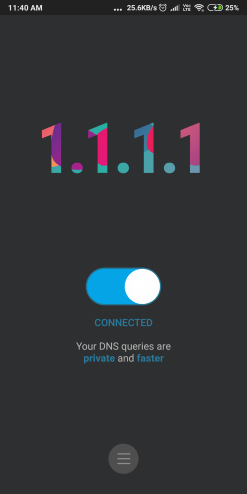
Changing the DNS also guarantees better privacy when browsing. Because with the default settings, every WiFi network that you have connected to and ISPs have lists of sites that you have visited.
7. Go to Internet Archive - Wayback Machine
Return machine is an interesting service that stores a copy of almost every website on the Internet. It saves multiple versions of a website and you can use it to access older versions of a website. Users can also use it to browse blocked content online.
So even if some services or websites become obsolete, the Wayback Machine has you covered. In addition, the Internet archive also contains many free movies, documentaries, nostalgic games, ebooks, etc.


8. Use the website's RSS feed
RSS readers are useful for getting new content and easily reading it. You can grab the RSS feed from the blocked website and add it to your reader. The catch here is that some RSS readers can load an entire web page on top of their user interface, which could be used to access a blocked website.
Just in case this website doesn't have a feed, there are some helpful online services to create the feed. In recent times, with the rise of fake news on social media platforms and algorithmic updates, RSS readers are making a comeback. You can use one like Feedly and get all the provided content from your trusted sources.
9. Use TOR (The Onion Router)
If you're a privacy advocate, you may already be familiar with the very popular Tor browser. This could act as a web blocker bypass tool if you configure it correctly. In many cases, you can unblock websites in school or office and remain anonymous as well. There is a double benefit as you will also be able to get rid of any kind of surveillance.
After VPN and proxies, using Tor is the most powerful way to unblock sites. It is also used as a gateway to dark websites, or .onion sites, which are blocked on your regular website. You can read our in-depth article on Tor to learn more about how it works.
Besides bypassing the web blocker, if you want to explore ways to improve your computer's security, you can also go for the deadly combination of TOR and VPN. Many VPNs like NordVPN and ExpressVPN provide technology like Onion Over VPN, which offers an additional layer of protection.
10. Change Internet network
Most ISPs provide dynamic IP address to users, which keeps changing from time to time. So it's possible that a website owner has blocked your particular IP address for some time. In this case, you can get to this blocked site by restarting your Wi-Fi router to force the ISP to give you another IP address.
Another easy way to get around the restrictions is to use your personal smartphone network if your network administrator has blocked particular services. While this method is not 100% foolproof, it is a great and legal alternative to breaking your office rules.
11. Use HTML to PDF converter
SodaPDF provides a free online service that can help you directly download a web page to your computer without even accessing it. Just visit this link and enter the desired URL. That's all. There are other HTML to PDF converter web blocker bypass services that you can try.
Some services need your URL and just send the unblocked web page to email. Overall, this is an easy way to unblock a website without a proxy or VPN.
12. Use Firefox from a USB key
If your school or office is known to take steps to restrict site access, I will not be surprised if you are not allowed to install extensions on the web browser to open websites for your personal use. In this case, you can install a portable web browser like Firefox on a USB stick. Pair it with a good unblocking proxy service, and you've got it covered.
13. URL redesign method
There are cases where a particular website is hosted in VPN and no verified SSL certificate is installed. For these websites, you can just go to your web browser's address bar and try typing https://www.url.com, instead of going to www.url.com or https: // www .url.com. This change may display a security advisory. Tap on the Continue Anyway option and visit the website. It is not a foolproof method, but it can sometimes be practical.
14. Modify the network proxy in browsers
Your college or institute may have more than one proxy for its network. Thus, it may happen that some websites are limited on one proxy, but accessible on another. You can try proxy surfing to access blocked websites at your college.
Disabling network proxy settings in your web browser is not a difficult task. You just need to find the connections / network option in your web browser settings. There you can select the non-proxy option or use another option that offers unrestricted browsing in your establishment. For example, here is a settings window showing how you can change settings in Firefox web browser:


Here are some of the most effective and easy to use methods to get around the censorship that has been imposed on your favorite websites. Let us know which one you prefer for accessing blocked websites in your area.






