Go to mail.aol.com, enter your AOL username or email address, choose Next, type your password, and select Sign in. AOL Mail is still active, web based, and widely used, with AOL support pages listing it as part of its current mail products and help system [source: AOL Help].
TLDR: To access AOL Webmail, use the official AOL Mail login page, not a search ad or a random “AOL login” result. For example, if Sarah checks a 15 year old AOL address every Monday for bank alerts, she should bookmark mail.aol.com and sign in there each time. A typical login takes under a minute if your password and recovery phone are current. If you use two step verification, expect one extra code check, usually adding 10 to 30 seconds.
Quick AOL Webmail Login Steps
The safest way to open AOL Mail is through the official web address. Do not trust pop ups, email links, or third party pages that ask for your AOL password. That small habit prevents most login trouble.
- Open a trusted browser such as Chrome, Safari, Firefox, or Edge.
- Type mail.aol.com into the address bar.
- Select Sign in if the page does not show the login form right away.
- Enter your AOL username, full AOL email address, or recovery email.
- Click Next.
- Enter your password.
- Complete any security prompt, such as a code sent to your phone.
- Select Sign in to open your inbox.
If you are on your own computer, you may see an option to stay signed in. Use it only on a private device. On a work, school, hotel, or library computer, leave it unchecked. It drives me crazy that this option is easy to overlook, because one rushed click can leave your inbox exposed.
Image not found in postmeta
Use the Correct AOL Login Page
Always check the address bar before entering your password. The page should use https and an AOL or Yahoo owned sign in page. AOL Mail accounts are managed through Yahoo’s sign in system in many regions, so seeing a Yahoo style login page can be normal.
Be careful with sponsored search results. Some may lead to support scams or fake repair pages. A real AOL login page will not ask you to call a phone number before signing in. It will not demand remote access to your computer. It will not ask for gift cards, banking details, or a one time fee to “unlock” normal mail access.
What You Need Before You Sign In
Have these details ready before you start:
- Your AOL email address: This usually ends in @aol.com.
- Your password: Use the most recent one you created.
- Your recovery phone or email: Needed if AOL asks for a code.
- Access to your authenticator app: Needed if you set up two step verification.
- A stable internet connection: Weak Wi Fi can cause repeated login loops.
If you have not signed in for a long time, AOL may ask you to verify your identity. That is normal. Old accounts with no recent activity are more likely to trigger extra checks.
How to Sign In on a Phone or Tablet
You can check AOL Mail from a mobile browser or from the AOL app. For quick access, open your browser and go to mail.aol.com. The steps are almost the same as on a computer.
For regular use, the AOL app is often easier. It keeps your inbox, folders, contacts, and notifications in one place. Download it only from the official Apple App Store or Google Play Store. Avoid APK files or app links sent through email.
After installing the app:
- Open the AOL app.
- Tap Mail or Sign in.
- Enter your AOL email address.
- Enter your password.
- Approve any security check.
Honestly, it feels like mobile login can take longer than it should when the app asks for a browser based approval. Still, it is better than saving your password in an unsafe notes app or texting it to yourself.
If AOL Webmail Will Not Let You In
Login problems usually come from one of five causes: a wrong password, old browser data, a locked account, a security code issue, or a fake page. Start with the simple fixes first.
- Check spelling: Make sure Caps Lock is off and the email address is correct.
- Try another browser: This can rule out a browser extension problem.
- Clear cookies and cache: Old sign in files can cause loops.
- Disable VPN temporarily: Some login systems flag sudden location changes.
- Use account recovery: Select Forgot password? on the official sign in page.
AOL’s help pages also provide account recovery guidance for users who cannot access a password or recovery method [source: AOL Help]. Use that route before trying any outside “email recovery” service.
Image not found in postmeta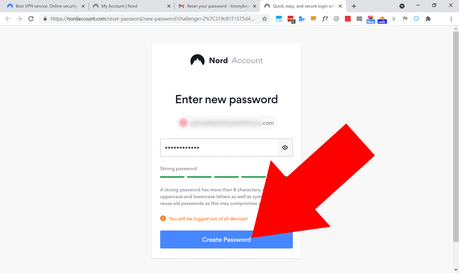
How to Reset Your AOL Password
If you forgot your password, do not keep guessing. Too many failed attempts can trigger a temporary lock. Instead, use the recovery tool.
- Go to the official AOL sign in page.
- Enter your username or email address.
- Click Next.
- Select Forgot password?
- Choose a recovery option, such as text message or alternate email.
- Enter the code AOL sends you.
- Create a new password.
Your new password should be long and unique. A strong example is a phrase with numbers and symbols, such as RiverDesk72!BlueLamp. Do not reuse the password from your bank, social media, or online shopping accounts.
Can You Access AOL Mail Through Gmail, Outlook, or Apple Mail?
Yes, but webmail is still the simplest choice for most users. If you want AOL Mail inside another mail app, you may need AOL’s IMAP and SMTP settings. In some cases, you may also need an app password, especially when extra account security is active.
Typical AOL Mail settings use:
- Incoming mail server: imap.aol.com
- Outgoing mail server: smtp.aol.com
- Incoming port: 993 with SSL
- Outgoing port: 465 or 587 with SSL or TLS
For many people, this setup is not worth the extra work. If you only check mail once or twice a week, AOL Webmail is cleaner. It also avoids sync errors, duplicate folders, and missing sent messages.
Security Tips Before You Check Your Inbox
Protecting your AOL account matters because email often controls password resets for other services. If someone gets into your inbox, they may try to reset your shopping, banking, or social accounts.
- Turn on two step verification if available for your account.
- Update your recovery phone number before you lose access to the old one.
- Review recent account activity if something feels off.
- Sign out on shared computers every time.
- Do not click suspicious attachments, even if they appear to come from someone you know.
When to Contact AOL Support
Contact AOL support if recovery codes never arrive, your account shows strange activity, or your mailbox seems missing after a successful login. Use official help pages only. Paid support options may exist for some users, but normal password recovery should start through the sign in page.
Keep a record of your recovery email, current phone number, and the date you last changed your password. That small checklist saves time later. Accessing AOL Webmail is simple when your account details are current, your browser is clean, and you start from the official login page every time.