


Vanessa Hand Orellana / CNET
The Fitbit Charge 4 is the best all-round fitness tracker of 2020 and has been recognized by CNET's Editors' Choice. The slimmer form factor, longer battery life, and lower price (now available for $ 99) make it a great alternative for anyone looking to monitor their health and fitness without the added bulk of a full-blown smartwatch.
With the Charge 4, Fitbit finally integrated a built-in GPS to independently track exercise outdoors, and added better training tools for athletes. It lacks some of the new Fitbit Versa 3's smartwatch features like voice assistant and dictation, but you also have access to Fitbit's advanced sleep tracking features, text replies (Android only), and contactless payments. It has everything you need for less and it's my favorite Fitbit to date.
For more of that
Subscribe to the mobile newsletter, receive notifications and see related articles on CNET.
Read on to find out how exactly I was won over by this fitness tracker.

Features added without additional bulk
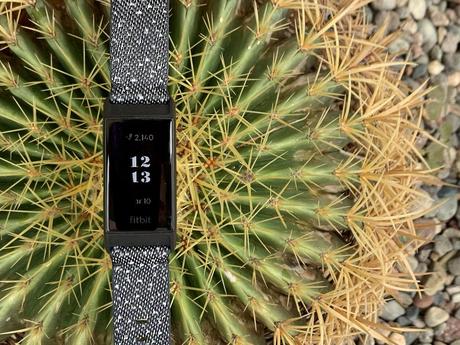
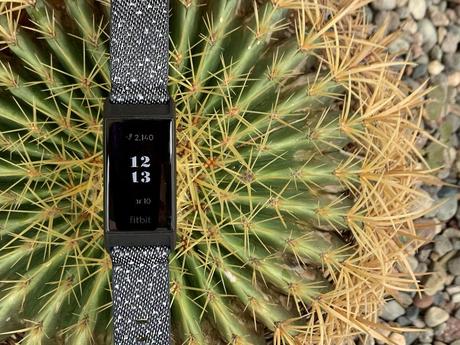
There are many great athletic wearables out there, like the Garmin Forerunner 945 and Suunto 3, that offer far more fitness chops than the Charge 4, but they're not the most fashionable ones. The $ 150 Charge 4 (£ 130, AU $ 230) is a tracker I'll wear around the clock thanks to its sleek, low-key design. If you're familiar with the Charge 3, the new version doesn't look much different - it's just the smallest bit bulkier on your wrist.
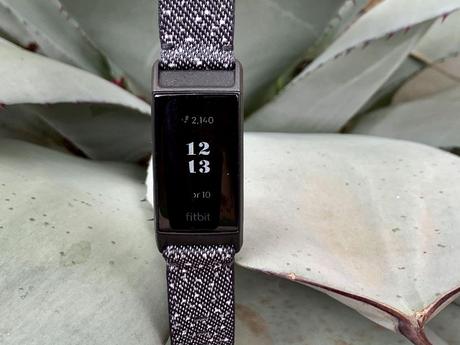
The screen can only be displayed in black and white, but I think it's good that it's almost half the size of a conventional smartwatch like the Apple Watch, and that physical buttons are also eliminated. Instead, you control the Charge 4 using a combination of the touchscreen and pressing the left side of the tracker to navigate through the settings. The touchscreen is not responding as quickly and it takes a few seconds to light up when you raise your arm to wake up the screen, but I finally got where I wanted to go. The only time the delay really bothered me was while I was running and wanted to quickly check my stats without taking my eyes off the road. As with the Charge 3, it is difficult to see the screen even in direct sunlight.
The regular Charge 4 is available in three different colors with silicone sports bands. However, the Special Edition or SE version I tested also has a woven ribbon option for an additional $ 20. The straps can be easily exchanged (in contrast to the Versa 2 with difficult switches). If you are upgrading from Charge 3, you can use these tapes on the newer tracker. There are also a number of third-party strap options that you can use to customize your look.
Charge 4 is comfortable to wear all day and won't dig into my skin if I tighten it during a run. You can wear it in bed too. Like other Fitbits, it also tracks your sleep. I'm not going to go so far as to say it's comfortable to wear in bed, but at least I didn't mean to rip it off in the middle of the night like other trackers.
Charge 4 made me run faster
As a basic fitness tracker, the previous Charge models already ticked most of the boxes: measuring steps, calories, floors climbed, heart rate, and distance (using your phone's GPS). But that wasn't enough for more serious runners like me. I'm not an elite athlete, but I run regularly, so a built-in GPS is high on my wish list. Using the GPS, the Charge 4 can map your route during an outdoor walk, running, biking, or hiking without relying on your phone.
I did a couple of runs and the Charge 4 took consistent distance readings on the same route with and without my phone. You can also view a heat map of your route in the Fitbit app, which also shows the intensity at which you ran based on your heart rate.
The only other Fitbit device that has built-in GPS functionality is the Ionic watch. It's now over two years old and I found it too big and bulky to wear regularly.


Vanessa Hand Orellana / CNET
The Charge 4 tracks over 20 different activities, from cycling to yoga. It's also waterproof up to 50 meters like the Charge 3 so you can use it for swimming. You can program up to six exercise shortcuts on the Charge 4, but you have to select them and sync them using the phone app. You can also set it to automatically track your runs and set goals for things like pace, distance, or calories burned before you start any activity.
GPS isn't the only tool for athletes. The Charge 4 has added a new metric called Active Zone Minutes, which uses your heart rate zones to determine the intensity of your workout. The goal is to log 150 active minutes by the end of each week. However, you can increase or decrease the goal depending on your fitness level.
A few years ago, Fitbit started dividing heart rate data into training zones for each activity based on age and weight. After your workout, you can log into the mobile app and see how long you've been in fat burning, cardio or peak. Charge 4 adds real-time heart rate zone notifications so you can take action while you exercise.
It took me a lot harder than usual to get my maximum heart rate alarm to appear on the screen (you also get a buzz on your wrist as you reach each zone). I realized that I had overestimated my efforts and it helped when the prosecution nudged me to get out of my comfort zone. I can see that this is a good training tool if you want to break your personal record in a race.
The battery life increases
The only downside to GPS on charger is that it gobbles your battery up much faster than charger 3. According to Fitbit, charger 4 can charge for up to seven days, but I barely made it to day four before you did need to connect.
I didn't mind having to charge after four days, but if you want to get the most out of your battery life (and plan to use it at night) I would recommend turning off the GPS when not in use. You just have to remember to do this after your workout. You can do this through the exercise links on the fee. Just swipe up from an activity that uses GPS, like running or cycling, and turn it off.
Sleep tracking has some serious advantages
I have never seen much about tracking my sleep in the past. With a 6 month old baby and toddler waking me up at odd hours of the night, I was scared of even seeing my stats, let alone evaluating my sleep, the next morning. Every morning you receive a sleep score with the Fitbit app, which ranges from the length of sleep to sleep phases to heart rate and fluctuations in blood oxygen content (SPO2).
After a few nights of testing, it actually provided some useful data on my sleeping habits. For starters, I got a passed grade (over 60) every night, even though I woke up to take care of my little one. The app told me it's normal to be awake up to 45 minutes each night which was comforting. It also gives you advice on how to improve your score, e.g. B. to keep your bedtime constant no matter what time (or early) it is.

Vanessa Hand Orellana / CNET
Anyone can see basic information in the app, such as: B. How much sleep you are getting and how good you are. However, Fitbit Premium subscribers get access to heart rate and blood oxygen data. I didn't see anything extraordinary on my chart, but I can see that this feature will be extremely helpful for people who suspect they have a more serious sleep-related condition like sleep apnea. If so, it might be worth the extra $ 9.99 (£ 8.99, AU $ 15.49) per month for a Premium account.
There's one predictable downside: With all of this sleep data, I worry that I might become dependent on the sleep score to help me feel energized during the day. This means that a low sleep value can subconsciously make me tired, even though I felt like I had a good night's sleep.
More than just a fitness tracker
The Charge 4 goes beyond health and fitness tracking and has some smart features up its sleeve. It reflects every notification that you can get on your phone, regardless of whether you have an iPhone or an Android phone. However, only Android users can reply to messages with preprogrammed quick replies.
You still can't save music on board to take with you. However, if you're a Spotify Premium subscriber, you can use the Charge 4 as a simple wrist remote to pause and skip tracks. However, there is no volume control.
It now also includes a new agenda app as well as the existing timer, alarm and weather apps.
You can set up Fitbit Pay on your wrist and use Charge 4 on any tap-to-pay payment terminal as the tracker now has built-in NFC (previously, you had to buy the special edition Charge to get Fitbit Pay). Unfortunately it still doesn't have as many banking partners as Google or Apple Pay and wasn't compatible with my primary bank (US bank) so I couldn't test it. I'm quarantined at home too, so most of my payments are made online anyway, not in brick and mortar stores.
The information contained in this article is for educational and informational purposes only and is not intended as health or medical advice. Always consult a doctor or other qualified health care provider with any questions about a disease or health goals.






