


Smartphone gimbals are an essential tool for anyone creating professional video content with a mobile device. They're also fun toys for people who love to shoot videos and want them to look as sleek and stable as possible. The recently released DJI OM 4 is the newest entry in the gimbal market.
The OM 4 is the direct continuation of last year's DJI Osmo Mobile 3. It looks very similar to the Osmo Mobile 3, but has a brand new trick: a magnetic mounting system.
DJI OM 4: What's in the box

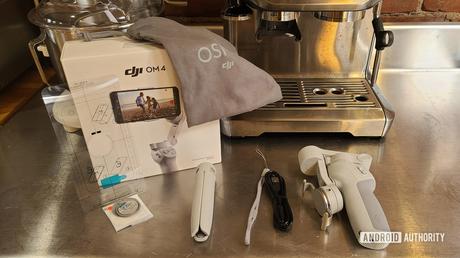
Unlike last year, there is only one version of the DJI OM 4. For the Osmo Mobile 3, DJI offered a regular kit with just the basics and then a combo kit with a hard case, tripod, and more. This year, however, the OM 4 will only be delivered in one package - and it does not contain a hardshell case.
You can find the following in the DJI OM 4 box:
- DJI OM 4 smartphone gimbal
- tripod
- Removable wrist strap
- USB-C to standard USB cable
- Magnetic ring to attach to your smartphone
- Tools and guides for attaching the ring
- Soft carrying case
The lack of a hardshell case option is disappointing, although DJI likely has a reason for leaving it out. Regardless, it makes your purchase easier as you don't have to choose between a regular or a deluxe package. What you see is what you get
Most aspects remain unchanged


Overall, there aren't too many major physical differences between the DJI OM 4 and the DJI Osmo Mobile 3. You will find that the branding has changed slightly as DJI removed "Osmo Mobile" from the official name of the gimbal. For DJI, however, this doesn't seem like a huge deal. The Osmo branding is all over the box, in big letters on the bag, and even in several places on the gimbal.
Connected: The six best smartphone gimbals you can spend your money on
The color is a little different (the Osmo Mobile 3 was a darker shade of gray) but the all-plastic construction and design are pretty much the same. Connections and buttons have a similar structure, but in slightly different places. There is still a gimbal shutter button (thank goodness) and the gimbal shutter button still folds the same way as the Osmo Mobile 3.
The Osmo Mobile 3 was such a seismic shift for DJI's smartphone gimbals that it's not surprising that this new version isn't dramatically different. After all, a company can't change its game wildly every year. While the DJI OM 4 may seem a bit boring now that it's been almost a year since we've seen the Osmo Mobile 3, that shouldn't be a bother. DJI found a formula for success last year and it's not about to leave it behind.
Of course, it still found a way to introduce something new.
DJI OM 4 Magnetic Mount: Quick and Easy


Unlike most gimbals, the DJI OM 4 does not have a permanently attached smartphone clip on the arm. Instead you will find a magnetic disk. You can use this to snap the included proprietary clip if needed.
This may seem overly complicated, but it makes life easier. With most other gimbals, removing the phone for normal use is a bit painful. You need to pry your phone out of the clip. Once it's back, you'll need to adjust the gimbals settings as you will inevitably not be putting your phone back exactly where it was before.
With the DJI OM 4, there is no need to reset your gimbal after removing your phone. Just turn your phone off and on again.
With the DJI OM 4 this is no longer a problem. The slim smartphone clip stays attached to your phone when you take it off your arm. When you want to reattach the device, simply snap it back into place and you're good to go: no rebalancing or adjustments are required. This saves videographers a lot of time when recording.
If you want to go a step further, you can use the included magnetic smartphone ring. That way, you can bypass the clip entirely - you can just snap your phone in your arm all by yourself. In the photo above you can see the magnetic ring and the plastic guide provided by DJI to help you place it.
Using the magnetic ring attachment is of course a major obligation. Once it's on your phone (or your phone case) it will stay there. Removing and reattaching is not practical. Hence, this only works for people who like the idea of a metal ring permanently attached to their phone.
Folding it up is still the best


The best thing about the DJI Osmo Mobile 3 was the fact that it could be folded up for easy portability. Fortunately, the DJI OM 4 does the same. In the image above, you can see the difference this makes for portability when you compare the OM 4 to a more traditional gimbal.
The OM 4 is still not pocket-sized or anything, but it folds up so small that it can be thrown into a backpack or handbag and is not a burden. Most traditional gimbals do not have this benefit.
Ultimately, the DJI OM 4's new magnetic mount doesn't seem like as big a deal as the Osmo Mobile 3's folding mechanism.
DJI OM 4: Practical Photo Gallery
Is it worth upgrading?


We still need to do a full review of the DJI OM 4 to see if it's a good buy or an upgrade to the Osmo Mobile 3. At first glance, however, the value proposition doesn't seem high enough to guarantee you an upgrade if you already love your current gimbal.
The OM 4 costs $ 150, which is definitely very expensive for a gimbal. By comparison, the Osmo Mobile 3 starts at $ 119, which is also more expensive than many of its competitors' products. Granted, you don't get the tripod stand for that $ 119 price tag, but a plastic stand is barely worth $ 30 more.
Ultimately, the magnetic mounting system will be what this product sells. If you're in love with the idea of saving a few seconds every time you take your phone off the gimbal, chances are you're already sold with it. If not, you might refuse to spend $ 150 on a gimbal.
You can look forward to our full review of the DJI OM 4, which covers the companion app and shows some examples of video footage.







