DaVinci Resolve is color grading, audio post-processing and high quality video editing software that has been used by Mac, Windows and Linux users for years. Well, DaVinci Resolve is now available for iPad users as well. Check out our complete guide to DaVinci Resolve to find out which iPads support this app and what its main features are.
Which iPads will support DaVinci Resolve?
This video editing software from Blackmagic Design will be compatible with iPads equipped with A12 Bionics or later and running iPadOS 16 or later.
iPads without M1 or M2 chips have limited functionality and HD quality due to lack of RAM. In fact, the App Store recommends using it on iPad Pro M1 or newer models.
You can download DaVinci Resolve for iPad from the app store.
File formats supported by DaVinci Resolve on iPad
Clips can also be imported from iPad Pro's internal storage, USB-C media drives, Photo Library, or external iCloud.
Key Features of DaVinci Resolve You Can Use on iPad
Key features of the software include advanced Neural Engine-based artificial intelligence processing, as well as tools such as a magic mask to track features and objects in a scene. More information is available below.
1. Apple Pencil Features
Apple Pencil is an undeniably powerful tool that enhances the iPad experience for graphic artists, video editors, and doodlers. The best part is that this powerful tool works well with DaVinci Resolve on iPad.
While working with the software, Apple Pencil also lets you adjust specific areas of your footage and merge clips. In addition, the movement of the dial and other regularly changing elements have also been polished.
2. Video editing
DaVinci Resolve for iPad lets you edit movies in a variety of file formats, including H.264, H.265, and other YouTube compatible ones. In addition, it also provides you with cloud service support to make it easier to edit on various devices, which will save you a lot of time.
3. Color correction
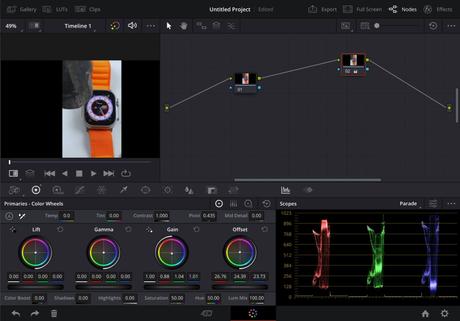
The colors in your videos are critical and the video editing app lets you choose from a range of tools. For example, there are several colored knobs for changing different components of your videos. You can also change the hue, temperature, saturation, tint, and brightness of your videos, or use the Color Boost tool to change the saturation in specific areas of your videos.
4. View areas
When editing video, our eyes don't always see the same thing as everyone else. Using tools to help you find the right mix in your film is a great idea.
The View Scopes panel is one such feature in the iPad version that lets you choose how you want to change the colors in your movies. By using this tool, you can make more precise and frequent changes.
5. Video setup
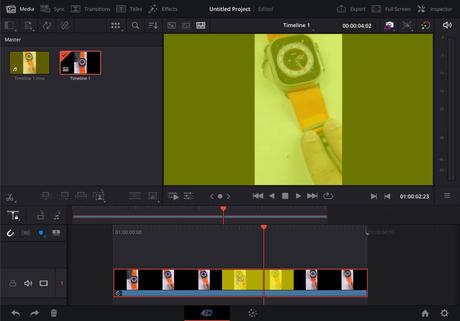
DaVinci Resolve for iPad lets you import and edit videos from any source, including iCloud, iPad storage, Photos app, and USB drive. The software also allows you to add lookup tables (LUTs) to your video and get an overview of your sequences.
With any video editing software, you will undoubtedly want to change clips, and with this application, you can add and remove content that you want to change or remove. In addition, the modification tools provided make the operation quite simple.
For example, when using the iPad app, you can use the Tone Curve tool to change the brightness, shadows, and other settings to get the effect you want.
Is DaVinci Resolve for iPad similar to the Mac version?
Whenever a new iPad is released, the gap between iPad and Mac gets smaller. And when the M2-powered iPad was released, the gap narrowed considerably. In addition, accessories such as a magic keyboard, iPad stand, mouse, and more help give your computer a Mac-like look and feel.
As we all know, the tools available on the iPad weren't of the same caliber as the tools available on the Mac. But with the introduction of DaVinci Resolve for iPad, we expected things to change.
To everyone's pleasant surprise, there is not much difference between the current DaVinci Resolve iPad app and the Mac version. While there are some user interface tweaks, overall operation is identical to that of a Mac.
Our in-house video editors advise you not to panic if you haven't identified a few things first; they are buried. Also, if you're not a frequent iPad user, it may take some time to adjust to the changes made by the iPad app.
How much will DaVinci Resolve for iPad cost?
The iPad version of DaVinci Resolve can be downloaded for free from the App Store. However, the free version has limited functionality. So getting DaVinci Resolve Studio and adding some more features to the powerful video editor requires an in-app purchase of $94.99.
Frequently asked Questions
Q. What is the best alternative to DaVinci Resolve?
If DaVinci Resolve seems too complicated for you, here is a list of the best alternative video editing software for your Mac.
Q. Are Macs really better for video editing?
Yes, the MacBook is one of the best video editing machines out there. The main motives are specialized sections of the chip for video encoding or decoding, as well as brand new M1 and M2 processors.
Do professionals use DaVinci Resolve?
Indeed, DaVinci Resolve software is used by professionals. The main reason for this is its speed and efficiency. Plus, it lets you focus on your creation rather than post-processing. So, are you going to use DaVinci Resolve on your iPad? Let me know in the comments.
Read more:
- Best YouTube Video Editing Software and Apps
- Wondershare Filmora 12: A cross-platform AI video editor for creators
- Best Video Editing Software for Mac
Руководства
#DaVinci #Resolve #iPad #detailed #guide #main #features