


Now that the ChatGPT premium is $42/month, and the freemium version is not guaranteed to be available at all times, it is time to think about ChatGPT alternatives.
No doubt, OpenAI's ChatGPT has revolutionized the content creators industry, but it's' not the only Chatbot with such incredible capabilities.
In today's article, you'll learn about ChatSonic review, the best alternative Chatbot to OpenAI ChatGPT. Here are a couple of things you will learn in this review of the ChatSonic Chatbot:
- What is Chatsonic
- Is ChatSonic for everyone?
- All the great features
- How to use ChatSonic voice command to Create content
- How to create beautiful images with ChatSonic
- Writing codes with Chatsonic
- Why ChatSonic is Better than ChatGPT for content creators
- How to use ChatSonic to get real-time information from the web.
- The pros and Cons
- Pricing
- And more
However, if you're in a hurry, use the table of content below to jump to a section within this ChatSonic review. Or you can click on this link to try ChatSonic out for free today only - no cost, no credit card required.
All are free, plus you get 2,500 free word credits and access to the full WriteSonic writing templates. So you have nothing to lose, all to gain.
Let's start.
What is ChatSonic
ChatSonic is an AI chatbot like OpenAI ChatGPT but with more capabilities and features. Behind the scenes, WriteSonic (Creator of ChatSonic) uses OpenAI's GPT-3 and ChatGPT technologies to advance its AI model- ChatSonic.
It uses natural language processing (NPL) to understand the context and generates human-like content, plagiarism free, engaging in conversation and accessing the internet to generate real-time information.
Unlike ChatGPT, Chatsonic can give you trending information that is happening now. And it can give you the most accurate information on any topic with links - thanks to its Google search integration.
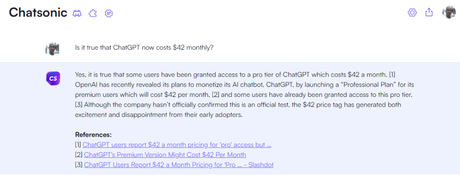
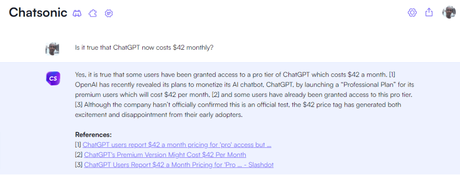
For example, I asked ChatSonic whether it is true that OpenAI's ChatGPT now costs $42, and here is the response. Since this is trending information on the internet, I guess it is good to ask.
I put forward the same question to ChatGPT to see its response.
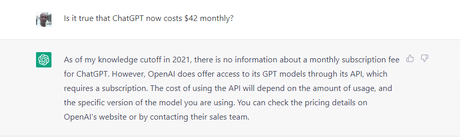
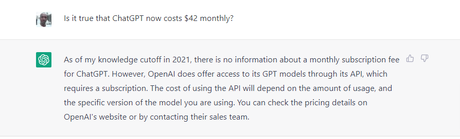
As you would expect, ChatGPT does not have up-to-date information on the queries; since its knowledge was cut off in 2021, it can't access the internet.
ChatSonic gets the information correctly and gives reference links to relevant, helpful content on the topic, which makes ChatSonic better than ChatGPT.
If you're a content creator who wants to save time researching facts to support your claims and write on trending topics, ChatSonic is a powerful game changer.
How to Start With ChatSonic
To begin using ChatSonics today, here is what you must do.
First, head over to the WriteSonic website from this link. It will take you to the ChatSonic page, don't worry; you're not subscribing to a paid plan yet.
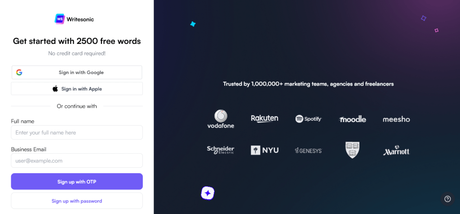
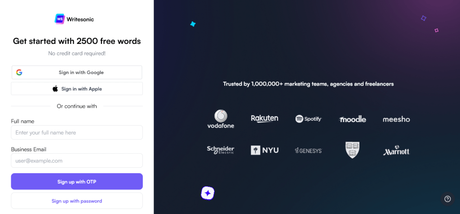
As seen in the below image, you're joining the ChatSonic revolution for free.
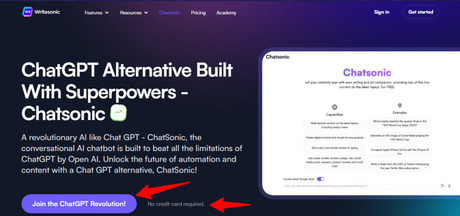
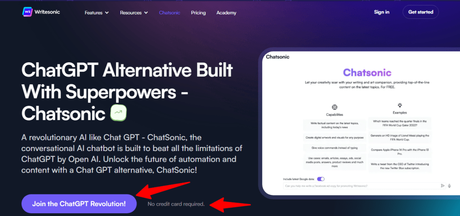
Next, click the button " Join The ChatGPT Revolution!
On the next page, enter your details to sign up for a free account and claim your free 2,500-word credits. That's it. You're in.
ChatSonic Top Features
ChatSonic has some core features worthy of mentioning, and if you're a content creator, you might want to take a second look.
Here are some of the top ChatSonic features:
- Real-Time Information - As you already know, ChatSonic can generate time-sensitive information from the internet. It can be used in the news industry, where information is rapidly changing every minute.
- Voice Command - ChatSonic recognizes the voice and can take your command to generate content for you. So instead of endlessly typing your prompt, you can save time telling the AI what you want.
- Conversational AI - Like your ChatGPT, you can engage ChatSonic in a conversation and get it going like humans.
- Image Creation - One of the best features of ChatSonic is the ability to create digital art from your text inputs. It takes your description to create an image that fits your imagination. This is good for creating original images for your content.
- Store Previous Conversation - ChatSonic stores your previous queries and answers for quick reference in the future. This allows ChatSonic to learn more about you and your writing style so it can produce better content next time and be more efficient.
- Select Your Personalities - You can tell ChatSonic to write from several personalities' writing styles. For example, tell ChatSonic to write as a Stand-up comedian or an accountant. As of writing, there are 13 personalities available in ChatSonic.
- Write Codes - Much like ChatGPT, ChatSonic is a multipurpose AI assistant. It can generate programming languages - PHP, Python, CSS, HTML, React, JavaScript, etc. So if you're a developer, ChatSonic will make you more efficient and reduce the workload.
- Text-to-Speech - You can have ChatSonic read the answers to your queries out loud. This is an ideal feature for visually impaired users.
- Edit in WriteSonic Editor - You can edit the ChatSonic AI-generated responses in the WriteSonic content editor to make the content more original and SEO optimized. It makes it easier to have everything in one place.
How to Use ChatSonic
There are endless possibilities for using ChatSonic in your content strategies; your imagination limits its ability. The more creative you're, ChatSonic becomes helpful in your business.
Here are four main ways to use ChatSonic in your business.
Real-Time Information
One of the main advantages of ChatSonic over ChatGPT is the ability to generate real-time information. It can access the internet to learn about trending topics and give references to supporting web pages.
Most OpenAI writing models, such as ChatGPT and GPT-3, have limited data on current events. Their data has a cuff date in 2021; the AI can not give accurate information on weather forecasts, current events, breaking news, etc.
With ChatSonic, you can write on these topics as well as get weather forecasts for specific places and locations.
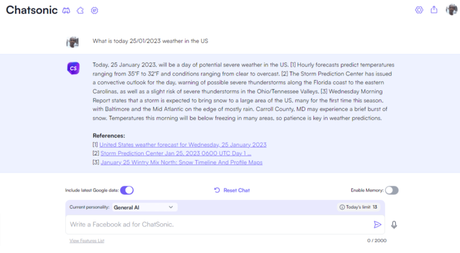
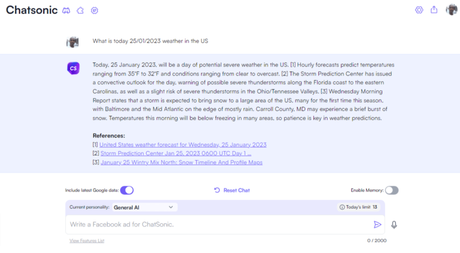
For example, the ChatSonic response to a weather forecast prompt I asked for.
From the above image, it's clear that ChatSonic understood the question and the intent and was able to give accurate information on the US weather forecast.
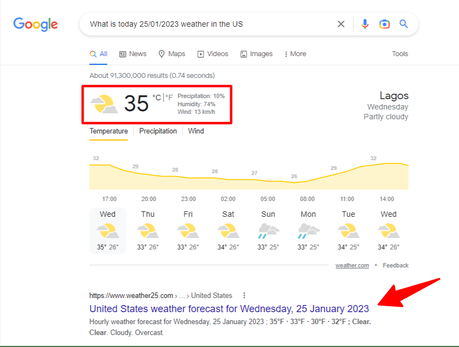
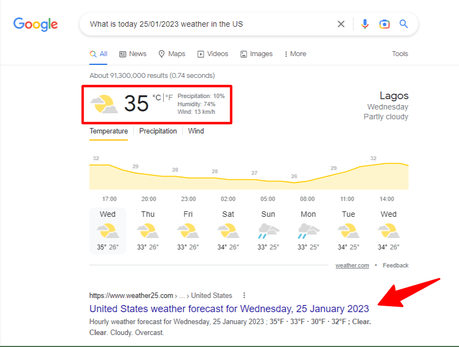
To be sure, ChatSonic is not just making things up to look smart; I asked Google the same search queries, and here is the result from Google.
Comparing the two results, it's clear ChatSonic is a reliable AI chatbot to find accurate information on past and present issues.
So, whether you write on evergreen topics, time-sensitive or personal stories, ChatSonic is your best AI writing assistant.


Create Digital Art Images
Another helpful use case of ChatSonic is image generation capability.


You can use ChatSonic to create original images for a variety of use cases if you fear copyright infringement on images you find online.
And it is so simple to create your images in ChatSonic.
Let's try to create one together.
Go to ChatSonic, and enter your image description in the text area. Remember you can also use voice commands to give your description.
ChatSonic will create the perfect image based on its understanding of your description.
Here is something I did for Ronaldo De Lima of Brazil (He is my favourite player of all time)
Honestly, not what you would expect. This is far from being good to call an image of Ronaldo De Lima of Brazil.
I tried a couple of other options to see how it compares to the first one. I asked Chatsonic to create an image of a king with a sword.
You would agree this is more of a gladiator than a king, but not too far from what I had imagined.
However, you must bear in mind that the underlying AI image generation technology is still a work in progress. So the image quality isn't really a lack of efficiency with ChatSonic, but with the AI technology for generating the images.
I hope AI technology will advance to give us better image-creation tools a few years from now. Until then, I score these images 6/10.
- Generate content outline in minutes
- Write ebooks
- Automate customer services in your business
- Automate employee interview questions and get feedback
- Create personalized content for each customer avatar.
- Generate business ideas
- Give detailed step-by-step advertising strategies
- Video script writer
- Create explainer video content
- Generate original and high-quality images from text inputs
- NFT
- Solve mathematically calculations
- Improve existing content quality and accuracy of facts.
- Detect plagiarism content
- Compose song lyrics
- Write jokes
- Counselling
- Generate business plan
- And so much more...
Write Web Codes
ChatSonic can help you save time and make you more efficient if you're a developer. It can help you write codes in different programming languages.
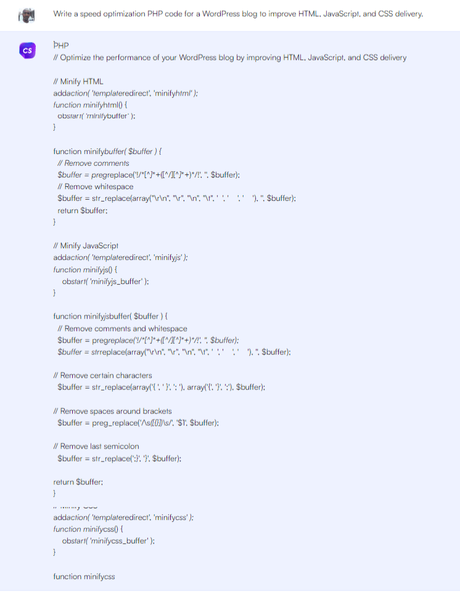
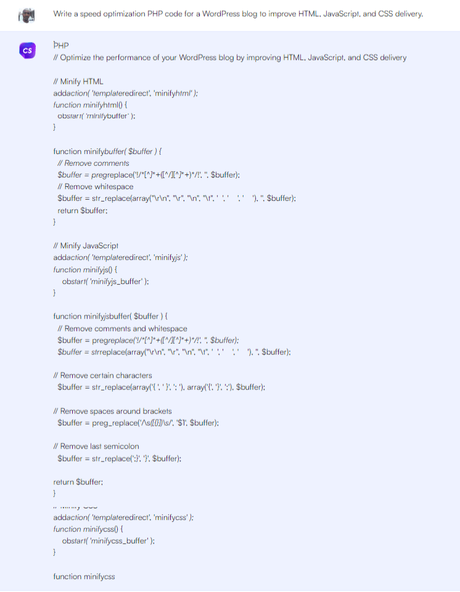
I asked ChatSonic to write a PHP code for optimizing JS, CSS, and HTML files in a WordPress blog; here is the outcome.
Though I am not a developer, I can't tell whether these codes are up to standard. But I guess it could be a good starting point if I know what to do here.
You could do more with programming languages if you know a thing or two about coding.
Use Case
Beyond the obvious, ChatSonic can help you in a variety of ways in your business. You can use it to write blog posts, generate headline variations, write email copy, ad descriptions, etc.
However, the best way to learn how to use any AI chatbot like ChatSonic is to lose your creativity juice. If you need inspiration, here are some positive ways to use ChatSonic:
There is no limit to how businesses can use AI chatbots in their day-to-day operations. The more you explore AI technology, the better it helps improve business value and save you time, costs, and productivity.
ChatSonic Pricing
ChatSonic offers more flexible pricing options for content creators; you can personalize your subscription plan to fit your marketing budget.
Note: ChatSonic is part of the toolsets in WriteSonic, subscription to WriteSonic gives you access to all the features, including ChatSonic.
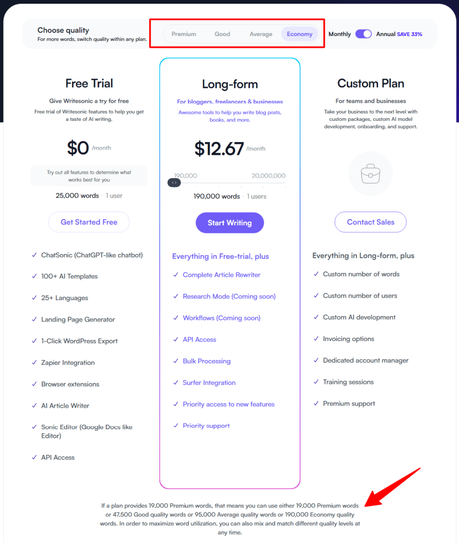
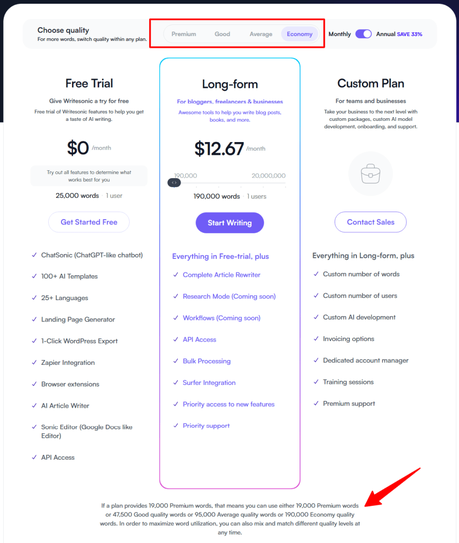
Also, when selecting a plan, pay attention to the word quality. There are four-word qualities to choose from:
The higher the quality, the less word credit you have. So, it's kind of quality vs quantity. You will have to trade quality if you want more word credit for the same price.
- Affordable Pricing - ChatSonic is fairly priced, making it one of the most affordable artificial intelligence writing assistants for most bloggers. On top of that, you can take advantage of the ChatSonic free trial to learn about the tool and its features.
- User Friendly - The user interface is simple, unclutter, and easy to walk through. You can start using the tool immediately after you sign up; no learning curve is required to understand the dashboard.
- Incorrect Fact - ChatSonic can occasionally generate incorrect facts and numbers. You should cross-check any references, facts, or numbers from any AI tool.
- Repetitive Sentences or Points - This is mostly all AI's weaknesses. ChatSonic can sometimes repeat itself or points made earlier, but you can always correct this if you read through the content.
-
Is ChatSonic better than ChatGPT?
ChatSonic is a more powerful and helpful chatbot because of its internet access, which is not possible with ChatGPT at the moment.
For publishers, you will find ChatSonic more helpful for writing on current events, news, and content research. -
How much does ChatSonic cost?
WriteSonic develops ChatSonic, and it's part of its toolset. So, your subscription to WriteSonic gives you access to use ChatSonic. The price ranges from $12.67/month up to $666 monthly.
-
Which AI is better than ChatGPT?
Because of specialisation, several AI chatbots are better than ChatGPT in some specific aspects. ChatGPT is developed to do all sorts of tasks, while some AI chatbots are designed to do a particular task better.
In contrast, ChatSonic is an AI developed primarily for content creators. Though it can be used in other industries, its primary use case is for content marketers. -
How does ChatSonic work?
ChatSonic is similar to ChatGPT but with more advanced power and capabilities.
It is a natural language processing AI model connected to Google search, which helps it produce more factual, current, and accurate data.
As with most AI writing assistant, you need to enter a prompt or question to engage ChatSonic
- Minimum Word - ChatSonic seems incapable of generating long-form content in its responses. You might have to struggle a bit to write long-form content with its responses.
- Internet Access - ChatSonic is connected to the internet so that you can pull information from different sources in real-time.
- Endless Capabilities - There is no limit to what you achieve with ChatSonic; the more you explore, the better it gets. It can help you in any industry and niche.
- Save Time Typing - Use voice commands to engage ChatSonic in conversation. Ideal for physically challenged people, and also it helps save time.
Here is WriteSonic's ChatSonic price.
There are two things to keep in mind when selecting a plan - the content quality and the number of word credits.
Pros and Cons
As an AI with improving technology, ChatSonic currently has some of its pros and cons worth knowing.
Also, you need to understand that the raw content output of any AI writing tool today is far from perfect; you need to edit, proofread, and make the final output fit your business goals and objectives.
Most AI writing assistants today lack emotion, empathy, persuasive content, and personalization. It is your duty to ensure the content meets the user's intent and makes them take the desired action.
Here are some of the pros and cons of ChatSonic AI chatbot.
Pros of ChatSonic
Cons of ChatSonic
FAQ - ChatSonic Review
Conclusion
ChatSonic is the best alternative to ChatGPT for many reasons; it works similarly to ChatGPT, understands text inputs, connects to Google, takes voice commands, generates artwork, etc.
It will make you more efficient in your work, help you write faster and error-free, and can be used by individuals and businesses.






