


You think you’ve mastered Netflix, but there’s a treasure trove of hidden features waiting for you. Unlock categories, tailor your binge-watching, and enhance your streaming with 16 underrated tips.
Dive deeper than ever before and customize your Netflix experience like a pro. Ready to discover the secrets? Let’s get streaming!
1) Easy Find Netflix Original

Discovering Netflix Originals is as simple as typing ‘Netflix’ into the search bar to explore the platform’s exclusive movies and series. When you’re looking for an easy find, the search bar is your gateway to Netflix originals, including interactive specials. However, note that 4K and HDR content are available in a limited amount; use the search box to filter for these options.
For a more tailored selection, secret codes unlock hidden subcategories, helping you discover specific genres like anime, holiday content, action and adventure, and musicals. If browsing feels overwhelming, websites like Flixable and JustWatch offer helpful filters for new and popular content. Alternatively, the Surprise Me option lets the algorithm pick for you, ensuring you won’t miss any hidden gems.
2) Get help with finding something to watch
If you’re unsure what to watch next on Netflix, the ‘Surprise Me’ feature can make the choice for you with a simple click. This option alleviates the burden of choice by utilizing the platform’s algorithms to get personalized suggestions that match your viewing history.
To find recommendations tailored to your taste, delve into your account settings and fine-tune your preferences. Don’t just stick to the mainstream; browse popular genres to discover hidden gems that often go unnoticed.
Moreover, exploring international content can open up a world of new stories and perspectives. These strategies ensure a more enriching viewing experience by connecting you with shows and movies that resonate with your interests and curiosity.
3) Netflix hidden codes unlock categories
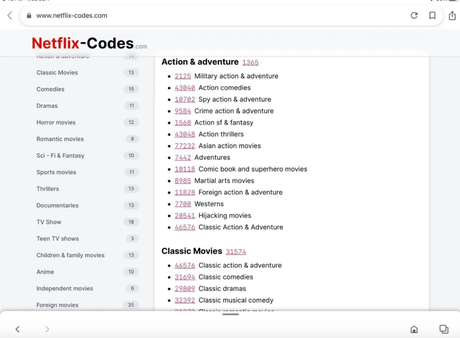
Exploring beyond the surface of mainstream selections, you’ll find that Netflix’s hidden codes grant access to a plethora of niche categories tailored to your unique tastes. By using secret codes, you’re unlocking hidden categories that go beyond what’s immediately visible, finding popular content that aligns with your interests. This isn’t just about exploration; it’s a strategic move for improving recommendations, as Netflix refines your profile based on your browsing and viewing habits.
Moreover, these codes enhance your experience by giving you control over video playback, ensuring that you spend less time searching and more time enjoying. Whether you’re delving into unknown cinematic worlds or indulging in your favorite genre, these codes transform how you interact with Netflix’s vast library.
4) Delete embarrassing binges
You can remove any unwanted titles from your watch history to keep your binge-watching habits private and tailor your future recommendations. This action is more than a quick fix for potential embarrassment—it’s an insightful way to enhance the algorithm’s ability to suggest content you’ll genuinely enjoy.
By deleting what doesn’t reflect your taste, you improve recommendations, ensuring a more personalized viewing experience.
Managing your watch history is also part of a broader strategy for optimized Netflix use. For instance, subtitle customization and accessibility features can be adjusted to your needs, reducing unnecessary mobile data usage.
Moreover, if you’ve logged in on multiple devices, utilize the remote device logout to maintain control over your account’s security and the integrity of your viewing patterns.
5) Control your video on a keyboard
While managing your watch history optimizes your recommendations, you’ll also find that keyboard shortcuts offer a seamless way to control playback when watching Netflix on a computer.
These shortcuts not only enhance your viewing experience but also intersect with various features such as subtitle customization and audio description availability.
For instance, toggling subtitles or audio descriptions can be swiftly accomplished without fumbling through menus, ensuring accessibility is just a few keys away.
Delving into settings, keyboard shortcuts facilitate quick adjustments to data usage settings, vital for managing bandwidth and maintaining profile security without interrupting your show.
An analytical perspective reveals these shortcuts as more than convenience; they’re integral tools that empower you to mold your Netflix experience to your precise preferences and security needs.
6) Adjust your data usage
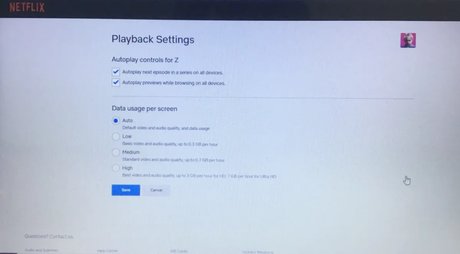
Adjusting your data usage settings on Netflix is essential for managing your bandwidth and ensuring your streaming doesn’t eat into your data plan unnecessarily. When you adjust data usage, you’re not only conserving data but also unlocking the potential for a smoother streaming experience, especially on networks with limited capacity.
This strategic move can lead to finding hidden gems that stream effortlessly at lower data settings. Moreover, it contributes to improving recommendations as Netflix’s algorithm adjusts to your viewing habits.
Don’t overlook the impact on managing multiple profiles; customizing data settings for each profile ensures that everyone can enjoy Netflix without compromising the data budget.
Additionally, remember to customize subtitles for an inclusive viewing experience, enhancing accessibility for all profile users.
7) Use Audio Description for narration
Another key feature to optimize your Netflix experience is the Audio Description function, which offers a voice-over narration for those who benefit from auditory guidance through each scene. Using audio description for accessibility not only enhances inclusivity but also provides a detailed narrative of visual elements, crucial for individuals with visual impairments. Engage with recommended shows and movies without missing a beat, as the descriptive service is available across a vast array of titles, including Netflix originals.
For a seamless viewing experience, remember to maintain browsing history privacy. Utilize keyboard shortcuts for video control to effortlessly navigate scenes. Don’t forget to adjust video quality settings to match your internet speed, ensuring an uninterrupted stream without compromising your data plan.
8) Change the look of your subtitles
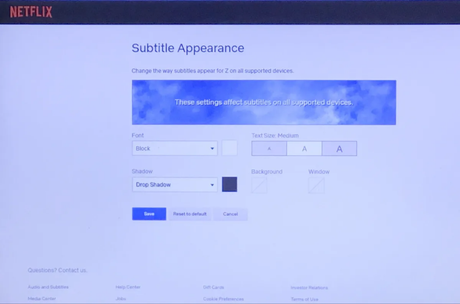
You can customize your subtitle experience on Netflix by altering font styles, sizes, and backgrounds to fit your preferences. Beyond aesthetics, the platform allows you to change subtitle color, ensuring that text stands out against any scene.
If you’re grappling with dialog moving too quickly or too slowly, adjust subtitle timing to sync perfectly with the on-screen action.
Diverse content often means encountering multiple languages; change subtitle language to comprehend every word spoken. Netflix’s interface facilitates these adjustments, letting you customize subtitle appearance with ease.
Whether you need to enable/disable subtitles for a quiet night or an inclusive viewing party, the control is at your fingertips—no more squinting or guessing dialogues, just seamless viewing tailored to your needs.
9) Lock down your profile
To ensure your viewing preferences remain private, set a PIN to lock your profile directly from your account settings. This layer of PIN protection is a cornerstone of profile security, preventing unwanted access and maintaining the integrity of your personalized recommendations. It’s especially useful if you’re sharing an account with others. By navigating to ‘Profile Lock’ under ‘Profile & Parental Controls,’ you can easily secure your Netflix experience.
Moreover, parental controls are integral for those managing family accounts. They allow you to curate content and restrict access, ensuring a safe viewing environment for younger users. If you’re considering a separate account, Netflix facilitates transferring profiles, preserving your watch history and profile customization. This seamless transition ensures your viewing ecosystem remains undisturbed.
10) Transfer a profile
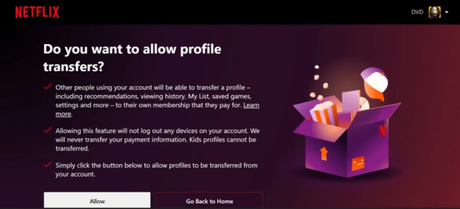
If you’re considering upgrading to your own Netflix account, the profile transfer feature makes it easy to take your personalized settings and viewing history with you. This underrated gem isn’t just a simple migration; it’s a thoughtful preservation of your curated Netflix experience.
By transferring your profile, you keep the bit rate stats that reflect your viewing preferences, ensuring seamless streaming on your new account. Your tailored recommendations, marked by those two thumbs up, will follow you, maintaining the essence of your unique watchlist.
Moreover, the notifications setup, which alerts you to new releases and episodes, remains intact, so you’re always in the loop. The convenience of the ‘download on the go’ option also sticks with your profile, guaranteeing your favorites are just a tap away, wherever you are.
11) Kick any device off your Netflix account
After setting up your own Netflix account and transferring your profile, you’ll want to ensure your streaming security by kicking off any devices that shouldn’t have access. Go to your account’s Security & Privacy settings to kick a device off.
This not only safeguards your preferences and watch history but also preserves your data usage settings. Speaking of data, adjust your usage to prevent unexpected streaming quality dips when your network is congested.
Hidden codes can enhance your browsing experience, revealing categories tailored to your interests, like Netflix originals. Utilize the audio description feature to enrich the viewing experience for those requiring narration.
Being analytical about your account management can enhance your enjoyment of Netflix’s extensive library.
12) Put a stop to autoplay
You’ve managed your streaming security and optimized your data usage; now let’s tackle autoplay to ensure you’re in control of what plays next on Netflix.
Stopping autoplay not only prevents unexpected spoilers but also helps limit data usage when you step away. To stop autoplay, dive into your account’s playback settings and uncheck the autoplay options. This change means more than just saving data; it’s an opportunity to customize your viewing.
While in settings, you might also customize subtitles for a personal touch or unlock hidden categories for a tailored experience.
These tweaks don’t just improve recommendations; they transform how you interact with Netflix, elevating your viewing from passive watching to active engagement.
13) Check your bit-rate stats
Monitoring your bit-rate stats on Netflix can offer insights into the streaming quality you’re getting, ensuring your setup is optimized for the best viewing experience. Bit rate optimization is crucial for improving video playback quality, especially if you’re frequently encountering buffering issues.
By comparing streaming quality, you can determine if you’re truly enjoying the highest resolution available or if adjustments are necessary. Understanding the impact of bit rate on data usage is essential for those with limited bandwidth or data caps.
If you’re experiencing subpar quality, checking your bit rate stats can lead to quick troubleshooting. Adjusting settings may resolve your issues, allowing you to fully immerse yourself in your favorite shows and movies without interruption.
14) Really love a show? Give it two thumbs up
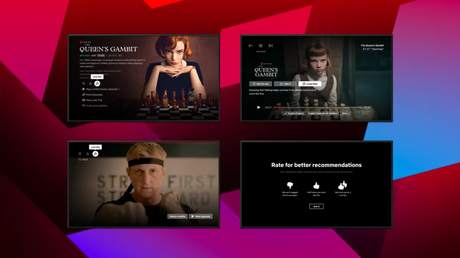
Why settle for a regular rating when you can emphatically show your appreciation for a series by giving it two thumbs up? This feature isn’t just a way to add a show to favorites; it’s a powerful tool for enhancing your Netflix experience.
By doubling your approval, you significantly refine your personalized recommendations, increasing the likelihood of uncovering hidden gems tailored to your taste. Moreover, this feedback aids in watchlist organization, as Netflix’s algorithm prioritizes content you’re more inclined to enjoy.
It even contributes to more nuanced parental controls, as the platform discerns which content resonates more positively with different age groups. In essence, this simple action is a cornerstone for an optimized, personalized viewing journey.
15) Set up notifications for shows and movies
To maintain the momentum in curating your viewing experience, set up notifications for your most anticipated shows and movies to ensure you don’t miss their release. Engaging with this feature not only keeps you informed but also interacts with Netflix’s algorithms for personalized recommendations. By signaling your interests through notifications, you’re indirectly refining your profile’s predictive suggestions.
This synergy between watchlist organization and alert customization creates a more tailored streaming journey.
Implementing notifications also allows you to stay ahead of content ratings, an essential aspect if parental controls are part of your setup. It’s a proactive step to filter out inappropriate content before it even becomes a consideration.
Embrace this often overlooked tool to enhance your Netflix experience, ensuring that your watchlist reflects both anticipation and mindful curation.
16) Download shows to go
You can download a number of your favorite shows and movies on Netflix to watch them offline whenever you’re on the go. This feature enhances your experience by offering download options that cater to your data management needs. The Netflix mobile app features intuitive offline viewing capabilities, allowing you to curate a personal library for those times when streaming isn’t an option.
Analyzing the streaming quality, you’ll notice that Netflix smartly balances it with your device’s storage capacity. You have the choice to select the video quality of your downloads, which is crucial for conserving data and managing storage space. It’s a sophisticated balance of accessibility and efficiency—plan your downloads in line with your data plan and device limitations to enjoy seamless entertainment anywhere.






